Packages
Choose a public package, find its import paths, and open its API source on GitHub.
On this page
Choose a package by the work it owns. Each section lists its public import paths and links to its current source on GitHub. Read signatures, overloads and types there; this page does not reproduce declarations.
The source links follow the repository’s rc branch. For an installed release, also consult the declarations shipped with that package.
Choose an entrypoint
| Work | Start with |
|---|---|
| Connect a framework or build tool | Installation → and its integration package below. |
| Compile CSS definitions or resolve stylesheet files | @master/css-compiler |
| Generate class rules from compiled definitions | @master/css |
| Observe classes in a browser DOM | @master/css-runtime |
| Render and hydrate a server response | @master/css-server |
| Extract or validate source | @master/css-tooling |
| Implement editor features | @master/ |
| Automate from a terminal or agent | CLI commands or MCP tools |
A compiled manifest does not contain the delivered native stylesheet
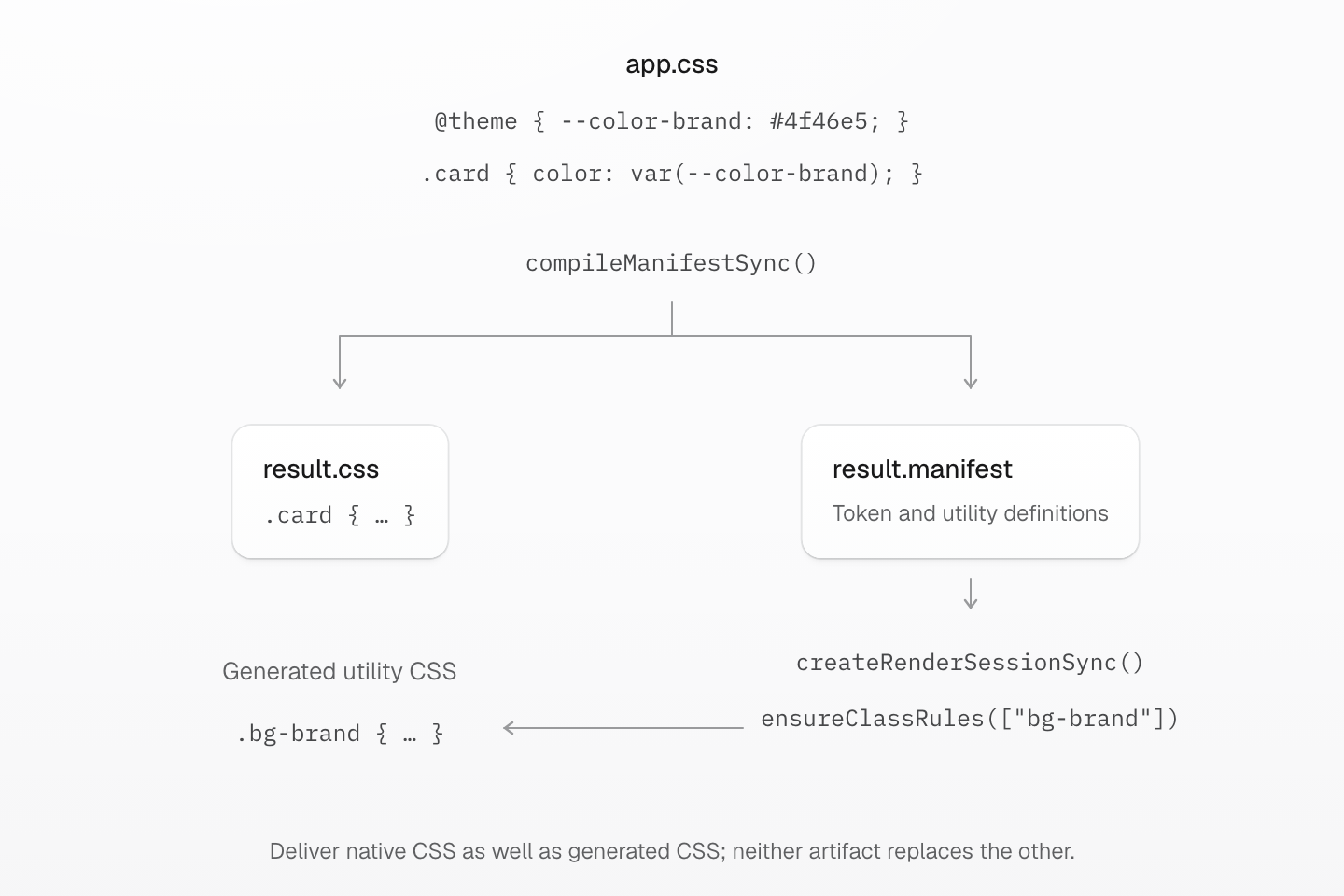
The compiler returns native CSS and definitions separately. A Node render session turns the supplied class into utility CSS; it does not redeliver the compiler’s native .card rule.
Text description
- app.css contains a theme token and a native .card rule. compileManifestSync from @master/css-compiler/node compiles it with an explicit base manifest.
- result.css carries the native rule. result.manifest carries the definitions used for later class generation.
- A Node createRenderSessionSync from @master/css/node accepts that manifest. Ensuring bg-brand generates its background-color rule and required token resources.
- The application must deliver the native CSS as well as generated CSS and coordinate shared resource ownership. Browser engines use compiled runtime programs instead of this Node manifest path.
A manifest describes definitions; it is not a native stylesheet. Deliver the compiler’s native CSS as well as the utility output your rendering mode produces. A Node engine uses a manifest; the browser engine uses a compiled runtime program. Rendering modes teaches which delivery path to choose.
@master/css-astro
Connect Master CSS to Astro configuration and request handling. The integration configures build behavior; the middleware entry exposes Astro’s request hook.
| Import path | Purpose |
|---|---|
@master/css-astro | Astro integration factory and options. |
@master/ | Astro request middleware. |
Use the default integration factory in Astro configuration. See Astro installation for build and middleware setup.
Source and README · Public export mappings
@master/css-compiler
Compile stylesheet directives, load project manifests and compose generated CSS with authored styles. Choose the entrypoint that matches the work and execution environment.
| Import path | Purpose |
|---|---|
@master/css-compiler | Asynchronous compiler sessions and in-memory directive compilation. |
@master/ | Synchronous native compilation and filesystem resolution. |
@master/ | Asynchronous project entry discovery and manifest loading. |
@master/ | Synchronous project entry discovery and manifest loading. |
@master/ | Node.js stylesheet resolution, composition and delivery assets. |
@master/ | Browser compilation from supplied source and a base manifest. |
@master/ | Project inspection reports with classes, files and diagnostics. |
Supply the base manifest explicitly when an API requires it. Inspect returned diagnostics before using the result. A delivery result is an asset set: publish every stylesheet and resource at its assigned URL. See Imports for resolution and delivery boundaries.
Publishing a file compilation
compileManifestFileSync(file, { baseManifest, delivery }) reads the file graph and returns assets without writing them. delivery supplies entryURL, stylesheetURL(file) and resourceURL(file); give distinct stylesheets distinct final URLs. Publish every returned stylesheets item at its href, and copy each resources item from file to href. The top-level css, nativeCSS and generatedCSS describe the entry only. Relative resource URLs keep their original source owner, query and fragment; reference-only stylesheets do not become published assets. Missing resources and colliding stylesheet URLs fail before publication. Omitting delivery returns the single-string result, without this asset-publication contract.
preserveNativeCSS defaults to true; explicit false suppresses raw native CSS while retaining compiled native mixin applications in included output. It does not enable pruning. Stylesheet collections separately select native CSS, Master base CSS and generated utilities through includeNativeCSS, includeMasterBaseCSS and includeGeneratedCSS. Excluded native output does not remove definitions used by generated utilities. See native pruning for file policy.
validation: 'report' is the default: inspect diagnostics while retaining the result. validation: 'error' rejects known-invalid CSS in the complete result before returning assets; unknown capabilities alone do not fail it. Ranged diagnostics identify original stylesheet sources where a usable source map exists. A host transform that cannot map a generated segment must not invent an original position.
Preparing native CSS for another transformer
Compiler hosts can opt into preserveNativeSource: true when another transformer
needs the untouched native portions of a stylesheet. Master definitions are still
consumed and native @apply rules are still lowered, while unrelated comments,
empty rules, value spelling, and rule boundaries are retained. The option defaults
to false, preserving the compiler's normal native CSS normalization.
Source preservation cannot be combined with enabled native pruning. Passing a class list alone does not enable pruning. preserveNativeCSS: false still suppresses native output. The option
does not prevent subsequent host transforms from optimizing the result or rewriting
its source map, and it does not discover new Master definitions or generated-global
references introduced by a later transform.
Continuing resource rendering after host transforms
compileRenderedStylesheet() and compileBrowserStylesheet() accept an optional
emittedGlobals resource-count snapshot when another output already supplies
generated theme variables or keyframe definitions. Positive counts suppress duplicate emission;
zero counts do not. New references still emit their transitive resource closure.
The returned snapshot includes the external context and resources required by this
render, without changing the input snapshot. Omitting the option preserves normal
standalone rendering.
This context prevents a later render from replacing an already processed variable with its original manifest value. It does not run host plugins on newly generated CSS. Hosts remain responsible for processing that new CSS and publishing its resources while preserving plugin ordering and source ownership.
Source and README · Public export mappings
@master/create-css
Plan and apply Master CSS setup for an existing project. The plan describes dependency changes, file edits, commands and warnings before application.
| Import path | Purpose |
|---|---|
@master/create-css | Setup planning, application and their options and result types. |
Call planMasterCSSSetup() to inspect the proposed changes. applyMasterCSSSetupPlan() checks recorded file preconditions before writing; create a new plan if those files change. Setup can modify project files and install dependencies. See Installation for the interactive workflow.
Source and README · Public export mappings
@master/css
Execute a compiled manifest or runtime program, generate rules for class names and inspect engine state. CSS entrypoints provide the preset stylesheet layers.
| Import path | Purpose |
|---|---|
@master/css | Asynchronous engine creation and one-shot class rendering. |
@master/css/node | Synchronous native engine, runtime program compilation and reusable render sessions in Node.js. |
@master/css/client | Ambient TypeScript declarations for generated virtual modules. |
@master/css/index.css | Complete preset stylesheet entry. |
@master/css/base.css | Base styles and the stable cascade-layer order. |
@master/css/theme.css | Preset theme definitions. |
@master/css/media.css | Preset viewport and preference conditions. |
@master/ | Preset container width conditions. |
@master/ | Preset utility registrations. |
Pass an explicit manifest to engine and render APIs in Node.js, or a runtime program from compileRuntimeProgram() anywhere; browsers execute only programs. Reuse a session for repeated work and dispose it when finished. For stylesheet authoring and project loading, use the compiler; for DOM observation, use the runtime.
Build integrations expose the delivery artifacts as virtual modules declared by ./client: virtual:master-css-manifest is the compiled MasterCSSManifest for the Node engine, server renderer and tooling; virtual:master-css-program is the browser engine program, a hashed .bin asset in production builds; virtual:master-css-emitted-globals lists variables and keyframes the CSS entry already emits, so runtime generation does not repeat them. A page hydration manifest is separate and describes one response.
Build-time and server generation use Rust semantics; the browser engine executes compiled programs and produces the same CSS for the same definitions and classes. Compile with matching compiler, server and runtime releases: unsupported execution or language versions are rejected.
executionState(names) reads stored rule references in request order, repeats included, without generating rules; unknown or never-ensured classes have empty references. Use snapshot() for complete rules and CSS. The browser engine has no inspection or render sessions. A host must synchronize resource state even when a transition has no CSS mutations, and a wrapper must forward every MasterCSSEngine member, including executionState, registerEmittedGlobals, replaceEmittedGlobals, refresh, dispose and Symbol.dispose.
Source and README · Public export mappings
@master/css-svelte-addon
The official Svelte CLI add-on configures Master CSS in SvelteKit projects, including dependencies, Vite integration, stylesheet imports and server hooks.
| Import path | Purpose |
|---|---|
@master/css-svelte-addon | Default add-on consumed by the Svelte CLI. |
Run this add-on through the Svelte CLI. Its setup rejects projects without SvelteKit, and its run step requires a Svelte dependency. See Svelte installation for the complete setup.
Source and README · Public export mappings
@master/eslint-config-css
Use the official flat-config preset to enable Master CSS lint rules in ESLint. The default export and recommended refer to the same configuration.
| Import path | Purpose |
|---|---|
@master/ | Recommended ESLint flat configuration. |
Add the preset to your ESLint flat configuration. Configure project-specific behavior through the plugin settings; Code linting shows each rule.
- @master/
css/ warnYessort- classes Classes out of generated-rule order, and duplicates.
- @master/
css/ errorNono- invalid- classes Invalid Master CSS syntax and invalid generated CSS; unmatched classes only with
disallowUnknownClass.- @master/
css/ warnYesno- conflicting- classes Full and partial declaration conflicts in the same variant scope; only full overrides are fixed.
- @master/
css/ warnYesprefer- canonical- classes Non-canonical forms, only when token identity and generated-rule behavior are preserved.
@master/ and @master/ are not in the preset.
Source and README · Public export mappings
@master/eslint-plugin-css
The ESLint plugin connects JavaScript and template syntax to Master CSS validation, class ordering and fixes. Its default and masterCSS exports expose the same plugin.
| Import path | Purpose |
|---|---|
@master/ | Plugin rules and recommended configuration. |
Use the official preset for the standard rules, or register the plugin in your own flat configuration. See Code linting for rule behavior.
Settings live under the @master/css settings key. Arrays replace their defaults.
| Setting | Default | Use |
|---|---|---|
classAttributes | ['class', 'className'] | Markup attributes that contain class strings. |
classFunctions | clsx, cva, ctl, cv, class, classnames, classVariant, styled, classList.add/ | Callees and tagged templates whose arguments can contain class strings; styled also accepts member forms such as styled.button. |
classDeclarations | [] | Project variables or object properties treated as class declarations. |
ignoredKeys | ['compoundVariants', 'defaultVariants'] | Object keys skipped while traversing variant config objects. |
@master/ reports raw values in token-backed utilities. requireProperties limits it to listed native properties (empty or omitted checks every token-backed property); allowProperties and allowedPatterns add exceptions; allowRawValues disables it. Native custom-property references stay valid. Its diagnostic data names the property scope and canonical token families; it has no autofix.
@master/ reports a class list in which more than max classes (default 3) style other elements through a top-level _, >, + or ~ combinator. Its diagnostic data lists classNames and their targets; it has no autofix.
Source and README · Public export mappings
@master/css-language-server
Provide Master CSS completion, hover, colors, formatting and semantic tokens through the Language Server Protocol. The library entry supports host-managed lifecycle; the server entry starts the process.
| Import path | Purpose |
|---|---|
@master/ | Language server, workspace settings and semantic-token request names. |
@master/ | Executable server startup entry; no named or default exports. |
Create and start MasterCSSLanguageServer when embedding it in a host, then dispose it during shutdown. Loading the /server entry constructs and starts a server immediately. See Language service for the editor-facing workflow.
Source and README · Public export mappings
@master/css-language-service
Map Master CSS tooling results to editor documents, language features and syntax highlighting. Use the Shiki entrypoint for server-rendered code presentation.
| Import path | Purpose |
|---|---|
@master/ | Editor document services, settings and trigger characters. |
@master/ | Shared completion trigger characters. |
@master/ | Shiki transformer, semantic decorations and language registration. |
@master/ | Hover-activated markup class colors for Shiki output. |
@master/ | TextMate grammar asset for directive highlighting. |
Supply a tooling session when creating MasterCSSLanguageService. Shiki helpers accept a reusable language session or manifest through their options. Import @master/ for hover-activated markup highlighting. See Language service for configuration and examples.
Source and README · Public export mappings
@master/css-mcp
Create a Master CSS Model Context Protocol server or start its stdio transport. The tool catalog identifies operations and their file effects.
| Import path | Purpose |
|---|---|
@master/css-mcp | Server factory and stdio startup. |
Use createMasterCSSMCPServer() when the host owns transport setup, or startMasterCSSMCPStdioServer() for stdio. See MCP server for client registration and the tool catalog for usage; read complete contracts through tools/list.
Source and README · Public export mappings
@master/css-next
Connect Master CSS to Next.js configuration and build output. The root export wraps Next configuration; the adapter entry supports build integration and adapter composition.
| Import path | Purpose |
|---|---|
@master/css-next | Next configuration wrapper and integration options. |
@master/css-next/adapter | Build adapter, composition helpers and rendered-output reports. |
Use the root default export in Next configuration. Await the wrapper when using a rendering mode that processes build output. See Next.js installation for the setup and supported rendering modes.
Source and README · Public export mappings
@master/css-nuxt
Register Master CSS as a Nuxt module. The default and masterCSSNuxtModule exports refer to the same module.
| Import path | Purpose |
|---|---|
@master/css-nuxt | Nuxt module. |
Register the module through Nuxt configuration so the framework owns its setup and lifecycle. See Nuxt installation for configuration.
Source and README · Public export mappings
@master/css-preset
The preset supplies theme tokens, conditions, utilities and a compiled default manifest. CSS imports and the JSON manifest serve different consumers.
| Import path | Purpose |
|---|---|
@master/css-preset | Complete preset stylesheet entry. |
@master/ | Compiled default manifest for engine, compiler and tooling APIs. |
@master/ | Complete preset stylesheet entry. |
@master/ | Base styles and the stable cascade-layer order. |
@master/ | Preset theme definitions. |
@master/ | Preset viewport and preference conditions. |
@master/ | Preset container width conditions. |
@master/ | Preset utility registrations. |
Import CSS when authoring a stylesheet; pass the JSON manifest to APIs that execute or compile against a base manifest. Theme tokens explains authoring and overrides.
Source and README · Public export mappings
@master/css-runtime
Observe classes in a document or shadow root and maintain their generated CSS. Runtime startup requires a runtime program, the project manifest compiled for the browser engine, and returns an owned session.
| Import path | Purpose |
|---|---|
@master/css-runtime | Runtime startup, observation, snapshots and custom-element integration. |
@master/ | The default preset compiled into a runtime program, for apps without a Master CSS build integration. |
Await MasterCSSRuntime.start() before using the session, and call dispose() when its owner is finished. withMasterCSSRuntime() integrates startup and disposal with custom-element connection callbacks and requires a shadow root. See Rendering modes for the browser workflow.
Official integrations inject startup. A custom entry passes program as a loader, such as () => import('virtual:master-css-program').then(module => module.default), plus emittedGlobals, then calls observe(). Runtime-only pages load the program during startup; progressive pages with a valid hydrationManifest defer the engine until a class outside it appears, unless engine: 'eager' or enginePrefetch: 'idle' is set. emittedGlobals applies to every page using the bundle. The runtime inserts generated rules and on-demand keyframes into its own stylesheet and never writes to linked stylesheets.
snapshot() separates usageCounts, connected DOM usage, from classRules, which can also hold warmed, hydrated or retained rules. engine is 'deferred', 'loading', 'ready' or 'failed'; before a deferred engine starts, class snapshots have no rule entries and layers is empty. ensureClassRules() and deleteClassRules() act independently of DOM usage; deletion is synchronous and bypasses retention. Before the engine is ready they throw RUNTIME_ENGINE_NOT_READY and start it, so await ready() first.
Source and README · Public export mappings
@master/css-schema
Shared types and codecs describe manifests, diagnostics, hydration and integration options. These contracts let hosts exchange structured Master CSS data.
| Import path | Purpose |
|---|---|
@master/css-schema | Common manifest, diagnostic and rendering-mode exports. |
@master/ | Manifest v6 types, variable helpers and serialization. |
@master/ | Hydration rules, resource order and serialization helpers. |
@master/ | Directive results, source ranges and output mappings. |
@master/ | Utility, selector and value representation types. |
@master/ | Utility classification constants and their type. |
@master/ | Runtime style element identifier. |
@master/ | Counts of resources already emitted outside a session. |
@master/ | Shared CSS vendor identifiers. |
@master/ | Diagnostic versions, source ranges and error payloads. |
@master/ | Rendering modes and shared integration options. |
Import types from the narrow subpath that owns them. A type declaration describes a data shape; it does not validate arbitrary input or compile stylesheet directives. Preserve version fields when passing manifests and diagnostics between APIs; editing them by hand does not make a manifest compatible.
Store manifests with serializeMasterCSSManifest(). Serialization normalizes derived fields; it does not replace engine validation or keep comments and editable CSS formatting. Unknown fields are not an extension mechanism: an outer envelope that retains them does not make nested fields accepted or executable.
Source and README · Public export mappings
@master/css-server
Render generated CSS into HTML and produce hydration data for the browser. Use a one-shot helper, a reusable renderer or a streaming HTML session to match the host lifecycle.
| Import path | Purpose |
|---|---|
@master/css-server | HTML rendering, streaming sessions and hydration options. |
Provide a compiled manifest before rendering. Keep emitted-global and hydration metadata aligned with the CSS delivered to the client, and dispose reusable sessions after use. See Rendering modes for complete HTML examples.
createServerRenderer() caches rules across renders: recreate it when the manifest changes, and bound maxCachedClasses in a long-lived server. Custom hosts can pass the final stylesheets a page may link, as { href, css, imports } from describeLinkedStylesheet() in @master/, with the documentURL that resolves them; theme variables and native keyframes those stylesheets already deliver are not repeated in style#master-css. Rendering tracks each keyframe definition independently, including same-name definitions in different layers or conditions.
Source and README · Public export mappings
@master/css-svelte
Integrate Master CSS with Svelte builds and SvelteKit server responses. Build and request handling use separate entrypoints.
| Import path | Purpose |
|---|---|
@master/css-svelte/vite | Svelte-aware Vite plugin and options. |
@master/ | Named SvelteKit request handler. |
Register the Vite plugin in build configuration and the named handle export in the SvelteKit server hook. See Svelte installation for the complete wiring.
Source and README · Public export mappings
@master/css-tooling
Analyze class syntax, extract candidates, validate rules and provide lint or language results. Choose a focused entrypoint or reuse a tooling session across operations.
| Import path | Purpose |
|---|---|
@master/css-tooling | Reusable asynchronous tooling session spanning analysis capabilities. |
@master/css-tooling/node | Synchronous native session and native declaration support. |
@master/ | Class-list and CSS source analysis. |
@master/ | Synchronous native class-list analysis. |
@master/ | Source candidate extraction and source-range types. |
@master/ | Synchronous native source extraction. |
@master/ | Filesystem scanner, retained candidates and scanner lifecycle. |
@master/ | Class validation against a supplied manifest. |
@master/ | Synchronous native class validation. |
@master/css-tooling/lint | Lint diagnostics, edits, canonical suggestions and content helpers. |
@master/ | Synchronous native class linting. |
@master/ | Editor-neutral analysis, completions, colors and semantic tokens. |
@master/ | Synchronous native language sessions and analysis. |
Supply the project manifest when creating sessions or calling semantic helpers. Reuse sessions for repeated analysis, then dispose them. Node subpaths expose synchronous native operations; filesystem scanning has its own asynchronous lifecycle.
Source and README · Public export mappings
@master/css-vite
Register Master CSS in Vite to compile project styles and coordinate the selected rendering mode. The default export and createMasterCSSVitePlugin are the same factory.
| Import path | Purpose |
|---|---|
@master/css-vite | Vite plugin factory and options. |
Call the factory in Vite configuration and let Vite own the returned plugin lifecycle. See Vite installation for the stylesheet entry and rendering-mode setup.
Source and README · Public export mappings
@master/css-webpack
Register Master CSS with Webpack. The default export and MasterCSSWebpackPlugin expose the plugin class; options select its rendering and scanner behavior.
| Import path | Purpose |
|---|---|
@master/css-webpack | Webpack plugin class and options. |
Construct the plugin in Webpack configuration so Webpack controls its compilation hooks. See Webpack installation for the stylesheet and loader setup.