Extraction
Static candidate extraction, source boundaries, classification and shared source ownership.
On this page
Extraction finds possible class names in source without running the application. These candidates, also called latent classes, are inputs to matching and candidate policy. Finding a string does not establish that it generates a rule, has a valid CSS value or works in a particular browser.
This page defines source boundaries, static extraction, candidate classification and source ownership. Scanning class names explains how to author discoverable classes and diagnose missing styles. Scanning directives owns the path and class-pattern grammar.
Complete static strings
Extractors use the source language's structure. JavaScript and TypeScript strings can contribute candidates even outside className: a class passed to a component as display text may still be discovered. The scanner does not infer which branch runs or what a function returns at runtime.
| Source form | What extraction can see |
|---|---|
HTML class="p-md shadow-md" | Both complete classes |
JSX className="p-md" | The complete class |
error ? 'bg-red-60' : 'bg-green-60' | Both static branches |
{ compact: 'p-sm', roomy: 'p-lg' } | The complete values in the object |
| A template literal with complete static class portions | Those complete portions |
'bg-' + tone or a template interpolation inside a class name | No inferred bg-red-60 or other completed result |
| A class returned only by an API at runtime | No source string to extract |
For example, the following source exposes both colors and the fixed padding and radius. The tone interpolation does not need to be evaluated to discover the complete classes already present in the object:
const tones = { neutral: 'bg-surface-base fg-text-neutral', destructive: 'bg-red-70 fg-white'}const className = `px-md r-md ${tones.destructive}`The extracted class set is bg-surface-base, fg-text-neutral, bg-red-70, fg-white, px-md and r-md. The scanner does not limit output to the destructive branch just because this example selects it.
Candidate classification
After extraction, the active manifest and stylesheet registrations determine a candidate's role. Unknown ordinary application classes are not automatically Master CSS errors.
| Candidate | Result |
|---|---|
Registered preset utility such as p-md | Generates its matched utility rule and dependencies |
Project-defined @utility class | Generates the rule registered by the project's compiled manifest |
Registered native class such as .card | Records native usage; it does not generate a new utility |
| Unmatched application class | No Master-generated rule |
| Malformed Master class | No rule; inspection can report a syntax diagnostic |
| Matched class with an invalid or unknown CSS value | Can emit CSS; matching alone does not prove value validity or browser support |
<article class="card p-md shadow-md">Release notes</article>Here p-md and shadow-md resolve through the preset. card retains a native rule only if the project actually supplies one and its pruning policy considers usage. A native stylesheet is preserved by default; scanning does not opt it into pruning.
Generated CSS
@layer theme { :root, :host { --spacing-md: 1rem } :root, :host { --shadow-md: 0 0 0 1px light-dark(oklch(0% 0 none / .05), oklch(100% 0 none / .06)), 0 1px 1px -.5px light-dark(oklch(0% 0 none / .045), oklch(0% 0 none / .3)), 0 2px 2px -1px light-dark(oklch(0% 0 none / .04), oklch(0% 0 none / .26)), 0 4px 4px -2px light-dark(oklch(0% 0 none / .04), oklch(0% 0 none / .24)), 0 8px 8px -4px light-dark(oklch(0% 0 none / .045), oklch(0% 0 none / .26)) }}@layer utilities { .shadow-md { box-shadow: var(--shadow-md) } .p-md { padding: var(--spacing-md) }}A compiler match, CSS syntax validation, CSS value validation and browser support are distinct checks. Use class inspection to distinguish them; a matching class still enters the browser's cascade and computed-value rules.
Source boundaries
Build integrations and CLI flows discover common source-like project files, including HTML, JavaScript, TypeScript, JSX, TSX, supported framework sources, Markdown, MDX and PHP. Ordinary application files do not need a broad @source directive.
Automatic discovery respects project and ancestor workspace .gitignore files, not global Git ignores. Dependencies, declaration files, binary files, VCS data and generated output are excluded. Master output and the current bundler output are not scan inputs; Next.js uses its configured distDir.
| Directive | Effect on discovery |
|---|---|
@source | Explicitly includes additional paths, including files excluded by automatic discovery or .gitignore |
@source not | Excludes paths; takes precedence over inclusion |
Use these exceptions for shared workspace source, external content or a scoped pruning root. Their relative-path rules and supported forms belong to Scanning directives.
Framework integrations prefer original MDX, Vue and Svelte source to scanning compiled display strings a second time. An extractor's language kind matters: intentional plain-text input can use kind: 'raw', but that is not a fallback for a source that failed to parse.
Markdown and MDX
Markdown and MDX extraction uses the syntax tree. Actual HTML/JSX, ESM and expressions participate. Prose, inline code, ordinary code fences and frontmatter do not. A documentation fence showing a class is therefore not an implicit live example.
A host can register an executable example as a virtual source with parentSource, or explicitly safelist its bounded classes. Virtual inputs make the ownership of executable content explicit; the host supplies the actual example source and language kind.
A malformed source reports SOURCE_PARSE_ERROR. Development retains the previous successful contribution, while a production build fails. Parsing or reading failure is not equivalent to an empty-source update.
Source locations
Extraction can report candidate occurrences as well as strings: original UTF-16 ranges, extractor, content kind, owner and inclusion or exclusion reasons. Encoded attributes retain ranges in the original source. Complete URL literals are excluded; an unknown native declaration can remain a candidate for later validation.
Source ownership
A scanner session tracks current source contributions, not every class it has ever encountered. Updating a source replaces its contribution. Removing one source does not remove a class that another current source or safelist still retains.
Removing one source does not remove a shared rule
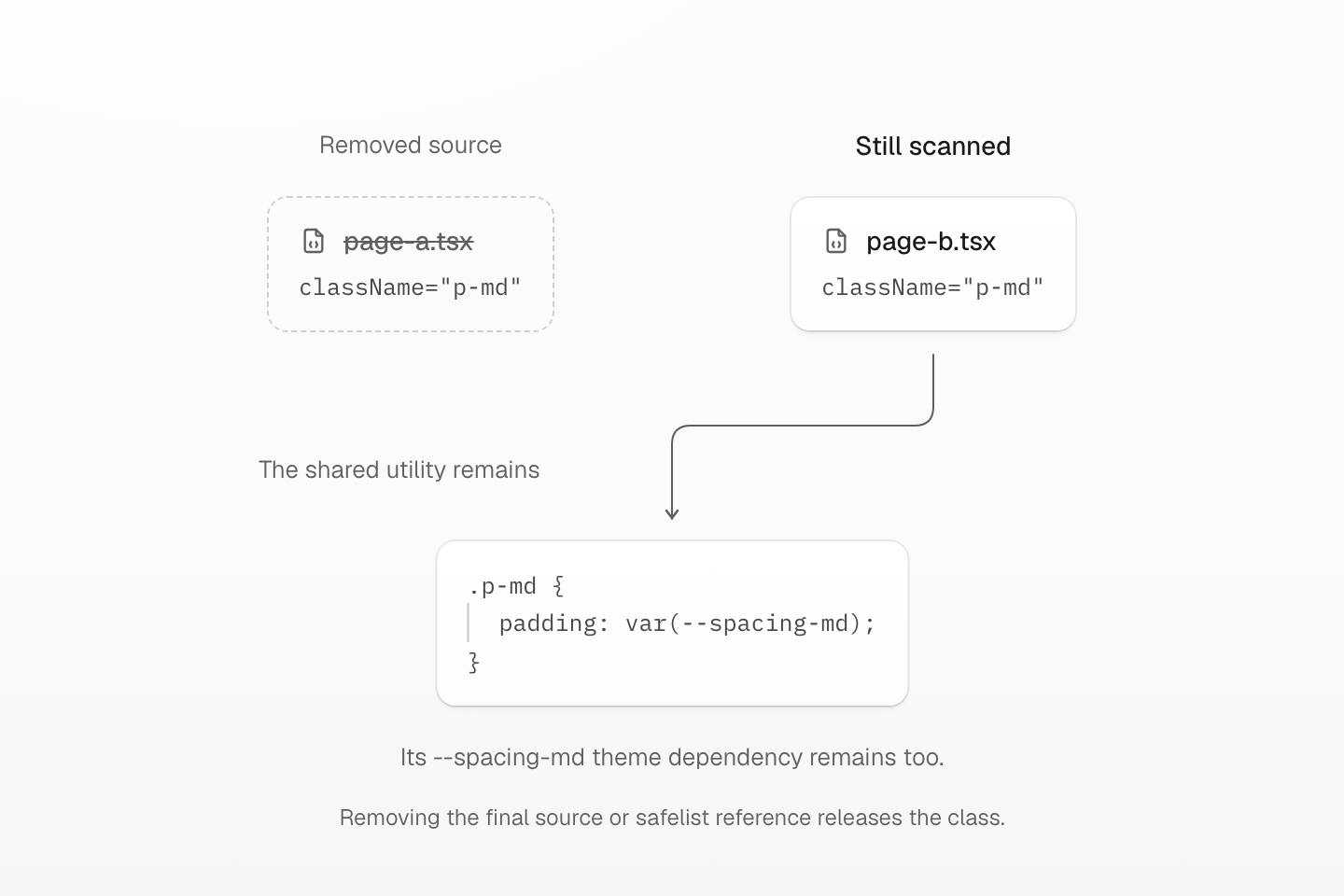
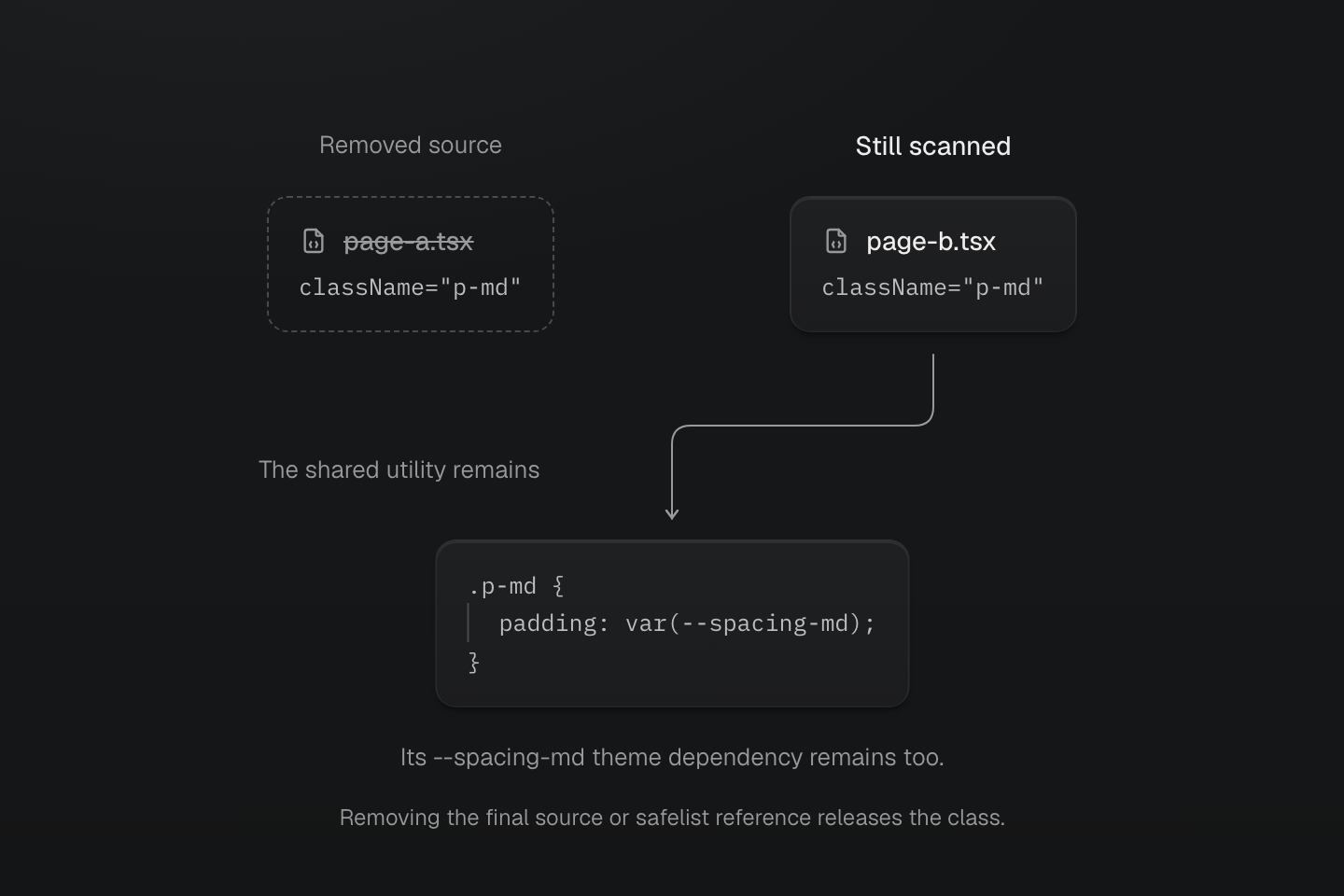
With unchanged definitions and policy, removing page A leaves page B’s reference to p-md. Source ownership changes even though the generated CSS can stay the same.
Text description
- Initially page-a.tsx and page-b.tsx both contain the complete p-md class.
- Removing page-a.tsx removes only that source contribution. The live connection from page-b.tsx keeps the shared utility and its --spacing-md dependency.
- The utility can leave when no current source or safelist retains it. Updating a source replaces its contribution rather than accumulating historical classes.
- The diagram shows the retained utility declaration; the theme dependency is described separately rather than reproduced as a complete stylesheet.
These session operations are available through MasterCSSScanner from @master/. They describe source ownership; integration users normally rely on their build plugin to perform them.
| Operation | Ownership effect |
|---|---|
collectCandidates | Pure extraction; does not retain source contributions |
scanSource | Replaces one source's content, including an empty string |
removeSource | Removes that source and its virtual descendants |
reconcileSources | Supplies the complete next source set for one owner |
registerNativeClasses | Registers native class identities for a stylesheet source |
removeOwner | Removes that owner's sources and native registrations |
await scanner.scanSource('page.mdx', content, { owner: 'pages' })await scanner.scanSource('page.mdx#live', html, { owner: 'pages', parentSource: 'page.mdx', kind: 'html'})scanner.removeSource('page.mdx', { owner: 'pages' })Removing page.mdx also removes its virtual example. References from another owner remain independent. A reconciliation retains only the inputs supplied for that owner; explicitly retained virtual inputs remain in that set even if their parent is managed externally.
changed indicates a change to generated output or pruning inputs. sourceChanged also captures provenance-only updates: a second source can add ownership without changing CSS. The sources view exposes the current successful source set, including empty inputs and virtual relationships.
Updating a source replaces its contribution
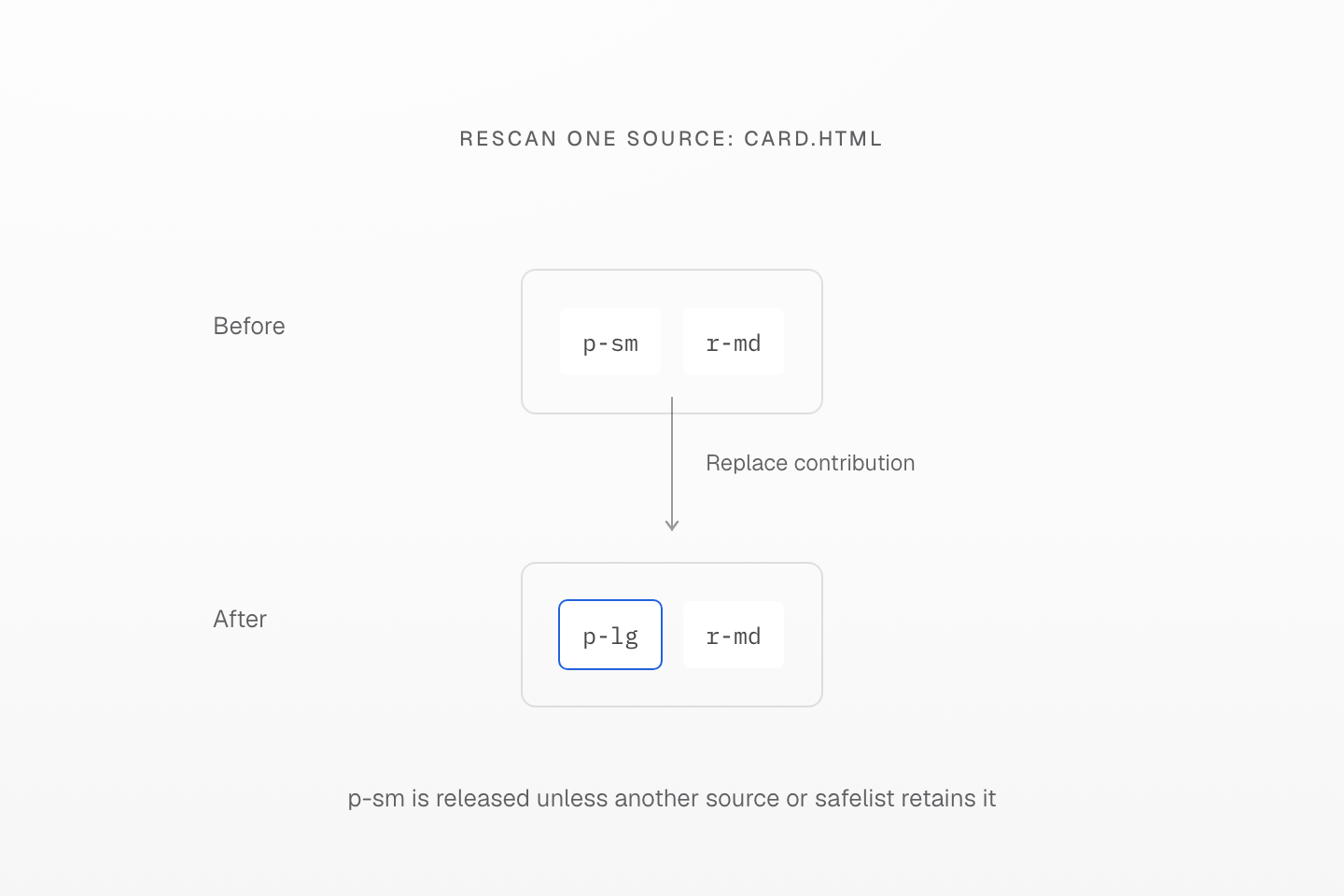
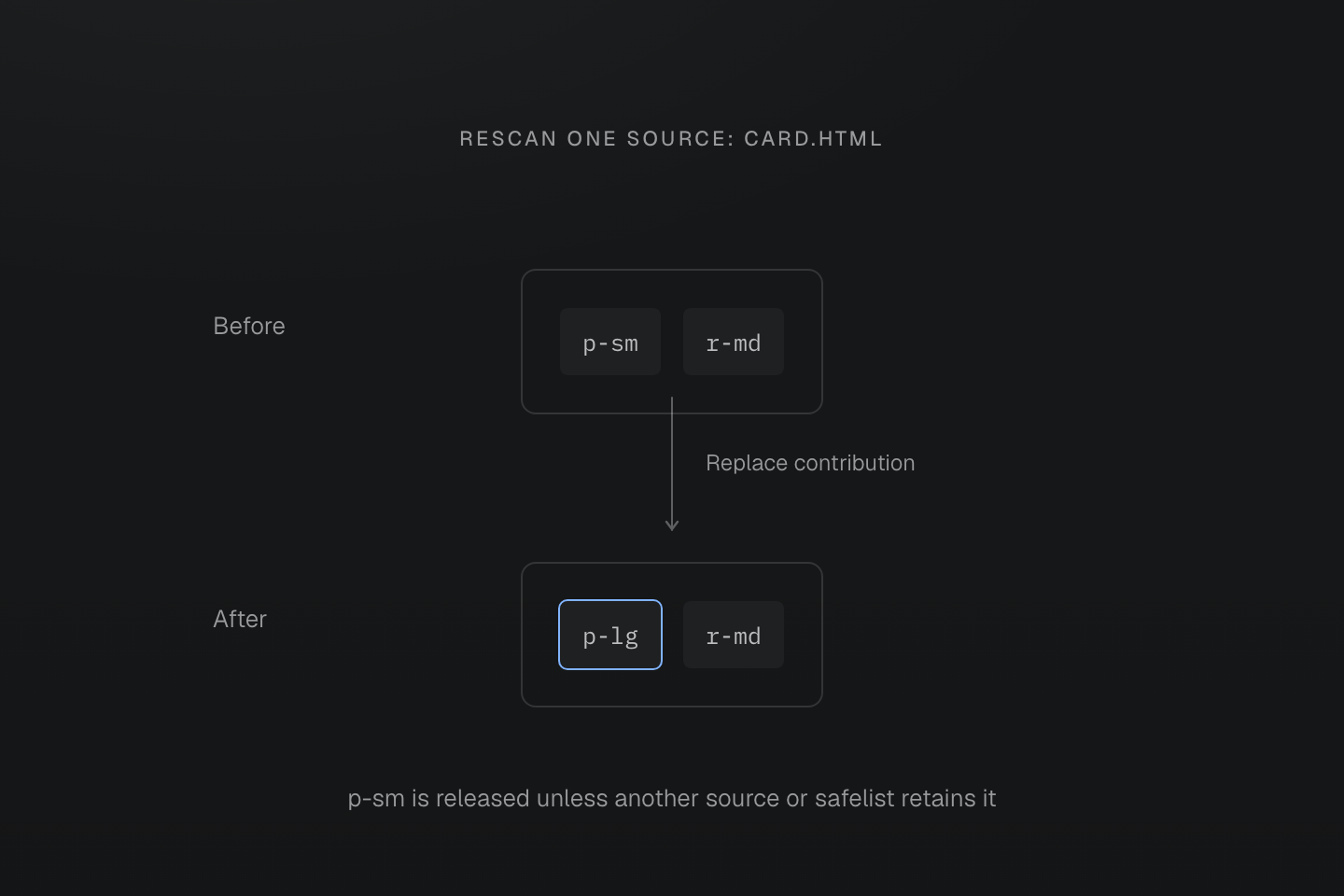
The repeated filename identifies one source. This example has no other sources or safelists retaining the old class.
Text description
- Initially card.html contributes p-sm and r-md. Its next content contributes p-lg and r-md.
- Rescanning the same source replaces its contribution: r-md remains, p-lg is added and p-sm is released.
- Another current source or safelist could still retain p-sm. Source updates do not accumulate all historically seen classes.
Runtime values
A value can change without changing its class name. A complete native declaration class can refer to a custom property supplied by markup or script:
<h1 class="(font-size:var(--headline-size))" style="--headline-size: 2rem">Launch notes</h1>The scanner sees one complete class. Updating --headline-size changes the browser's value without a new utility rule. See the working value example.
The same contract applies to (width:var(--progress)): script can call element.style.setProperty('--progress', '40%') while the class stays unchanged.
If the class name itself first exists after startup, a static build cannot discover it. Supply a bounded safelist or use runtime or progressive rendering.
Candidate policy
| Directive | Purpose | Limit |
|---|---|---|
@safelist | Retains bounded external classes, such as CMS states or widget classes | Does not bypass matching or define missing utilities |
@blocklist | Prevents false-positive candidates from generating CSS | Does not rewrite the source or remove arbitrary native CSS |
For class patterns, precedence and native usage, see Scanning directives. For removal of native rules and keyframes, see Native CSS pruning. Candidate discovery and native preservation are separate policies.
For a missing style, inspect the complete class, the file's discovery boundary and its candidate policy before changing authoring syntax. The Guide diagnosis checklist walks through those checks in context.