CLI commands
Choose a command, check its file effects, and find complete options in CLI help and source.
On this page
Install the CLI through the setup guide, then run it from the project root. Generate, lint and inspect discover ordinary app sources without source arguments; explicit path arguments replace that selection. Suggest accepts a CSS declaration block.
Quote source globs so the CLI, rather than the shell, expands them. These commands operate on the current working directory; only suggest exposes --cwd. Extraction owns source parsing and Scanning owns stylesheet source policy.
Run master-css --help to list commands and master-css <command> --help to read all options for your installed version. Current command definitions live in the CLI source.
Command effects
| Command | Default output | File effects |
|---|---|---|
generate | CSS entry and required assets | Publishes output; --no-export prints CSS instead. |
lint | JSON diagnostics | Reads source; --fix writes supported fixes. |
inspect | JSON inspection report | Reads source; shell redirection can save the report. |
suggest | JSON declaration proposal | Reads declarations; does not apply the proposal. |
master-css generate
master-css generate [options] [source paths...]Publishes CSS and associated stylesheet resources. Use --no-export --verbose 0 to print only CSS without publishing files. --watch runs until interrupted; check rebuild errors even while the process remains active.
Printed CSS and published assets have different delivery boundaries
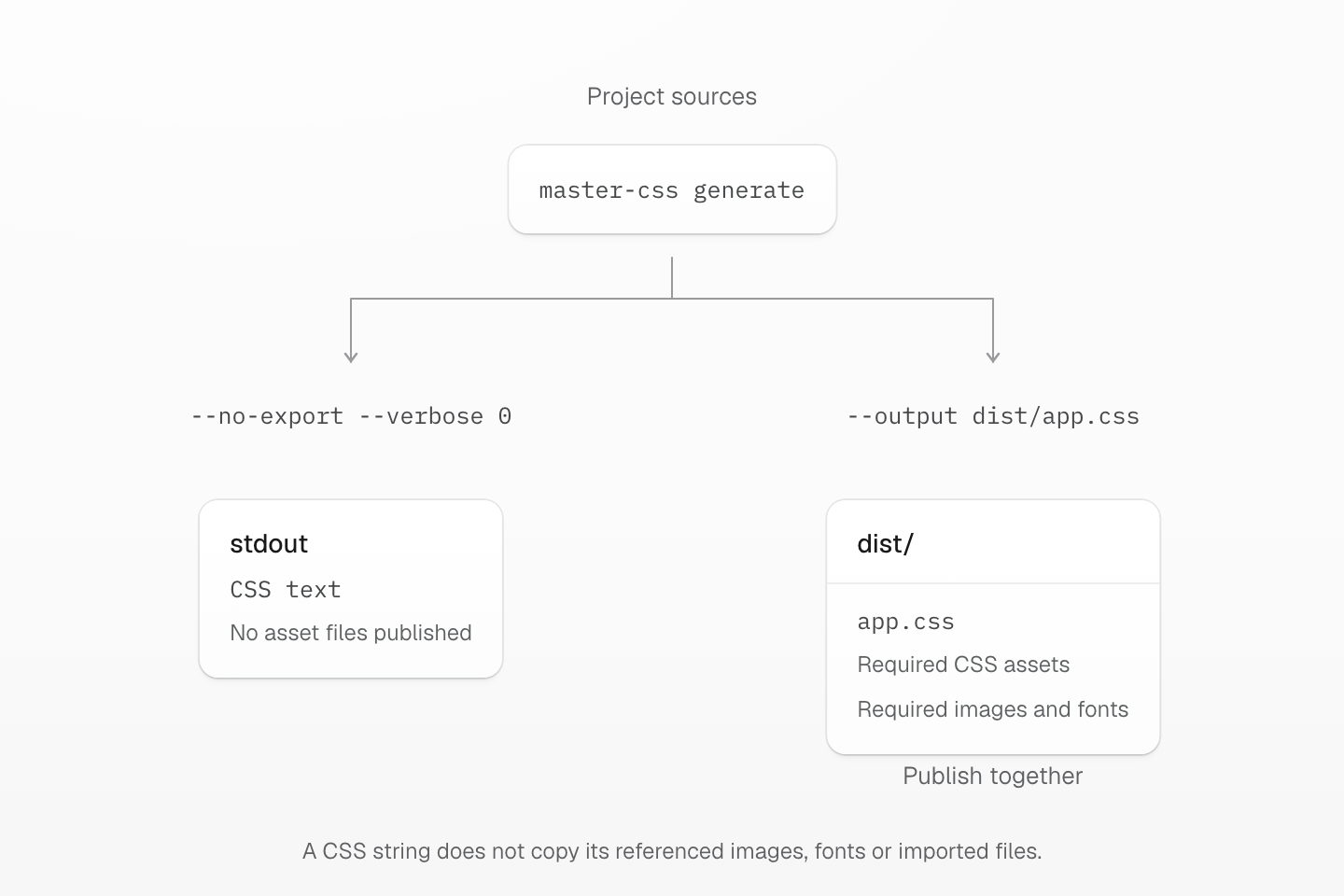
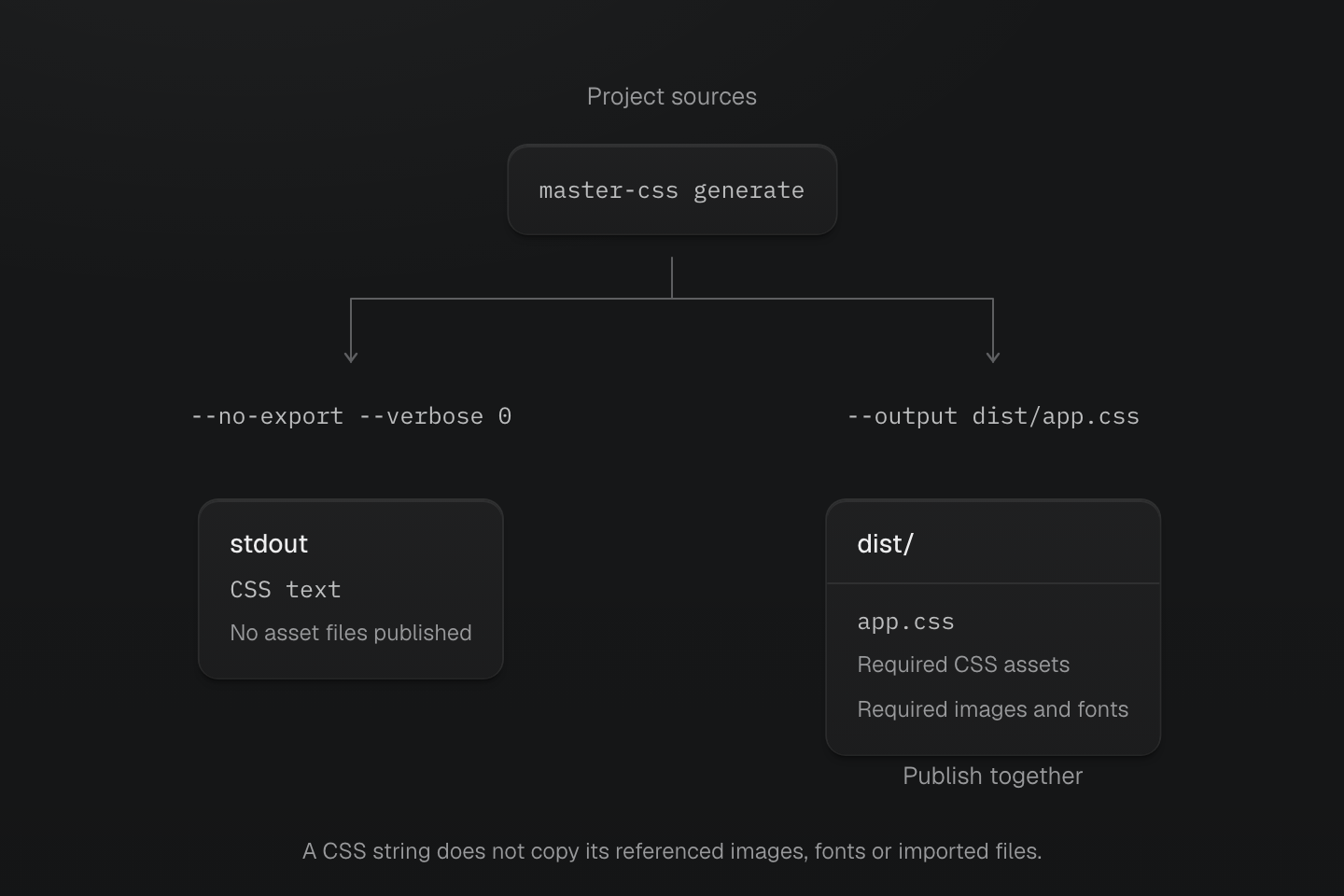
Both commands read project sources. --no-export prints CSS; --output publishes the entry and its required assets. Deliver the complete file set when imports or resources remain separate.
Text description
- master-css generate reads the selected project sources and stylesheet entries in either case.
- --no-export --verbose 0 sends the CSS result to stdout without publishing output files. The caller remains responsible for referenced resources and their URL bases.
- --output dist/app.css publishes the named entry and any separate stylesheet or resource assets required by its import graph.
- The file group is an asset set, not a promise that every project produces additional files. When such files are produced, deploy them together with the entry.
Inspect generated CSS without writing output files:
master-css generate \ --no-export \ --verbose 0Publish CSS to an explicit file:
master-css generate \ --output master.cssRegenerate that output when project sources change; stop with Ctrl+C:
master-css generate \ --watch \ --output master.cssRun master-css generate --help for every option. Implementation.
--output names the CSS entry (default: master.css). Publish its sibling stylesheet and resource assets as well; local imports and resources can remain separate files to preserve ordering, conditions and URL ownership. A copied entry alone may be incomplete. See Imports for stylesheet boundaries.
--strict rejects known CSS syntax or value errors before publishing assets. Unknown browser capabilities are not treated as verified support. --prune-native-css opts project-owned files into native pruning; package files keep their own policy and @preserve native wins locally. Native CSS pruning defines the rule and keyframe behavior.
--no-export prints one CSS result and does not publish its referenced resources; preserve the required stylesheet and resource URL bases yourself. --verbose 0 suppresses progress logging. Stop watch mode with Ctrl+C; a live watcher can still have a failed rebuild, with the last successful export retained.
master-css lint
master-css lint [options] [source paths...]Reports class diagnostics without writing source by default. --fix applies supported fixes; --fix-dry-run returns proposals without applying them. Stdin content is never written back to its virtual path.
Inspect class-order proposals in one existing source file:
master-css lint "src/button.html" \ --rules sort-classes \ --fix-dry-runApply those class-order fixes after reviewing the proposals:
master-css lint "src/button.html" \ --rules sort-classes \ --fixInspect a source buffer on stdin without modifying its virtual file:
master-css lint --stdin \ --stdin-filepath src/button.html \ --rules sort-classes <<'HTML'<button class="p-md flex"> Save</button>HTMLRun master-css lint --help for every option. Implementation.
Lint report v5 separates checked inputs from diagnostic files. coverage.checkedFiles lists every input passed to lint, including clean files and stdin virtual paths. summary.checkedFiles counts those inputs; summary.filesWithDiagnostics counts checked files with diagnostics. The files array remains limited to diagnostic results; an empty array does not mean no checks ran.
Read coverage.status before interpreting zero diagnostics: complete means the selected inputs were checked, no-inputs means no source inputs matched, and not-run means manifest loading blocked source lint. Manifest diagnostics do not count as checked source files. With --fix, diagnostic counts describe the rechecked content. Clean stdin still counts as one input without creating a disk file. Stylish output includes the coverage summary on stderr.
coverage.description explains the result and distinguishes manifest stylesheet entries from linted source inputs. Empty manifest.entries does not mean no source checks ran. Coverage applies only to the selected inputs and enabled lint rules. It does not verify browser behavior or prove the whole project was checked. A zero exit status with no-inputs is not evidence of a successful source check.
master-css inspect
master-css inspect [options] [source paths...]Reports source discovery, stylesheet entries and missing CSS without publishing CSS or rewriting source files. --classes checks the scan result; it does not safelist those classes. Read diagnostics and coverage before interpreting an empty result.
Check a class used by an existing source file and include generated CSS:
master-css inspect \ "src/button.html" \ --classes "p-md" \ --include-cssRead a human-readable report on stderr:
master-css inspect \ --classes "p-md" \ --format stylishSave JSON for automation while retaining diagnostic-based exit status:
master-css inspect \ --include-css > inspection.jsonInspect token references and collisions across managed project CSS:
master-css inspect \ --design-systemRead metadata and raw-value policy from an existing version 1 options file:
master-css inspect \ --design-system \ --design-system-options design-system.jsonAdd route and component stylesheets imported from JavaScript, which the CSS entry graph does not reach:
master-css inspect \ --design-system \ "app/**/*.css"Run master-css inspect --help for every option. Implementation.
Project snapshots
--snapshot writes a resolved project snapshot to stdout. Save it before a change, then use --compare to compare that snapshot with the current project. These two modes are mutually exclusive and always return JSON. They compare definitions and known consumers, not browser pixels.
master-css inspect --snapshot > before.json# After the intended source change:master-css inspect --compare before.json > comparison.jsonDesign-system options
--design-system-options reads a JSON file and requires --design-system. The same object is accepted by the MCP mastercss_scan_project designSystem input (project context only) and the language server's designSystem setting; all three return the same report.
{ "version": 1, "metadata": { "--color-brand-old": { "description": "Previous brand color", "deprecated": true, "replacement": "--color-brand" } }, "rawValuePolicy": { "requireProperties": ["color", "background-color"] }}| Field | Contract |
|---|---|
version | Required; 1. |
metadata | Optional map from a token name in the active project to description, deprecated and replacement. Deprecation warnings cover authored CSS var() references; a replacement is a review suggestion and is never applied automatically. |
rawValuePolicy.requireProperties | Optional. Native declarations of these token-backed properties must use a token; a complete var() component, including its fallback, is exempt. Omit the policy to skip raw-value checks. |
Unrecognized fields are rejected. The options only affect the inspection report, never generated CSS or browser programs. components lists each class's attribute vocabulary from attribute selectors in the same compound, such as .button[data-variant="primary"]: exact values and whether a bare [name] selector exists (presence); attributes inside functional pseudo-classes such as :where() are not collected. The report covers project entries and their local dependencies, plus any stylesheets named as source paths (listed in project.routeStylesheets, with no importers); with --design-system, source paths must match .css files. Package CSS and files outside the project root are excluded, an @reference edge supplies definition context without delivery, and browser stays not-checked.
master-css suggest
master-css suggest [options] [declarations]Suggests classes and validates their generated declarations without editing files. Uses the active project manifest and preserves uncertain blocks as CSS. Review the cascade and browser behavior before applying a proposal.
Suggest classes from declarations using the active project manifest:
master-css suggest 'display:flex; align-items:center; padding:16px; gap:1rem;'Read a declaration block from stdin:
master-css suggest --stdin <<'CSS'display:flex; align-items:center; padding:16px; gap:1rem;CSSRun master-css suggest --help for every option. Implementation.
Pass one quoted declaration block or --stdin, never both. Select the project root with --cwd (default: current directory). For an argument beginning with --, use stdin or place -- before the argument. Input must contain declarations only, without a selector or surrounding braces.
The version 1 JSON envelope contains cwd, manifest, result, validation and diagnostics. manifest.entries lists discovered Master CSS entries; if none are found, suggestions use the default preset. A discovered entry that fails to load is an error, never a preset fallback. Check entries before relying on project tokens or utility overrides.
result is the versioned declaration-suggestion report: classes, generated CSS, remainingCss, notes and verification. A preserved result retains the entire original block and exits successfully; keep that CSS and read its notes. A suggested result checks declaration correspondence, not cascade or browser rendering. Class-specific diagnostics identify className; validation separates matching, CSS syntax, CSS values and browser support.
Reports always go to stdout as JSON. Errors are also written to stderr and exit with status 1. Input, manifest or execution failures return result: null; known invalid suggested CSS produces an error while retaining the proposal. Unknown values are not errors, and browser support remains not-checked. Argument-parser errors, such as unknown flags, use ordinary CLI help diagnostics.
Check results
For lint and inspect, the default JSON report is written to stdout; --format stylish writes readable diagnostics to stderr. Diagnostic errors normally produce a nonzero exit status. --exit-code never suppresses diagnostic-based failure, so read the report before treating the run as successful. See Code linting and Scanning class names for troubleshooting. Source links follow the rc branch.