MCP tools
Choose a tool, understand its file effects, and find the current protocol contract.
On this page
Use the MCP setup guide to connect a client to your project. Ask the connected server for tools/list to read its current input and output schemas. This catalog helps you choose a tool; complete registrations and schemas live in the server source.
The server uses the workspace passed to --root. Start with mastercss_workspace_info to verify the root and stylesheet entries. A connected server does not by itself establish that the intended project manifest is loaded.
Choose a tool
| Question | Tools |
|---|---|
| Is this the intended project and setup? | workspace_info, setup_audit |
| Which definitions are available? | manifest_query, inspect_directives |
| What does a class mean, and was it found? | inspect_class, extract_classes, trace_class, scan_project |
| What CSS or class syntax should I use? | render_css, suggest_classes, suggest_syntax |
| What changed or needs repair? | css_compare, lint_project, lint_content |
| How do I review and apply edits? | preview_fixes, preview_directive_format, apply_preview |
The table abbreviates tool names; every protocol name below starts with mastercss_. Request examples show the arguments object passed to tools/call, not a complete JSON-RPC envelope.
Preview lifetime
A preview applies only to the file version it recorded
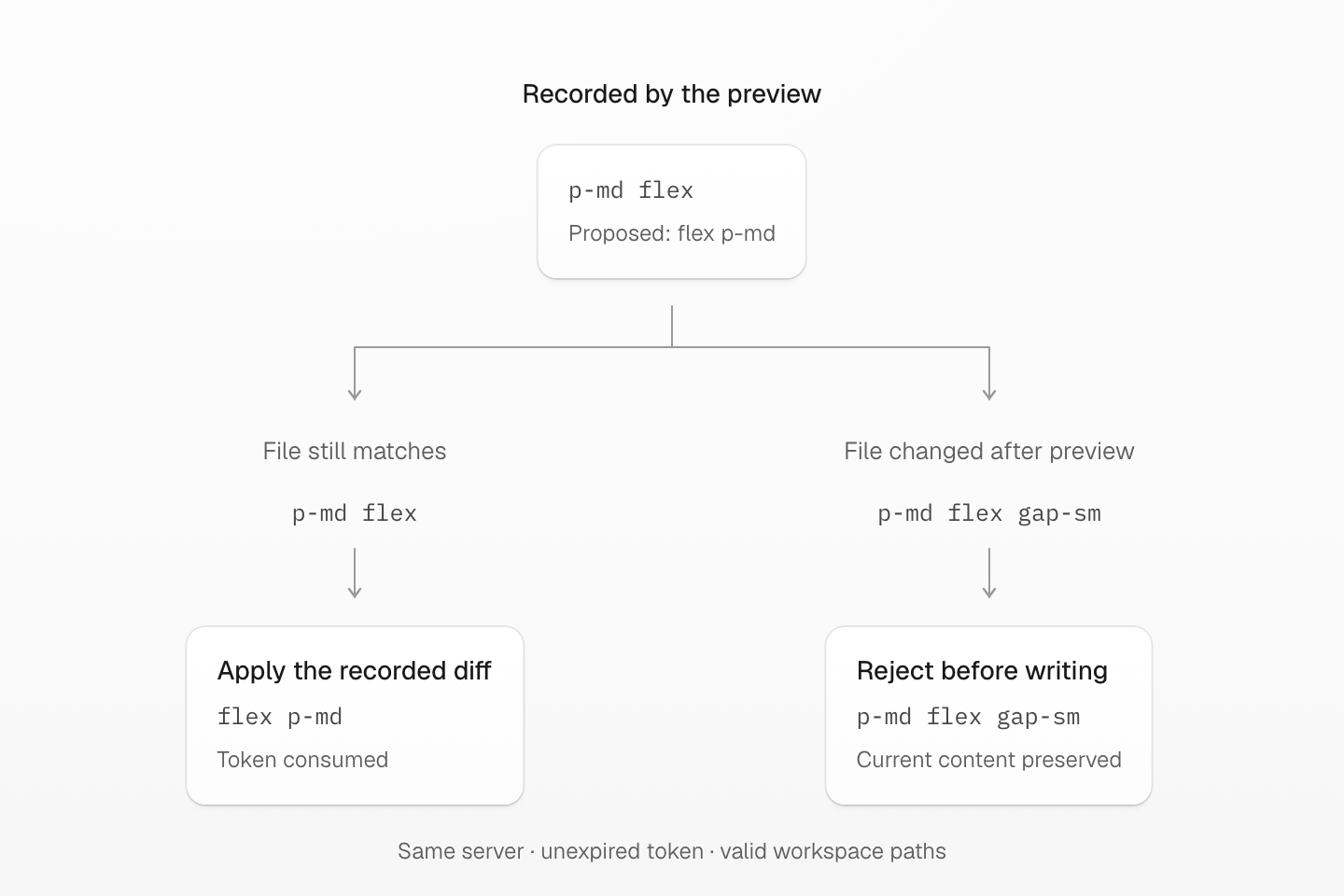
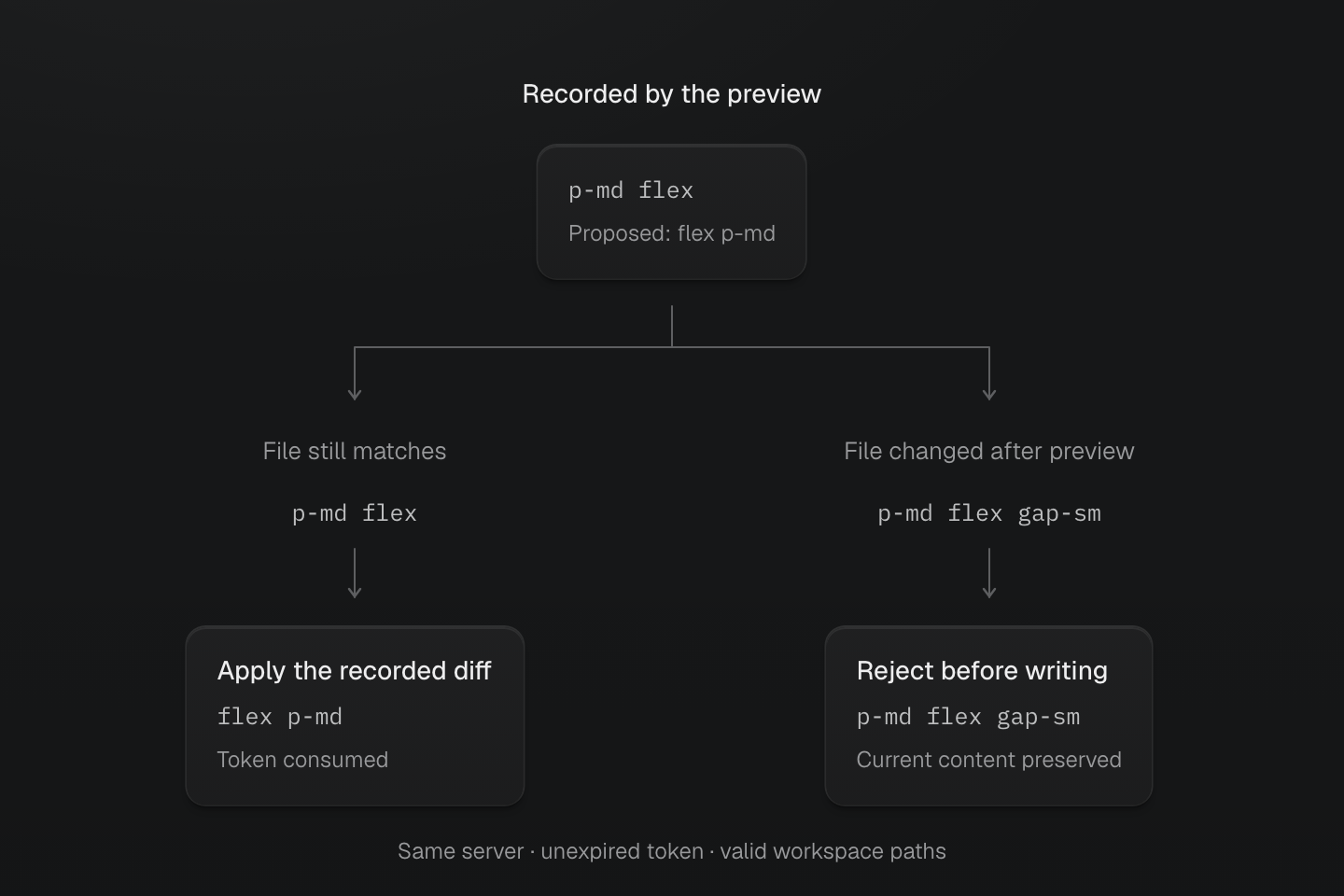
Both cases start from the same class-order preview. Applying it requires an unexpired token in the same server and matching original files. A changed file is rejected before any proposed file is written.
Text description
- A class-order preview records the original p-md flex and proposes flex p-md. Previewing leaves the source file unchanged.
- If every affected file still matches its recorded hash, applying the valid token writes the proposed contents and consumes the token.
- If a file now contains p-md flex gap-sm, its hash no longer matches. Apply rejects the preview before writing any proposed file, preserving the newer content.
- This comparison isolates file identity. Token expiry, server restarts and invalid workspace paths can also prevent application. Sequential writes are not a transactional rollback mechanism.
A preview records the original file identities and proposed contents in one server process. It does not reserve a file or follow subsequent edits. A nonempty file preview returns confirmToken and expiresAt; unchanged results and in-memory formatting do not. Apply validates token lifetime, workspace containment and every original file before writing. Successful application consumes the token. Writes are sequential, so this is not a transactional rollback guarantee.
Use the AI coding workflow to review a concrete change and verify the rendered result. The contract here defines what the tool accepts and writes.
mastercss_suggest_classes
Suggest classes for an isolated CSS declaration block using the active manifest. Read remainingCss and validation separately; declaration correspondence does not prove surrounding cascade or browser behavior.
{ "declarations": "display:flex; padding:16px; gap:1rem;"}This operation does not write files. Uncertain blocks are preserved in full as native CSS.
mastercss_workspace_info
Start here to confirm the server root, package resolution, and discovered CSS entries before interpreting project-dependent results.
{}This operation does not write workspace files.
mastercss_setup_audit
Investigate missing packages, undiscovered CSS entries, and integration configuration after checking the workspace root.
{}This operation does not write workspace files.
mastercss_inspect_class
Check how one class is interpreted by the active manifest. Use mastercss_trace_class when the question is whether project scanning actually finds it.
{ "className": "p-md"}This operation does not write workspace files.
mastercss_trace_class
Trace a class through source discovery, scanner state, and generated CSS to explain why it is present or missing.
{ "className": "p-md", "patterns": [ "src/button.html" ], "includeCss": true}This operation does not write workspace files.
mastercss_extract_classes
Find exact class tokens and source positions in a buffer, or inspect extraction across selected project files.
{ "content": "<button class=\"flex gap-sm p-md\">Save</button>", "filePath": "src/button.html", "includeRules": true}This operation does not write workspace files.
mastercss_inspect_directives
Inspect directive structure and compilation effects from an entry stylesheet or a CSS buffer. Provide entryPath or content; an empty arguments object cannot be compiled.
{ "content": "@theme { --color-brand: blue; }", "filePath": "app.css"}This operation does not write workspace files.
mastercss_render_css
Generate CSS for a small literal class list or HTML fragment using the connected project context.
{ "classList": "flex gap-sm"}This operation does not write workspace files.
mastercss_scan_project
Inspect scanned files, stylesheet entries, generated CSS, and optional missing-class checks for a chosen source scope. Add design-system inspection to check token references and policies in managed project CSS.
{ "patterns": [ "src/button.html" ], "classes": [ "p-md" ], "includeCss": true}This operation does not write workspace files.
mastercss_manifest_query
Look up tokens, utilities, native mixins, custom media and canonical token families in the active manifest.
{ "kind": "token", "namespace": "color", "query": "brand", "limit": 10}This operation does not write workspace files.
mastercss_css_compare
Supply both project snapshots to compare independent definitions and known consumers, including edits with unchanged markup. Otherwise, compare two class selections using the same active manifest. The result explains generated CSS differences; it does not establish visual equivalence.
{ "beforeClassList": "p-sm", "afterClassList": "p-md"}This operation does not write workspace files.
mastercss_lint_project
Run native class diagnostics over selected files. In lint payload v5, coverage.checkedFiles lists checked inputs, summary.checkedFiles counts them, and summary.filesWithDiagnostics counts files with diagnostics. files contains diagnostic results only. coverage.status is complete or no-inputs; zero diagnostics with no inputs does not verify source. coverage.description explains these fields: manifest stylesheet entries are not linted source inputs. Manifest failures remain MCP error results. Use the project’s ESLint command separately for its parser, plugin settings, and team rules.
{ "patterns": [ "src/button.html" ], "rules": "sort-classes"}This operation does not write workspace files.
mastercss_lint_content
Check an unsaved source buffer with the native class diagnostics and the connected workspace’s manifest. Lint payload v5 reports its virtual path in coverage.checkedFiles and summary.checkedFiles: 1, even when clean. summary.filesWithDiagnostics is zero for a clean buffer, and files is then empty. Coverage describes this buffer and the enabled lint rules, not browser behavior or the whole project.
{ "content": "<button class=\"p-md flex\">Save</button>", "filePath": "src/button.html", "rules": "sort-classes"}This operation does not write workspace files.
mastercss_suggest_syntax
Request language-service completion candidates and hover information at a position in an unsaved document.
{ "content": "<div class=\"(padding:\"></div>", "filePath": "src/card.html", "position": { "line": 0, "character": 20 }, "limit": 5}This operation does not write workspace files.
mastercss_preview_fixes
Prepare a reviewable diff for native lint fixes or generated CSS output. This request does not apply its changes.
{ "mode": "lint-fixes", "patterns": [ "src/button.html" ], "rules": "sort-classes"}Workspace files stay unchanged until mastercss_apply_preview. A nonempty preview stores a token in this server process; expiry, restart, or successful application requires a new preview. An unchanged result has no confirmation token.
mastercss_preview_directive_format
Format directives in a source buffer or create a file-formatting preview. Content mode returns formatted text directly and does not create an apply token.
{ "content": "@safelist \"(background-color:transparent) !\";", "filePath": "card.css"}Content mode does not write files or store a token. In file mode, workspace files stay unchanged until mastercss_apply_preview. A nonempty preview stores a token in this server process; expiry, restart, or successful application requires a new preview. An unchanged result has no confirmation token.
mastercss_apply_preview
Apply the exact changes from a reviewed preview in the same running server session. This tool writes workspace files.
{ "confirmToken": "<token-from-reviewed-preview>"}The server validates all original file hashes and writable paths before writing the proposed contents. Successful application consumes the token. File writes are sequential; this is not a transactional multi-file rollback mechanism. Run project checks and inspect the changed UI afterward.
Prompts
Request a prompt through prompts/get in a connected client.
| Prompt | Use |
|---|---|
debug-missing-css | Inspect scanner coverage, manifest loading, syntax, native CSS pruning and stylesheet entry configuration when classes do not produce CSS. |
review-mastercss-classes | Run class diagnostics and propose only safe, scoped write previews. |
migrate-to-mastercss | Audit an external styling system and plan incremental batches with a rendering mode, validation commands and visual risks; it does not edit files. |
Results
Every tool returns a version 3 object with metadata, diagnostics and a required result. Success has result: { status: 'success', data }; failure has result: { status: 'error', error: { code, message } } and also sets MCP isError. JSON text and structuredContent contain the same object; validate both branches with the tool's outputSchema.
metadata reports package, language and binding versions, the context actually used, the manifest fingerprint, entries and dependencies; unavailable values are null or empty arrays. Project context is the default: a missing entry or failed compilation is an error, never a silent switch to the preset. Pass context: 'preset' explicitly for preset-only queries.
Class inspection reports matchStatus, cssSyntaxStatus, cssValueStatus and browserSupport separately, and each check record names its version, phase and scope. A CSS grammar error differs from an unknown future capability, var() does not establish a computed value, and browserSupport stays not-checked unless a browser check ran. Known CSS math types are checked without computing lengths or converting units; distinct token definitions stay ambiguous even when their values are equal.
Markdown and MDX extraction separates live markup and code from display text and returns original UTF-16 ranges with inclusion or exclusion reasons; the CLI, editor and MCP share the same Rust extraction and matching. CLI report versions are independent of this envelope. In MCP payloads root is the configured workspace root; in CLI reports cwd is the command root.
Project comparison: call mastercss_scan_project with includeSnapshot: true before and after editing, then pass both result.data.snapshot objects to mastercss_css_compare as beforeSnapshot and afterSnapshot; they cannot be mixed with class, content, filePath or context inputs. The result is { version: 3, mode: 'project', comparison }, where comparison.version is 1 and lists changed definitions, known consumers and files, before/after rules, native references, output assets, delivery order and coverage. Native consumers are conservative at stylesheet granularity.
Design-system inspection: mastercss_scan_project.designSystem takes the design-system options object and cannot be combined with context: 'preset'. The version 1 report in result.data.designSystem lists authored var() references with source ranges, selector and at-rule ancestry, importers, token-family collisions, component attribute vocabulary (components) and policy diagnostics; add routeStylesheets globs for stylesheets imported from JavaScript; read project.routeStylesheets, project.excluded and coverage. An unregistered custom property can still resolve through native CSS and is not automatically an error.
Read the full contract
Use tools/list in the same connected server session for accepted arguments. On GitHub, read the tool registrations, output schemas, and result envelope. The workflow guide shows a complete preview and apply sequence. Source links follow the rc branch; the connected server describes your installed version.