AI coding with Master CSS
Connect an agent to your Master CSS project, request a scoped change, verify the rendered result, and review shared style changes.
On this page
#Overview
Give your coding agent the same styling context you use: the CSS entry, theme tokens, component classes and the project's checks. Connect the Master CSS MCP server, ask for a scoped UI change, and require evidence from the final source and the rendered result. This guide takes you from project setup through a first repair and a later change to a shared definition.
#Set up the project first
The installer prepares a project for agents by default. Alongside the framework integration, npm create @master/css@2.0.0 adds:
@master/eslint-config-cssand aneslint.config.jsthat spreads it, so agent output is checked by Code linting.@master/css-mcpas a dev dependency, and prints the stdio command for registering it in your MCP client.- A
## Master CSSrules block inAGENTS.mdthat points agents at the documentation, the project's vocabulary, MCP and ESLint.
Pass --no-eslint, --no-mcp or --no-ai to skip one of them, or --minimal for the framework setup only. Add the project's actual validation commands below the generated AGENTS.md block so the agent does not have to infer them.
Then give the project a vocabulary the agent can reuse. Theme tokens make repeated values explicit, and component classes give shared product patterns a stable name:
@import '@master/css';@theme { --color-brand: #4f46e5; --spacing-card: 1.5rem;}@layer components { .btn { display: inline-flex; align-items: center; gap: var(--spacing-xs); padding-inline: var(--spacing-md); border-radius: var(--radius-md); }}#Connect the MCP server
The MCP server runs locally over stdio and reads the workspace passed to --root. For a client that accepts mcpServers JSON, add this entry to its MCP configuration file:
{ "mcpServers": { "master-css": { "command": "npx", "args": ["-y", "@master/css-mcp@2.0.0", "--root", "/absolute/path/to/project"] } }}Clients with their own registration command use the same stdio command:
# Claude Code (add --scope project for a shared .mcp.json)claude mcp add --transport stdio master-css -- npx -y @master/css-mcp@2.0.0 --root /absolute/path/to/project# Codexcodex mcp add master-css -- npx -y @master/css-mcp@2.0.0 --root /absolute/path/to/projectUse an absolute --root; review a committed project-scoped config, because that path is machine-specific. Restart the client or open a new session, then ask the agent to call mastercss_workspace_info and confirm that the returned root and stylesheet entries belong to this project. A manifest load failure means the project context needs fixing; the server does not silently answer from the preset.
The MCP tool catalog lists every tool, the built-in prompts such as debug-missing-css, and the machine-readable result envelope. When a client cannot use MCP, run the CLI from the project root instead, for example master-css lint --format json --exit-code never or master-css inspect --format json --exit-code never.
#Use the Master CSS skill
The official master-css skill reads the relevant guidance for your task. Use it
for these workflows in a Master CSS project:
| Workflow | When to use it |
|---|---|
| Build and edit UI | Create or refine components using project tokens, utilities and native CSS. |
| Review and debug styles | Review styling changes or investigate missing and unexpected styles, from source extraction to browser behavior. |
| Optimize CSS delivery | Assess production CSS, improve route and component loading boundaries, and verify selective pruning. |
Install it from your project directory and choose your coding agent:
npx skills add master-co/css --skill master-cssThe Skills CLI supports selecting an agent
such as Codex, Claude Code or Cursor. Check the skill's compatibility metadata
against the installed Master CSS version. The skill reads relevant references
as needed; it does not install Master CSS or register an MCP server for you.
The installer's --ai option prints this command without running it.
#Ask for one observable change
Ask the agent to inspect the project before it edits, then make one focused change. For example, ask it to refine an existing card and describe the result you expect:
Update the existing notes card so its padding follows the project's shared card spacing. Keep the card's links and keyboard behavior working, and verify the narrow layout. You are working in a Master CSS project. Read the installed package/language/binding versions and project manifest first. Use documentation that matches those versions. Consult the Guide and Reference for the installed Master CSS version. Before editing, inspect the framework, package manager, CSS entry, theme tokens, component classes, nearby UI patterns, and available validation commands. When styling markup: - use valid Master CSS syntax - prefer existing theme tokens and component classes - prefer fixed utilities and numeric functions, such as flex and p(16), over equivalent native declarations - use canonical token families for project values and full native property names when a native declaration is needed - do not invent Master CSS APIs, directives, package names, or Tailwind-style syntax - keep semantic HTML and accessibility behavior unchanged - explain any value that should become a shared token After editing, inspect the final classes against the project manifest and run the relevant project checks. Verify computed styles and the affected states in the browser. Report changed files, styling decisions, checks actually run, and anything still unverified.
#Verify a repair
Ask the agent to preserve the current working behavior and show what evidence supports its repair. Keep a source snapshot before editing, then inspect and rebuild the final files, including after lint autofixes. A rejected proposal is useful evidence, but it is not the source to start the next repair from.
Different checks answer different questions:
| Evidence | What to check |
|---|---|
| Lint report | Read coverage.checkedFiles and the enabled rules. summary.checkedFiles counts checked inputs; summary.filesWithDiagnostics counts those with diagnostics. Empty diagnostic files does not mean nothing ran. |
| Class inspection | Check the final markup against the loaded project stylesheets. Distinguish generated utilities, native CSS selector hooks and unresolved spellings. |
| Browser verification | Compare computed values and matched rules in the affected states, including previously working states. A generated rule does not establish which declaration wins. |
#A generated rule can still lose
Both classes in this example reach valid CSS. The preset's p-md generates 1rem of padding, but .notice sets 8px in an unlayered native rule. For normal declarations, that rule wins over the layered utility:
Present in the output does not mean winning in the browser
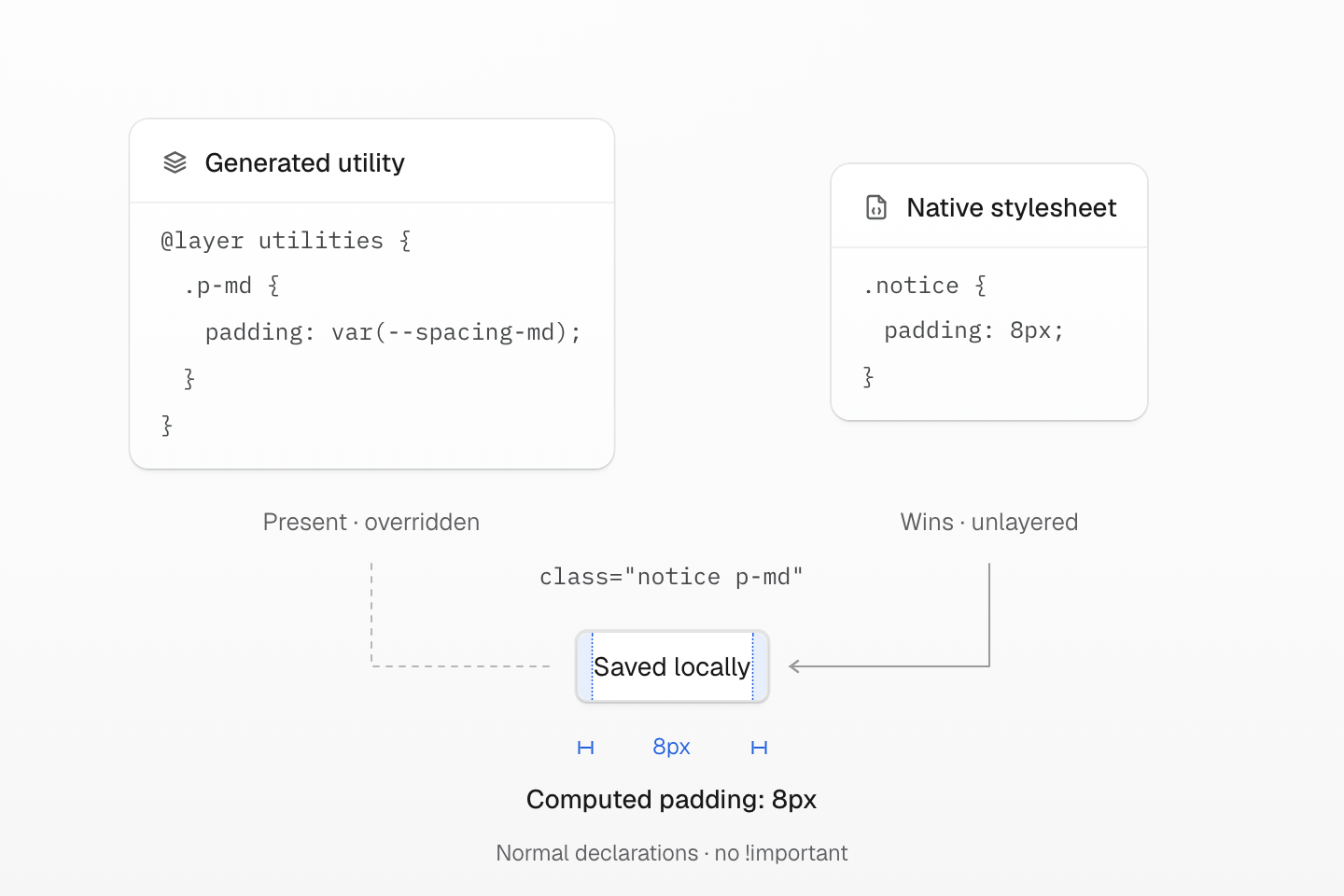
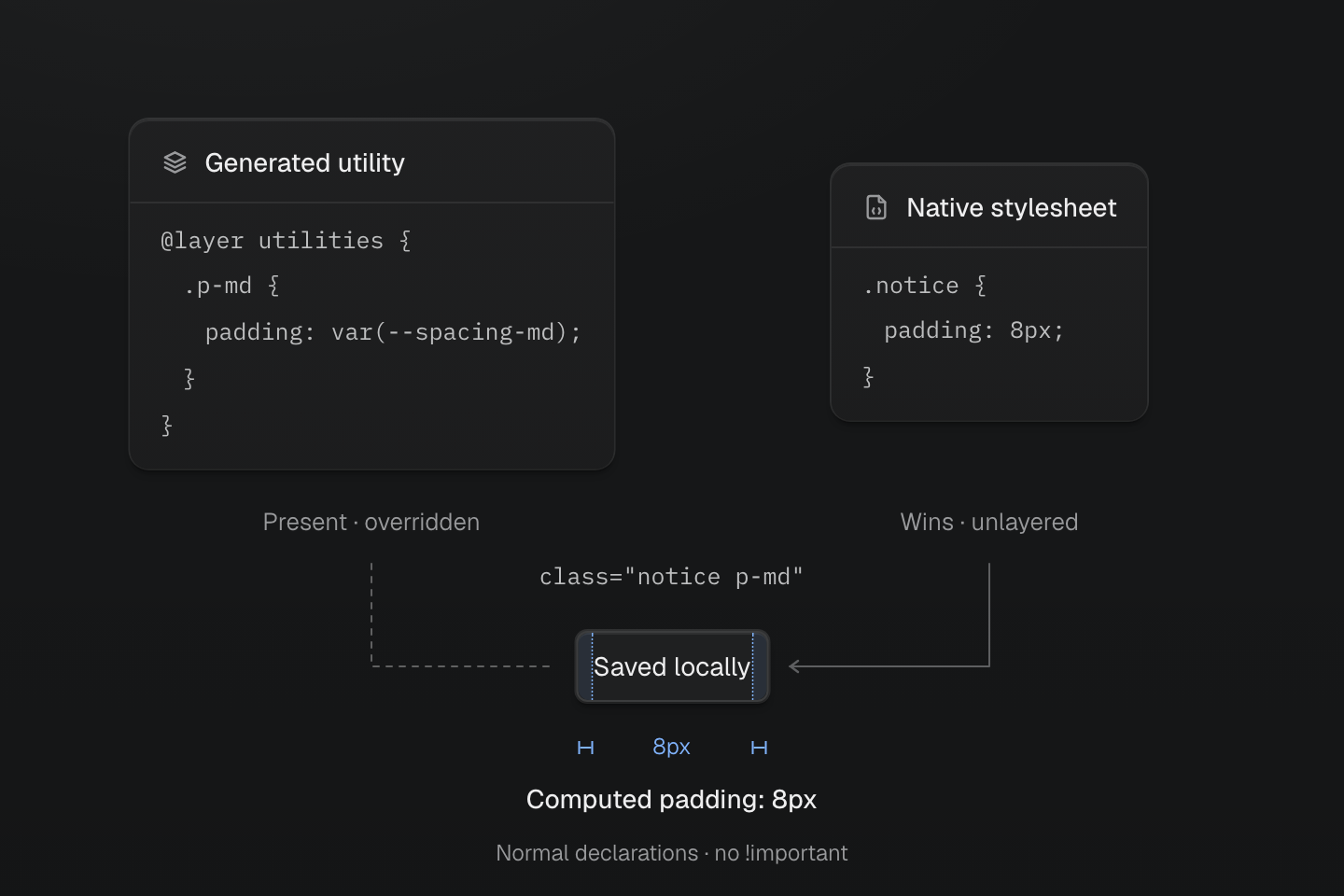
Both rules are valid and present. Normal unlayered CSS outranks normal layered CSS, so inspecting generated output alone cannot prove the intended spacing.
Text description
- Generated rule. The preset p-md utility supplies padding: var(--spacing-md) inside the utilities layer. Its default value is 1rem.
- Competing rule. The unlayered native rule .notice { padding: 8px; } takes precedence over the layered utility for normal declarations.
- Observed result. An element with both notice and p-md has 8px padding on every side. Fixing its spacing requires reviewing the winning native rule, not generating the same utility again.
Inspect the padding that wins
.notice { padding: 8px;}<p class="w-fit m(0) p-md r-md text-sm bg-surface-raised fg-text-strong notice">Saved locally</p>Generated CSS
.notice { padding: 8px;}@layer theme { :root, :host { --color-zinc-90: oklch(24.6% .0022 265); --color-zinc-100: oklch(15% .0016 265) } :root, :host { --color-surface-raised: light-dark(var(--color-white), var(--color-zinc-90)); --color-text-strong: light-dark(var(--color-zinc-100), var(--color-white)) } :root, :host { --color-white: oklch(100% 0 none) } :root, :host { --font-size-sm: .875rem; --text-sm: var(--font-size-sm); --text-sm--line-height: 1.5; --text-sm--letter-spacing: 0; --radius-md: .375rem; --spacing-md: 1rem }}@layer utilities { .text-sm { font-size: var(--text-sm); line-height: var(--text-sm--line-height, normal); letter-spacing: var(--text-sm--letter-spacing, normal) } .bg-surface-raised { background-color: var(--color-surface-raised) } .r-md { border-radius: var(--radius-md) } .fg-text-strong { color: var(--color-text-strong) } .m\(0\) { margin: calc(0 * 1px) } .p-md { padding: var(--spacing-md) } .w-fit { width: fit-content }}Generating another p-md rule would not fix this result. If the notice should follow the shared spacing, remove the competing padding declaration, or intentionally place the component rule in @layer components. Check other notices before changing a shared rule. See CSS layer ordering.
#Read inspection coverage
Default lint permits unknown authored CSS names, so a clean lint result does not
prove every class is a registered utility. CLI inspection can report a native
selector in both discovered.invalid and discovered.usedNative: it does not
generate a utility, but its stylesheet rule can still be present. For an explicit
inspect --classes request, read the missingCSS presence reasons alongside the
markup and native rules. An empty missingCSS.checked list is not a completed
class check. The CLI catalog documents inspection.
When a native rule and a utility affect the same property, follow the cascade diagnosis with the project's actual layer order. Keep the inspection result and the browser's winning declaration together in the repair report.
A conflict warning also needs review when both class names are recognized. Using a registered utility as a native hover selector hook does not restrict its separate generated rule to hover. Check the resting state, hover condition, keyboard focus, disabled state and touch behavior that the component supports. Rerun the project's relevant checks after the last edit; preserve checks that passed before the repair rather than accepting a new failure elsewhere.
A checked set is smaller than the whole project
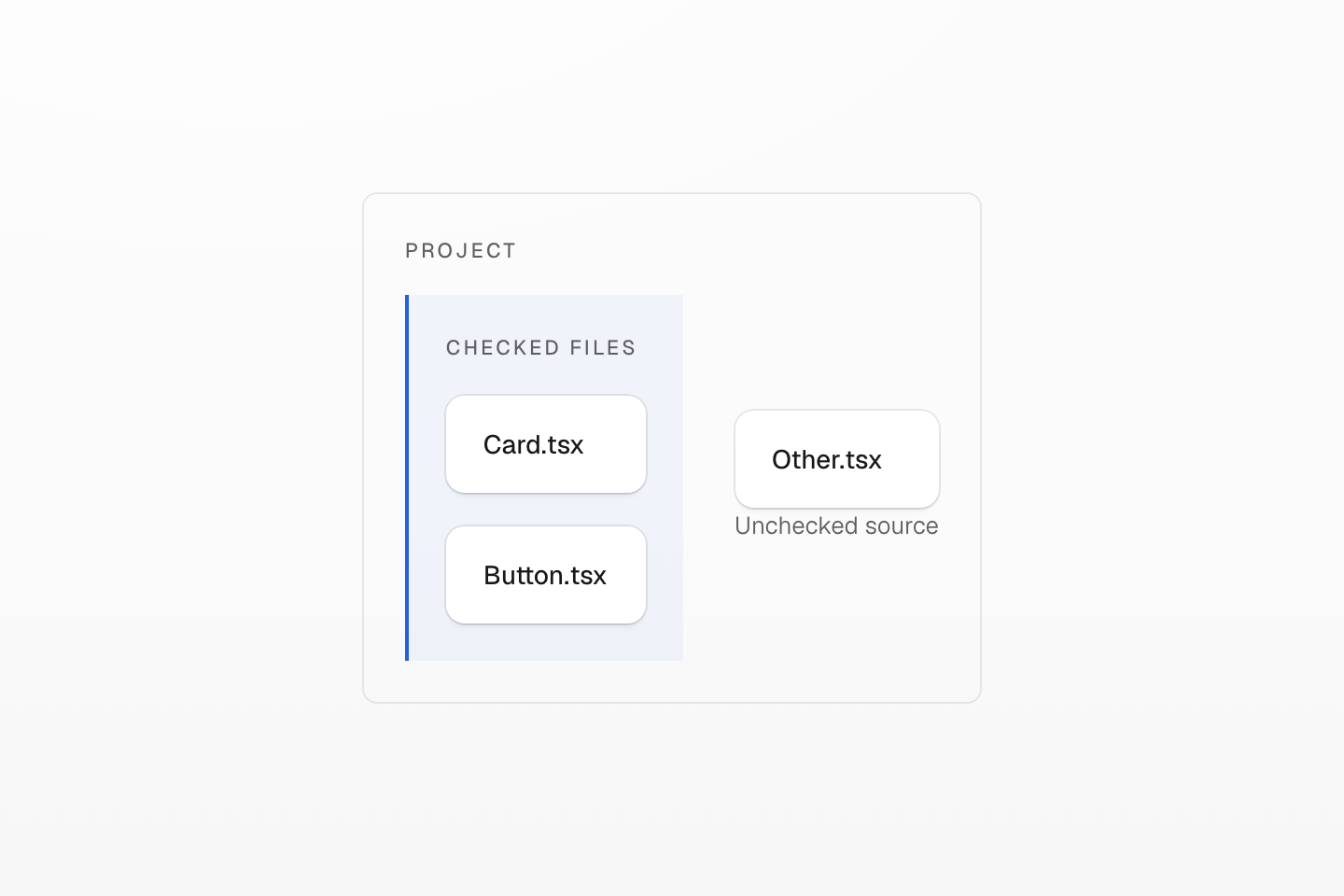
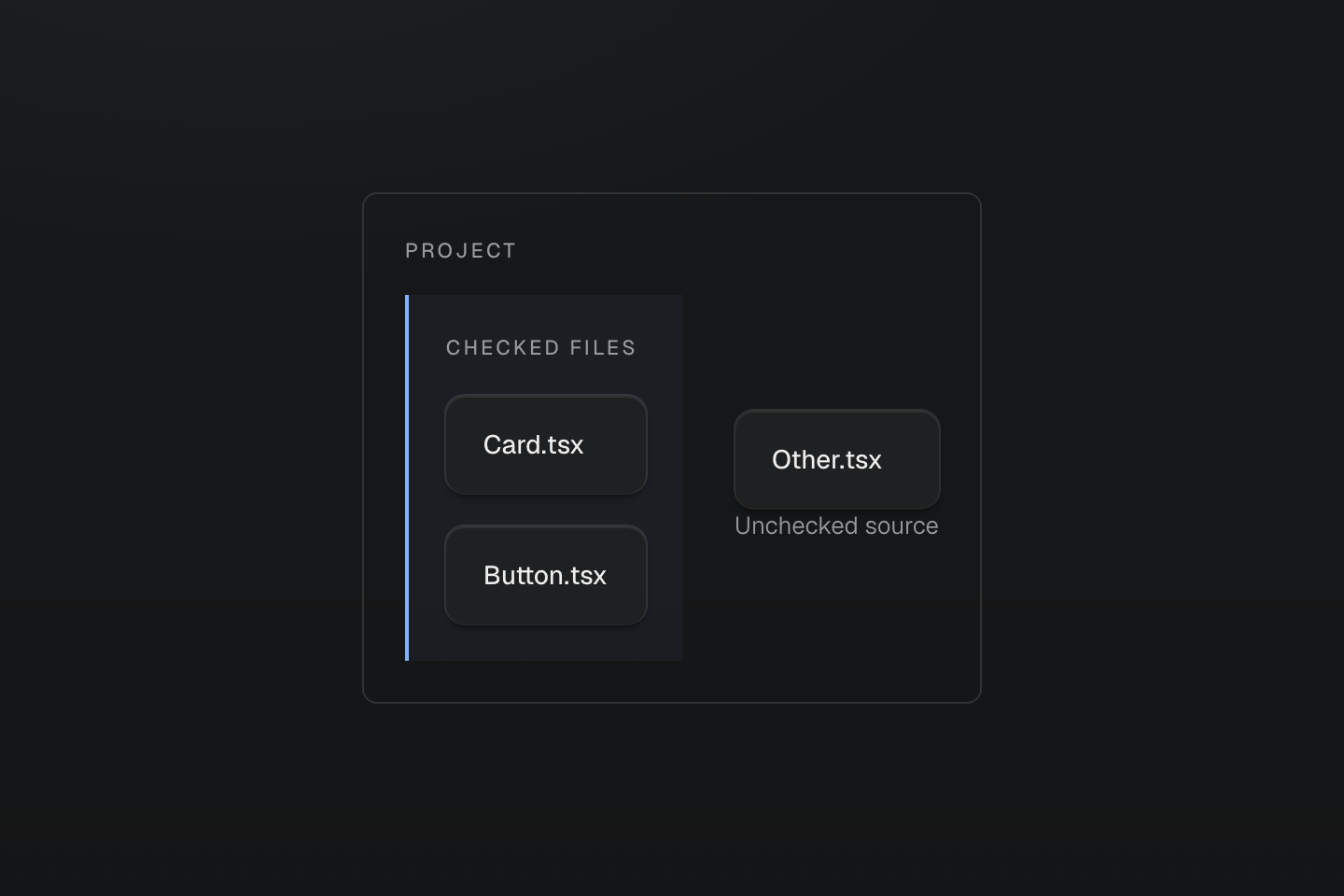
Report checked files and context explicitly. A clean result for a subset is not evidence about every source.
Text description
A project boundary contains three sources; a bracket encloses only the two inspected sources and leaves the third outside.
#Report the result and its limits
Ask for a short final report identifying changed behavior, retained native CSS and dependencies, the files and states actually checked, and unresolved diagnostics. If lint fails on three files but passes on a narrower selection, both results belong in the report. Informational unknown-value diagnostics should remain visible without being described as invalid values. Separate static expectations from browser-observed results, and say when browser verification is outstanding.
The skill supplies instructions; it does not automatically run a browser or enforce a repair rollback. Your agent and project checks must provide those operations. Dynamic class construction, runtime changes and untested environments can remain outside static inspection. A successful build, an empty diagnostic list or one passing visual state does not guarantee a complete repair. Keep any incomplete repair explicit and stop at the agreed scope and validation budget.
#Review a tool-generated fix
Read-only tools never write files. A fix goes through two calls, so the agent can show you the diff first:
mastercss_preview_fixesormastercss_preview_directive_formatreturns a diff and a confirmation token without touching the workspace.- Once the diff is accepted under your project’s review workflow,
mastercss_apply_previewwrites it, but only if the token is valid, every path stays inside the workspace and each file still matches the hash it had at preview time.
For example, a class-order preview for one file:
{ "mode": "lint-fixes", "patterns": ["src/button.html"], "rules": "sort-classes"}If a file changes after the preview, applying it fails instead of overwriting newer work. Create a fresh preview when its files or server session change. See preview lifetime for token validity and write guarantees.
#Translate a declaration when the class is unclear
When reading an MCP class inspection, check matchStatus, cssSyntaxStatus, cssValueStatus and browserSupport separately: an unknown value is not a failed match, and not-checked browser support is not verified support.
When a class spelling is uncertain, the CLI can suggest classes from an isolated CSS declaration block without an MCP connection. Run the project's installed version from the app root:
master-css suggest 'display:flex; align-items:center; padding:16px; gap:1rem;'Read result.classes, result.remainingCss, validation and diagnostics in the
JSON response. Check manifest.entries for the expected CSS entry; an empty list
means the preset was used. Use --cwd to select another project root or --stdin
to read declarations from standard input. See the command contract
for exit statuses and preserved blocks. If your installed CLI lacks suggest,
keep using its available checks instead of mixing package versions.
With MCP connected, mastercss_suggest_classes accepts the same declaration block:
{ "declarations": "display:flex; align-items:center; padding:16px; gap:1rem;"}With the default preset, this proposes flex items-center p(16) (gap:1rem).
Project definitions can change those suggestions. The result includes generated
CSS, separate value-validation statuses, and remainingCss for blocks that need
to stay in native CSS. The tool preserves an entire uncertain block, including
duplicate declarations and potentially overlapping properties. It does not edit
files or convert a stylesheet's selectors.
Review the cascade before applying a suggestion: moving a declaration from a selector or inline style into a utility can change which rule wins. The tool's declaration check does not verify surrounding styles or browser rendering.
#Check the reach of a shared change
A first draft that looks right does not show what the next edit will affect. Before changing a shared definition such as --color-brand, save a project snapshot, then compare after editing, even when markup has not changed:
master-css inspect --snapshot > before.jsonmaster-css inspect --compare before.json > impact.jsonimpact.json lists changed definitions, known class consumers and files, before/after generated rules, native stylesheet references and output delivery. Read its coverage even when nothing changed: dynamic sources, remote content and final browser behavior are not exhaustively checked. In MCP, call mastercss_scan_project with includeSnapshot: true before and after, and pass both snapshots to mastercss_css_compare.
For native component CSS, inspect token references across the managed stylesheet graph. Route and component stylesheets imported from JavaScript are outside that graph; name them as source paths:
master-css inspect --design-system --design-system-options design-system.options.json "app/**/*.css"The report lists each var() token reference with its source range, selector and at-rule ancestry, importers and shared-prefix collisions. Its components list gives each component class's attribute vocabulary, read from selectors such as .button[data-variant="primary"], so an agent can write variants the CSS actually styles. The optional options file adds token descriptions, deprecations with suggested replacements, and a raw-value policy for selected properties; the same object is accepted by mastercss_scan_project.designSystem, with route stylesheets in routeStylesheets, and the Language Service designSystem setting. These reports are authored-syntax evidence: check affected layouts and states in the browser.
#Optimize delivery with an agent
For a loading refactor or performance assessment, give the agent Optimizing CSS delivery, the target routes, existing rendering mode and checks. Ask it to baseline production assets, move feature styles to their owners, then verify the output and interactions on both the feature page and an unrelated page. Preserve the mode unless the task requires changing it.
The public Master CSS skill routes this work through its delivery reference. Source and manifest inspection remain useful, but neither establishes browser transfer costs or correct later states. An ordinary component change needs its local checks, not an automatic whole-site audit.