Optimizing CSS delivery
Reduce unrelated CSS with route ownership and selective pruning, then verify production output, runtime behavior and navigation costs.
On this page
#Overview
Make each page receive the CSS it needs, including the states that appear after interaction. Start by tracing delivery, move feature styles to their owners, and prune native rules only where the build knows their possible uses. Compare the resulting assets and behavior before setting a regression budget.
This guide follows an overview page and a reports page with the same navigation. Only Reports renders a report panel. The desired result is that Overview never downloads the panel's rules, while Reports keeps its ready and keyboard-focus states.
Complete your framework's installation first. Route-level styles explains local style ownership and definitions; Scanning class names explains discoverable class strings and source exceptions. Use those Authoring guides for everyday component work; use this workflow when investigating delivery cost or missing assets.
Record the installed Master CSS version, CSS entry, rendering mode and pruning policy. Keep the existing mode during a delivery refactor. The reproducible example below uses Vite with progressive rendering to show that initial CSS, later utilities and native pruning are separate concerns. It uses only public packages and preset tokens.
#Establish what each page receives
Build the current source and keep the output with its lockfile and tool versions. Choose both a page that uses the feature and a page that does not. Include direct loads and navigation between them; a shared asset already in the cache can change the cost of the second page.
Trace each HTML stylesheet link through its CSS imports, counting each resolved asset once per page. Record inline style blocks separately. Inspect module imports as well: a component imported through a shared registry can load CSS even when its markup is absent. Record runtime scripts, programs and hydration data separately from stylesheets.
Use three different kinds of evidence:
| Evidence | What to record | What it establishes |
|---|---|---|
| Build output | Unique external files, import depth, raw and gzip/Brotli bytes, inline CSS | Which assets the build delivers and their deterministic size under the recorded compression settings |
| Browser requests | Responses, encoding, transferred bytes, cache reuse and initiators | What this navigation actually fetched |
| Browser behavior | Paint and interaction timing, computed styles and relevant states | Whether the page works, and how it performs under the tested conditions |
The Network panel exposes requests and their dependencies. Measure a cold load and a warm navigation separately, using the same browser, viewport, content and throttling settings before and after. Repeat timing runs and keep the samples as well as a median. Compressed file size alone does not establish a faster paint.
Coverage can suggest a feature to investigate. A rule unused during one recording may still serve a closed dialog, focus state, another viewport or externally supplied content. Establish ownership and possible states before removing it.
#Give feature rules a local owner
Suppose the common JavaScript entry imports both navigation and report styles:
import './style.css'import './reports.css'Both pages now receive the report rules. Their absence from Overview's DOM does not change the import. Move that second import to the reports entry, which only Reports loads. Keep the shared navigation in the common stylesheet.
Move the import, change the delivery path
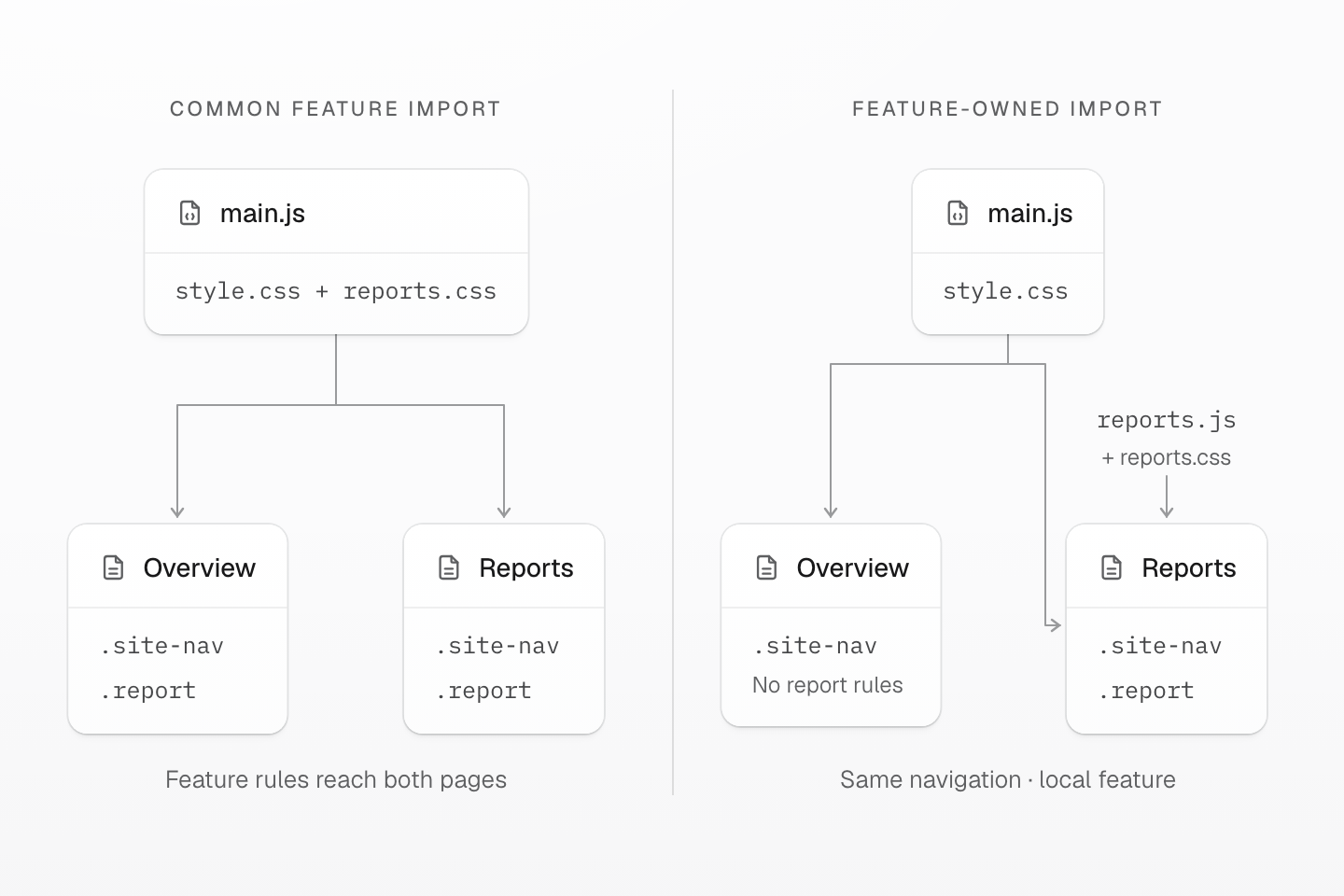
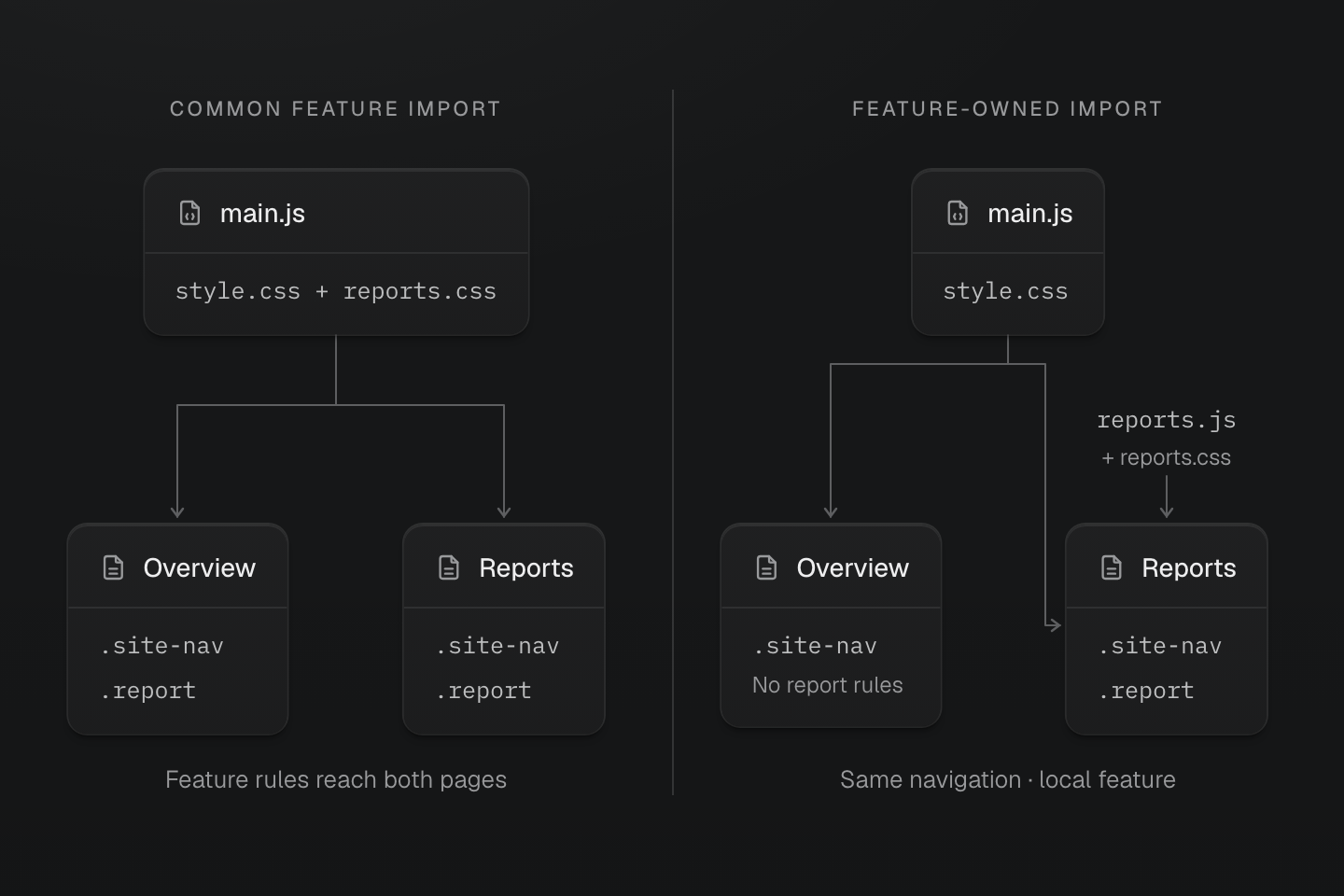
The reports entry owns the feature import. Shared navigation still reaches both pages; report rules reach only Reports. Blocks denote rule groups, not measured bytes.
Text description
- Common import. When main.js imports navigation and report styles, both Overview and Reports receive both groups even though Overview has no report markup.
- Local import. Move reports.css to reports.js. Both pages retain the common entry; only Reports loads reports.js and receives the report rules.
#Reproduce the two-page example
Use an empty directory with the following files. Install the public packages with npm install, run npm run build, and serve the result with npm run preview. Use matching Master CSS releases; retain the resulting lockfile for comparisons.
- package.json
- vite.config.js
- index.html
- reports
- index.html
- src
- style.css
- main.js
- reports.css
- reports.js
 package.json
 vite.config.js
 index.html
 style.css
 main.js
The Vite multi-page build uses two HTML entries. Both contain their initial markup, so Vite's HTML pipeline can pre-render it. An application with custom request-time SSR needs its framework's server integration; this example does not give Vite a request-time renderer.
Complete two-page project
{ "name": "css-delivery-example", "private": true, "type": "module", "scripts": { "dev": "vite", "build": "vite build", "preview": "vite preview" }, "dependencies": { "@master/css": "2.0.0" }, "devDependencies": { "@master/css-vite": "2.0.0", "vite": "^8" }}import { defineConfig } from 'vite'import masterCSS from '@master/css-vite'export default defineConfig({ plugins: [masterCSS({ mode: 'progressive' })], build: { rolldownOptions: { input: ['index.html', 'reports/index.html'] } }})<!doctype html><html lang="en"><head> <meta charset="utf-8"> <meta name="viewport" content="width=device-width, initial-scale=1"> <title>Overview</title> <script type="module" src="/src/main.js"></script></head><body class="p-lg"> <nav class="site-nav" aria-label="Main"><a href="/">Overview</a><a href="/reports/">Reports</a></nav> <main><h1>Overview</h1><p>The overview does not render a report.</p></main></body></html><!doctype html><html lang="en"><head> <meta charset="utf-8"> <meta name="viewport" content="width=device-width, initial-scale=1"> <title>Reports</title> <script type="module" src="/src/main.js"></script> <script type="module" src="/src/reports.js"></script></head><body class="p-lg"> <nav class="site-nav" aria-label="Main"><a href="/">Overview</a><a href="/reports/">Reports</a></nav> <main> <h1>Reports</h1> <button id="refresh" type="button">Refresh report</button> <section id="report" class="report report-idle" data-state="idle" tabindex="0">Report waiting</section> </main></body></html>The common entry imports the one full Master CSS entry. Its navigation rule uses a public spacing token:
import './style.css'@import '@master/css';@layer components { .site-nav { display: flex; gap: var(--spacing-md); }}The reports module imports its own stylesheet. Complete class strings describe the finite status alternatives; the attribute selector and focus rule stay with the panel too:
import './reports.css'const states = { idle: 'report-idle', ready: 'report-ready' }const report = document.querySelector('#report')document.querySelector('#refresh').addEventListener('click', () => { report.classList.replace(states.idle, states.ready) report.dataset.state = 'ready' report.textContent = 'Report ready'})@prune native;@layer components { .report { padding: var(--spacing-lg); border: 1px solid currentColor; } .report[data-state="ready"] { border-width: 3px; } .report:focus-visible { outline: 2px solid currentColor; outline-offset: 4px; } .report-idle { opacity: .65; } .report-ready { opacity: 1; } .report-debug { outline: 8px solid red; }}Open / and /reports/ directly. Trace their emitted CSS imports: only Reports should receive .report. Refresh the report, then focus its panel using the keyboard. Its border becomes 3px, opacity becomes 1, and keyboard focus has an outline.
The @prune native marker opts this file in, but removal also requires a build path that supplies class usage. In the current Vite local-stylesheet transform, the report rules are compiled with project definitions without a usage set for pruning; .report-debug therefore remains in that local output. The ownership improvement still works. The next section verifies pruning separately through the public CLI rather than treating a directive in source as proof of a smaller production file.
#Share definitions without importing the feature
A local stylesheet can use project tokens and mixins without importing the full entry again. The integration supplies that definition context. When definitions live outside the entry graph, use @reference; it supplies definitions without loading the referenced file's native rules.
Native selectors keep their ordinary document scope after loading. Route ownership controls delivery, not selector matching or whether the framework retains CSS after navigation. Keep shared values in tokens, shared roles in native classes, repeated declarations in mixins, and independent local choices in utilities. Reusing styles covers those design decisions.
#Prune only a known usage set
Native CSS is preserved by default. First remove unnecessary imports. Then consider files whose classes and states you can account for. Keep project-wide pruneNativeCSS off while establishing these boundaries, and opt individual sources in with @prune native;.
Pruning applies to the declaring file and uses its root's class usage scope. It does not automatically spread into imported files. Package CSS needs its own opt-in; a consumer's project-wide setting does not make all package styles prunable. Only consider pruneNativeCSS: true when pruning all project-owned stylesheets is intentional and their possible uses are covered. The pruning Reference owns the full scope rules.
In this example, the markup contains report and report-idle, and the JavaScript map also contains report-ready. Those complete names allow a scanner-backed build to retain both status rules. Finding report retains its attribute and focus selector branches even before the ready or focus state is active. Class scanning does not prove that a selector matches a reachable DOM relationship; a retained rule may still never match.
A known class retains its later selector states
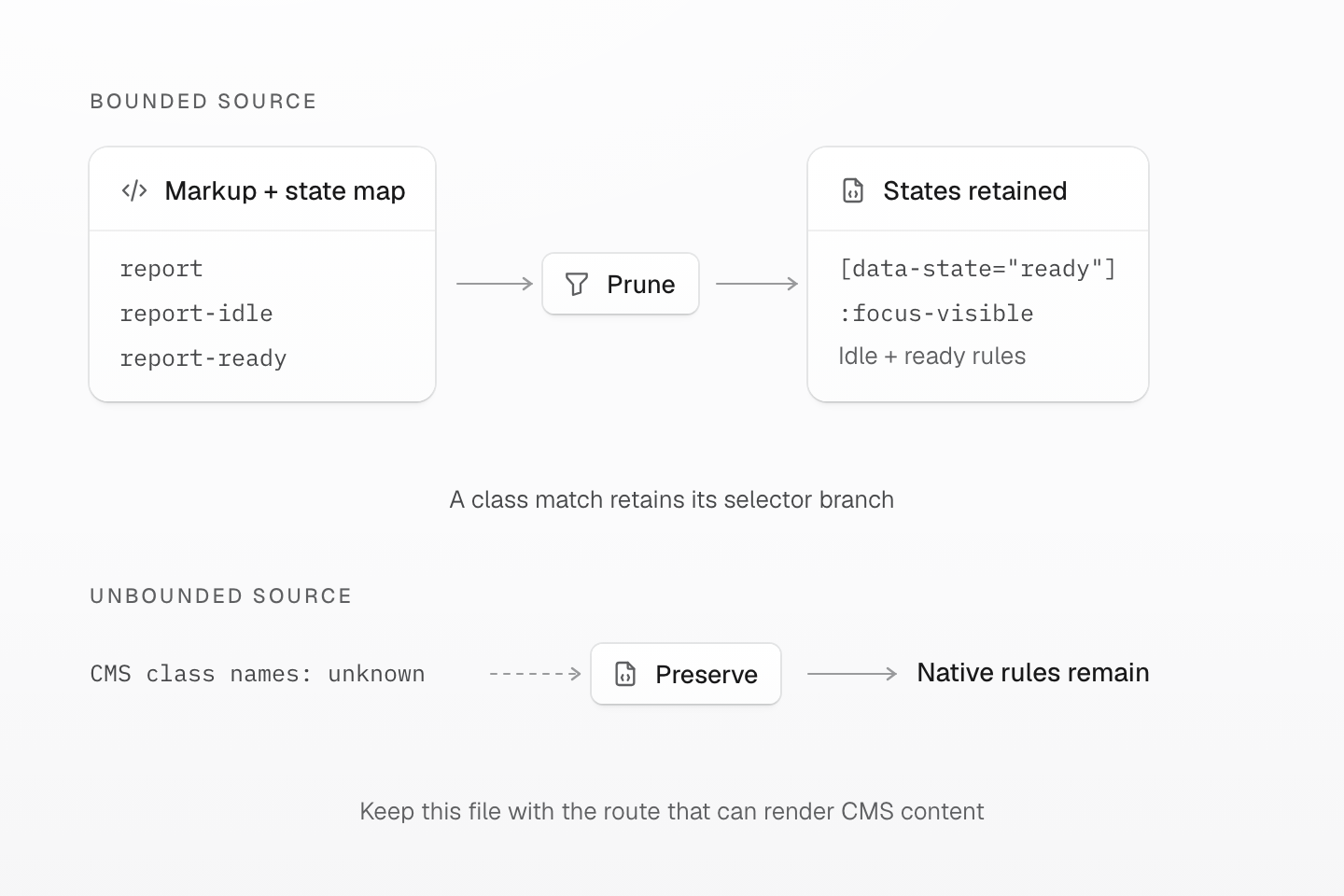
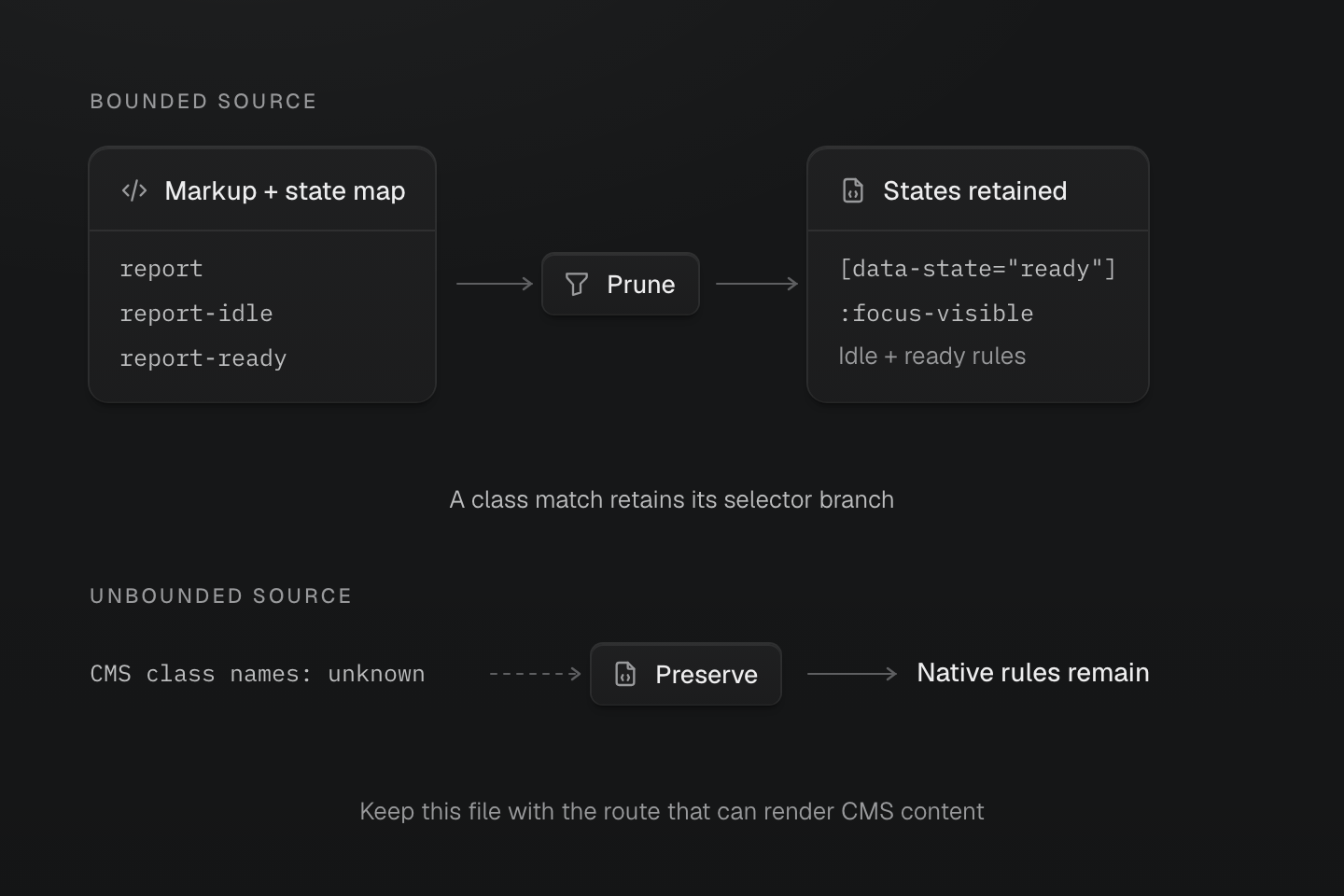
The evidence is the possible class set, not a screenshot of the initial DOM. A safelist can complete a bounded external set; an unknown set needs preservation.
Text description
- Known usage. The report markup and complete idle/ready map supply report, report-idle and report-ready. A scanner-backed build retains their rules, including report[data-state="ready"] and report:focus-visible.
- Unknown usage. Unbounded CMS classes cannot be proven absent from a source scan. Preserve their owning native stylesheet and load it where the CMS content can appear.
Rules without class selectors remain available. Pruning is based on class usage, not a snapshot of the initial DOM.
Native pruning leaves classless rules available
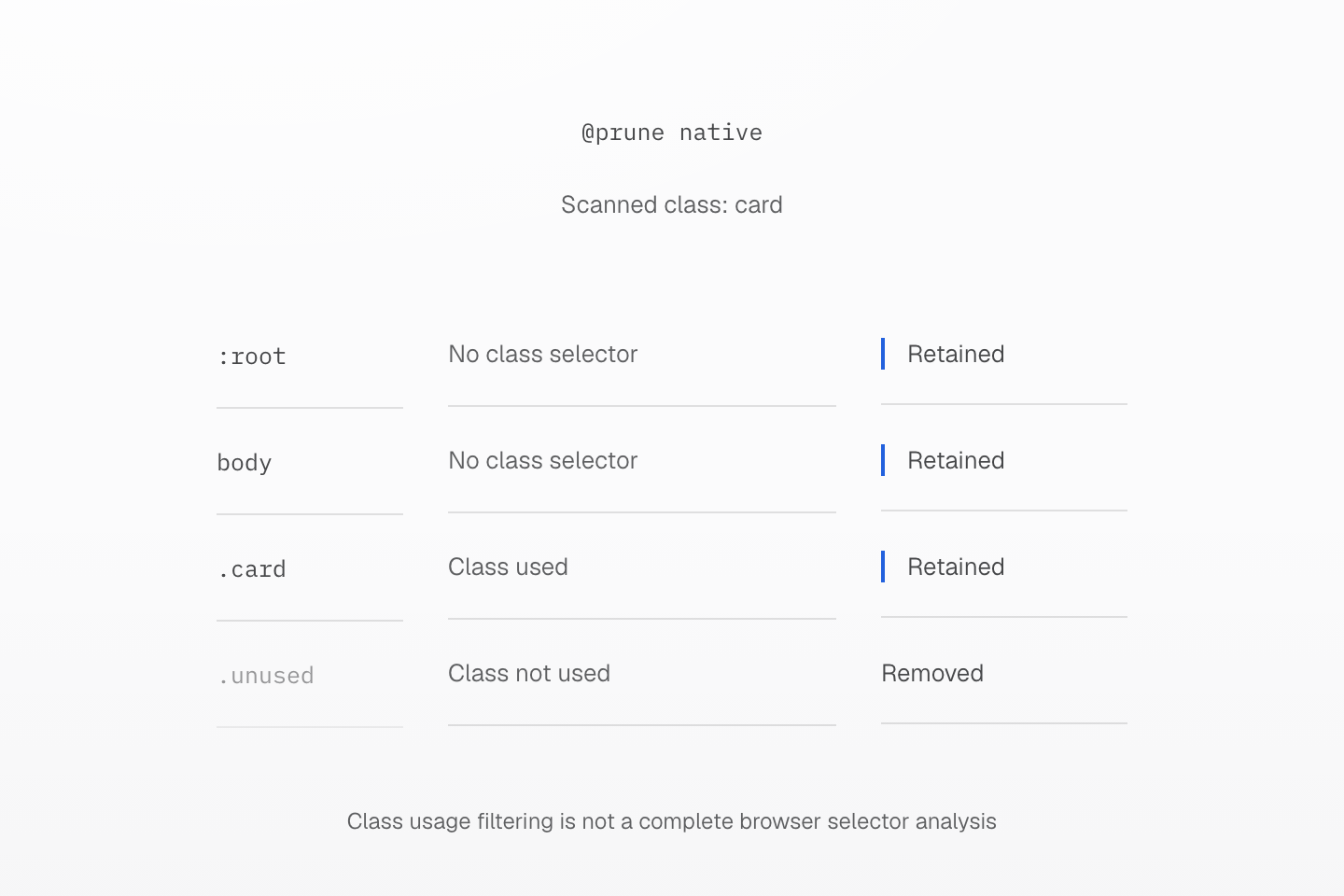
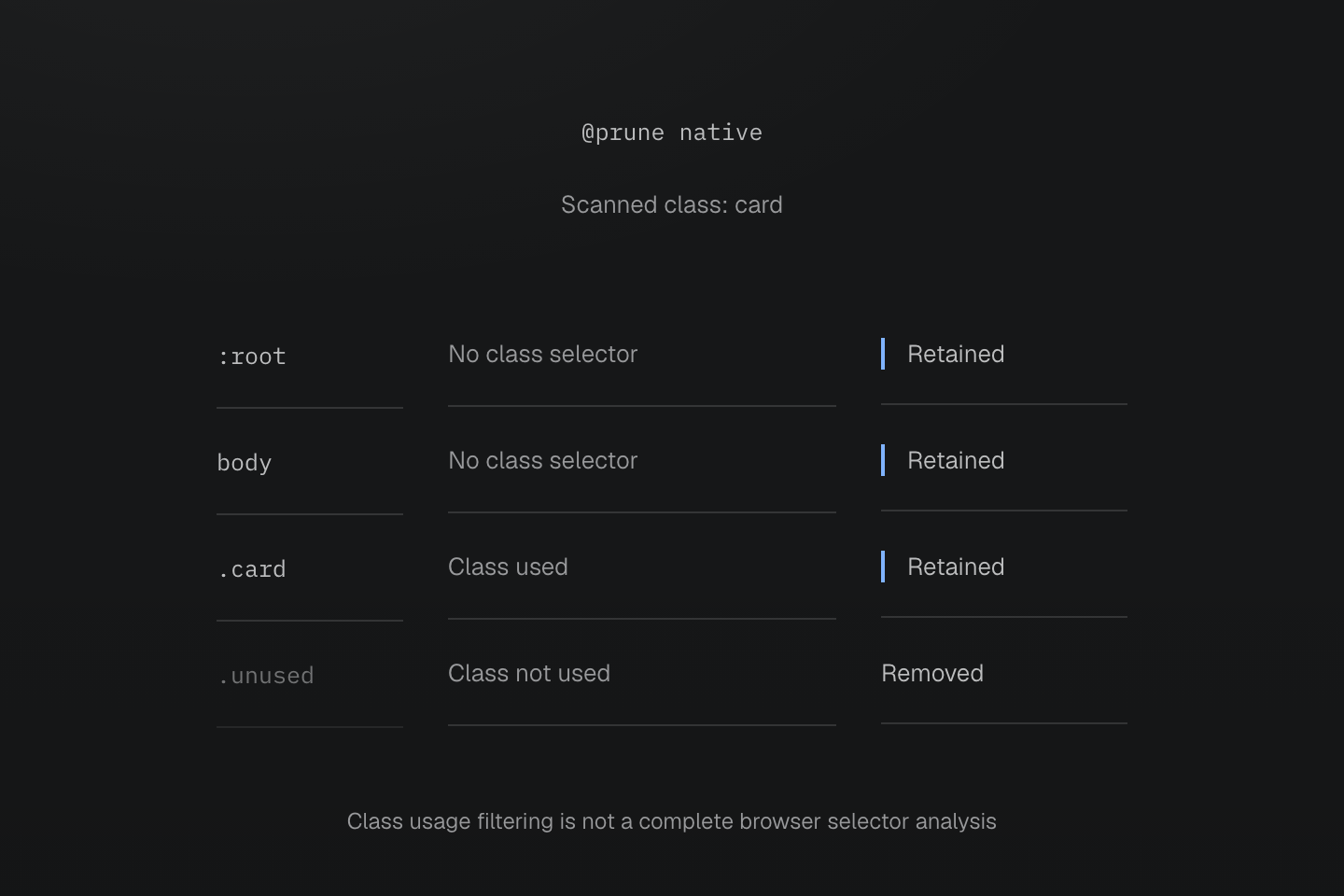
The source opts into @prune native. Retained classless selectors still obey ordinary CSS matching and cascade rules.
Text description
- body and :root have no class selectors, so native pruning preserves their rules.
- A used .card rule remains; an unused .unused class rule is removed in this example.
- Native pruning is based on class usage, not a browser analysis of every selector or a guarantee that all retained rules currently match.
#Verify the pruning step independently
Reproduce native pruning with the CLI
To inspect this file with a build path that supplies scanned usage, install the matching public CLI with npm install -D @master/css-cli@2.0.0. Copy the report sources into a disposable check directory:
mkdir pruning-checkcp src/reports.css src/reports.js reports/index.html pruning-check/Add this entry inside that directory:
@import '@master/css';@import './reports.css';From the project root, run:
cd pruning-checknpx master-css generate 'index.html' 'reports.js' --strict -o output.cssFollow the imports from output.css. The report rules and their spacing dependency remain; .report-debug is absent. This check establishes the CLI's output for those inputs. It does not change the app's Vite pipeline. Do not import this second full entry into the application to force pruning: that would restore unrelated shared delivery. Use pruning in your production integration only when its actual output demonstrates the intended filtering.
#Keep external and uncertain sources safe
For a finite class added by a widget, list its complete name in the pruned file:
@prune native;@safelist "report-exported";@layer components { .report-exported { border-style: double; }}A safelist supplies candidates; it does not add classes to the DOM. For an open-ended CMS or vendor source, preserve its native rules in their owning file instead of guessing at a complete list:
@preserve native;@layer components { .cms-callout { border-inline-start: 3px solid currentColor; }}Load that file wherever the CMS content can appear. @preserve native overrides native pruning in its file. It preserves native delivery, not byte-for-byte source formatting, and does not force every unused utility into the output.
Review animations and variables alongside selectors. In an opted-in file, managed keyframes become on-demand definitions. A retained animation declaration and its variable dependencies can keep the required definitions alive. Names supplied only by external JavaScript may need exact @safelist keyframes "report-enter"; entries. Follow the keyframe contract, including conditional/layer wrapping and restrictions on anonymous layers and relative URLs. Arbitrary hand-written native selectors are not runtime definitions.
#Keep rendering mode and pruning separate
Rendering mode answers when classes become CSS and whether the browser can generate new rules. Native pruning answers which eligible native rules survive a stylesheet build. Progressive rendering can use a pruned native stylesheet while still delivering the initial page CSS and supporting later utility classes.
Rendering and native pruning are independent choices
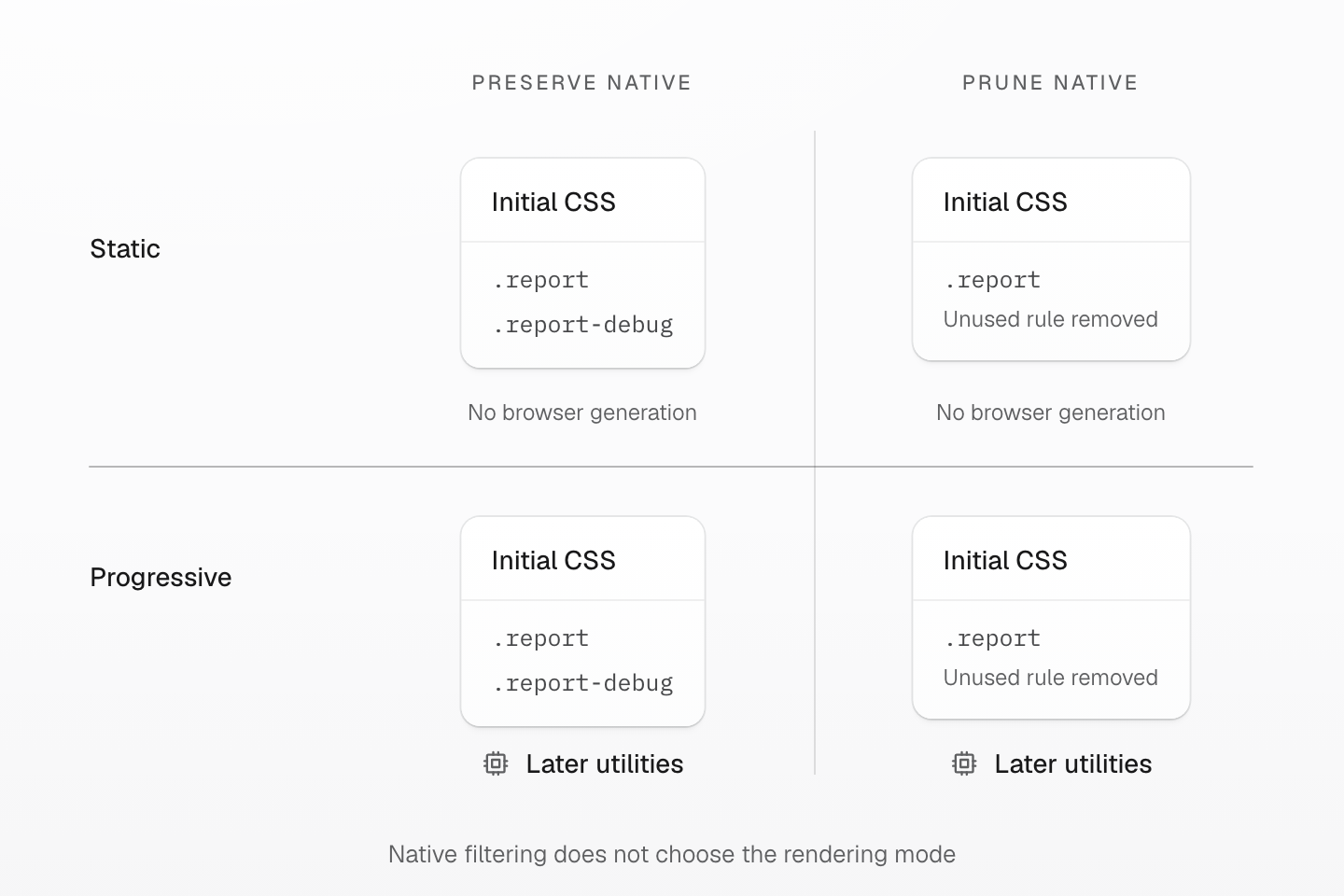
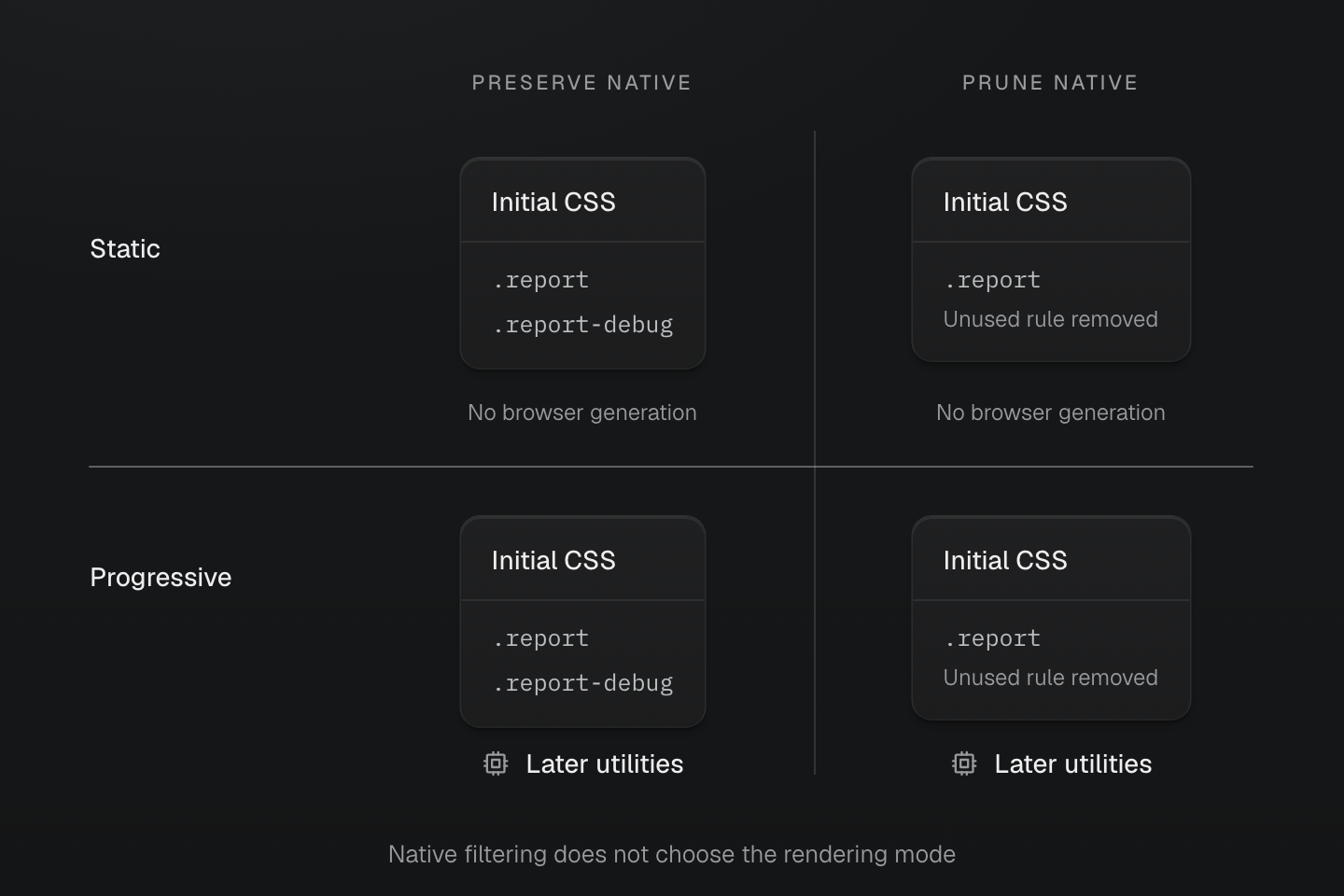
Both columns can serve initial CSS. The progressive row additionally supports later utilities; pruning changes eligible native output, not the rendering mode.
Text description
- Native policy. Preservation keeps native rules. A supported pruning path filters eligible native rules against its known usage set. The matrix illustrates policy, not a guarantee that every integration path supplies that set.
- Rendering mode. Static rendering does not generate new browser rules. Progressive rendering serves initial CSS and can generate later valid utilities in either native-policy column.
- Boundary. Runtime generation does not restore arbitrary removed native selectors. Managed keyframes follow their separate definition and dependency contract.
Static extraction needs complete class names in its source set. Native pruning needs the native names that may be used. Full literal maps make finite alternatives auditable in both cases. Runtime and progressive modes can also handle new valid utility names constructed after startup; their validity and generation cost still matter. Use CSS variables for continuously changing values when one stable rule suffices.
Runtime generation cannot reconstruct an arbitrary native selector that pruning removed. Adding report-ready later only works if that native rule was retained and loaded. Managed keyframes have their own definition and dependency contract; do not infer their behavior from the treatment of ordinary selectors.
For the example, verify these separately:
- View the response source before JavaScript:
style#master-csscontains the initialp-lgutility. The native report stylesheet is linked only on Reports. - Refresh Reports: the retained native state rules apply without needing newly generated utilities.
- Reload Reports for an independent runtime check. Before refreshing the report, add a new valid utility absent from the page's hydration manifest in DevTools:
const report = document.querySelector('#report')report.classList.add('(letter-spacing:0.123em)')Inspect the computed letter spacing and document.querySelector('style#master-css').sheet.cssRules. With the default progressive startup policy and valid hydration data, a missing class triggers the deferred engine/program path. A class already covered by the page manifest does not establish that this path works. Do not use the style element's text content as a live CSSOM snapshot.
Keep HTML, CSS, hydration data and runtime resources from the same build. Test production as well as development; integrations can use different development behavior. See Rendering modes for startup options, hydration failures and framework support.
#Compare cost and behavior, then set a budget
Keep one change under review at a time: first delivery ownership, then pruning where supported, then asset grouping if measurements justify it. For this example, compare the version with reports.css imported in main.js against the version above. Overview should lose report rules; Reports should keep both its appearance and interaction states.
A smaller output needs a behavior check
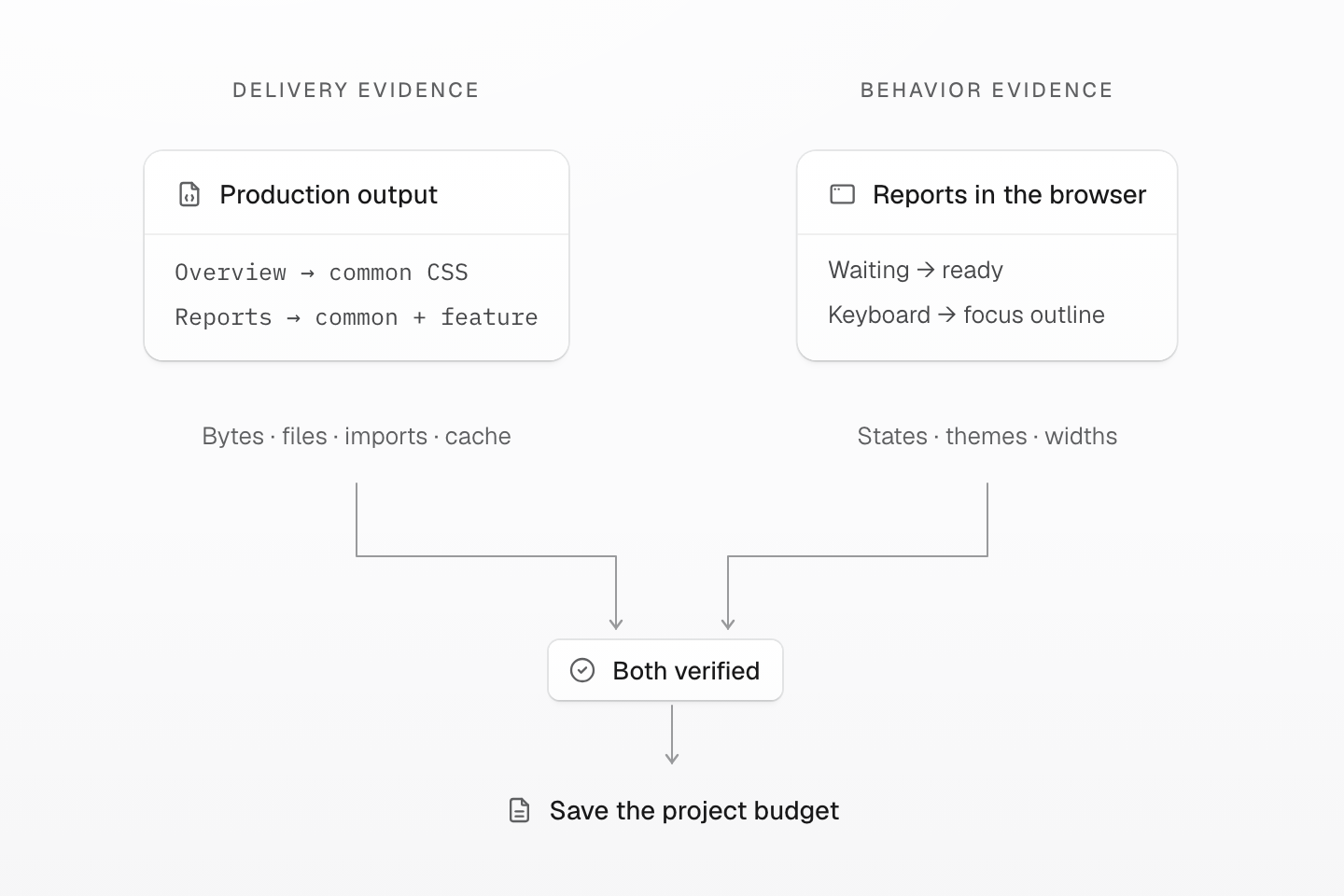
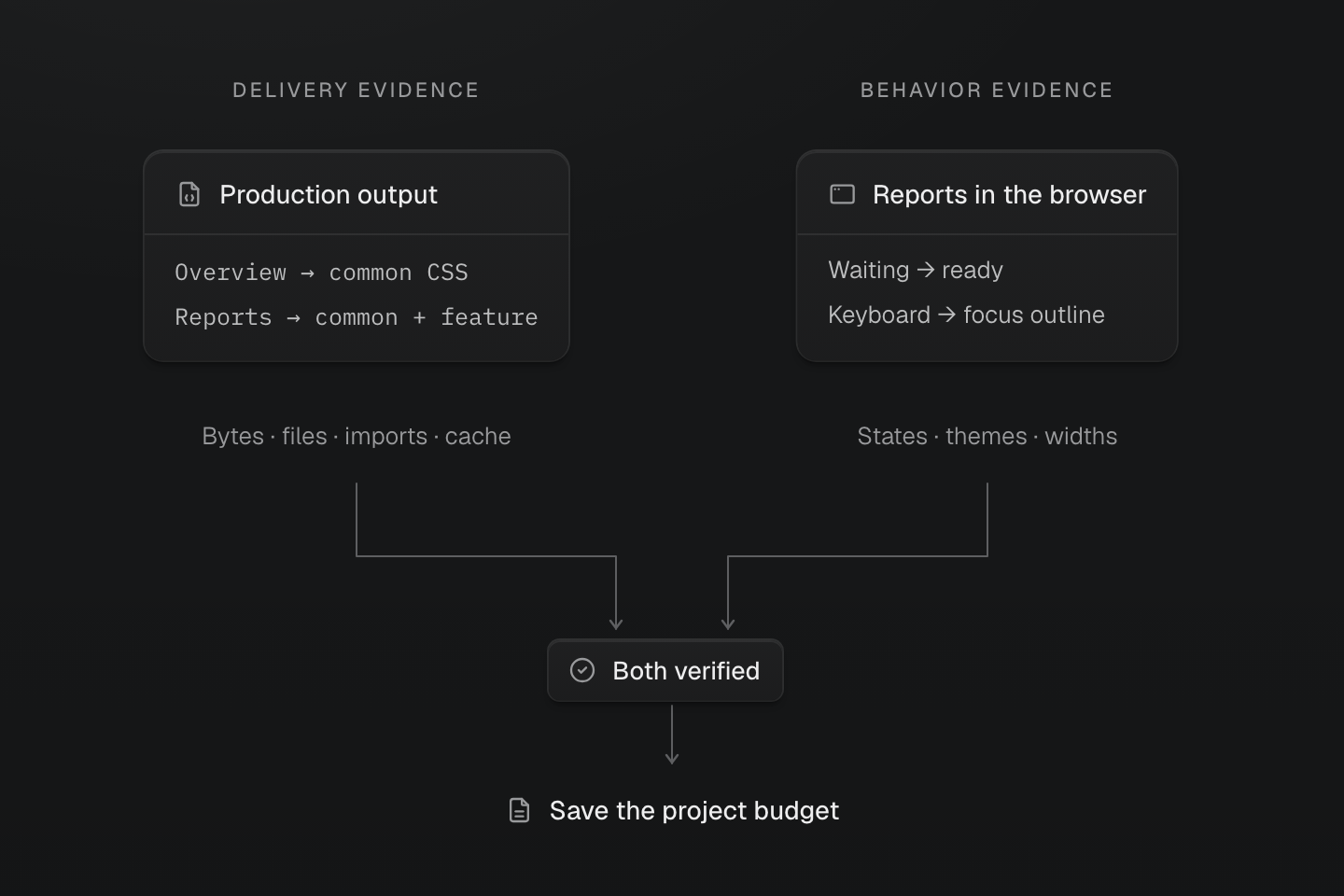
The two checks establish different facts. A missing feature can make a file smaller, so byte savings alone cannot pass the change.
Text description
- Output evidence. Compare Overview and Reports with the same build and compression method. Trace external imports and inline CSS; record files, depth, bytes and cache reuse.
- Behavior evidence. Open both routes directly, navigate between them, and exercise ready, focus, theme and responsive states. For progressive pages, verify initial CSS and a new runtime utility separately.
- Budget. Save project-specific ceilings only after the intended delivery change and preserved behavior are both verified. Timing samples remain separate from deterministic byte limits.
| Check | Overview | Reports |
|---|---|---|
| Direct production load | Navigation and page typography remain; no report rules | Panel and all required native states arrive |
| Interaction | Navigation still works | Refresh and keyboard focus retain their intended styles |
| Navigation and cache | Count newly fetched and reused CSS assets separately | Test arrival from Overview and a fresh direct load |
| Progressive output | Initial utility CSS exists before runtime | Initial CSS plus a genuinely new utility both work |
Record unique external CSS bytes, gzip/Brotli bytes, inline CSS, file count and import depth using the same method as the baseline. Inspect theme variables, conditional rules, pseudo-elements and animation dependencies as well as selectors. Explain each output difference: moved delivery, removed unused rules, deduplication, or a necessary dependency repair.
A local file can produce several output fragments; source file count is not request count. In this small example, moving the import reduces Overview’s delivered CSS but increases Reports’ fragments in the tested build. That proves a narrower owner, not a performance win for every route. Compare the tradeoff before accepting it as an optimization. Smaller route bundles can reduce a cold load while giving the next page more new bytes to fetch. Sharing stable assets can improve reuse, while excessive splitting adds requests and import chains. Compare the whole navigation sequence as well as each page. Let the applicable bundler or integration assemble assets with correct URLs, conditions, layers and cache identity; do not concatenate arbitrary CSS files to chase a lower count.
Only after behavior passes, save the measured per-page ceilings in your project's existing checks. Include the feature page and the page that must not receive it. There is no fixed KB limit that suits every application. A new feature may justify a changed budget, but the review should name the added behavior and its measured cost. Keep timing samples separate from deterministic byte ceilings, and do not turn a small timing fluctuation into a speed claim.
For agent-assisted work, give the agent this guide, the target routes, existing mode and allowed scope. Ask for the baseline, source change, production output and exercised states. A manifest inspection or clean lint result is useful source evidence; neither replaces a build or browser verification.