Rendering modes
Choose where to generate CSS, compare static, pre-render, runtime and progressive delivery, and verify the result.
Choose when CSS is generated and how it reaches the page.
On this page
#Overview
Choose a rendering mode by when your application knows its complete class names. Start with static rendering when those names are visible in source. Use pre-rendering to generate CSS from finished page HTML, runtime rendering for new classes created in the browser, or progressive rendering to combine page CSS with runtime support.
Complete your framework's installation guide first. Official integrations load the CSS entry and configure the selected mode; the examples below explain what each mode does and how to verify it. Framework support and the HTML available for processing depend on that integration.
#Choose a rendering mode
| Mode | Classes come from | Initial CSS | Master CSS in the browser |
|---|---|---|---|
| Static | Complete strings in source files | A generated stylesheet | No runtime or engine |
| Pre-render | Rendered page HTML | Rules delivered with that page | No runtime or engine |
| Runtime | Connected DOM elements | Rules generated after runtime startup | Runtime and engine |
| Progressive | Rendered HTML, then later DOM changes | Rules delivered with that page | Runtime tracks usage; the engine can wait until a class is missing |
An interactive application can use static CSS. Switching among known classes, changing CSS variables, and using native selectors do not require a runtime engine. Runtime generation matters when a complete class name first becomes available after the build.
Pre-rendering requires actual page markup. An empty root element in a client-rendered app gives the server renderer no application classes to process. Also check the integration's boundary: the Next.js progressive adapter processes build-time HTML, so request-time dynamic SSR responses rely on the browser runtime for generated rules.
#Static rendering
The build scans source text for complete class strings and generates CSS from the project's definitions. It does not execute application code or observe the DOM. The browser loads the resulting stylesheet without a Master CSS runtime.
#Generated stylesheet entry
Import Master CSS from the stylesheet your application already loads:
@import '@master/css';This import is the insertion point for generated utilities, their required resources, and the preset's base styles. Use one entry for each generated stylesheet root. Keep it in the top-level import block, before ordinary style rules; other CSS imports in that block are emitted before generated Master CSS.
To see the source-to-CSS process, add this utility definition after the import and use the button in a scanned source file:
@utility btn { display: inline-flex; padding-inline: var(--spacing-md);}<button class="btn text-center">Save</button>Generated CSS
@layer theme { :root, :host { --spacing-md: 1rem }}@layer utilities { .btn { display: inline-flex; padding-inline: var(--spacing-md) } .text-center { text-align: center }}The scanner finds btn and text-center. The engine resolves the project recipe and the preset's fixed utility, then generates their rules and referenced resources. Defining btn alone does not emit its rule: a scanned class or explicit safelist must request it.
Integrations discover ordinary application sources and update CSS during development. Keep complete class names in source and pass changing values through CSS variables; Scanning class names covers both, plus @source and safelist exceptions.
#Native CSS entries
Native selectors in the CSS entry are preserved by default, even when their classes are absent from scanned source. Their var(--*) and animation references can retain the matching theme variables and keyframes.
Use pruneNativeCSS: true when you intend to prune project-owned native CSS, or @prune native; for one file. @preserve native; excludes a file from integration-level pruning. See pruning unused native CSS.
A late class cannot extend a static stylesheet
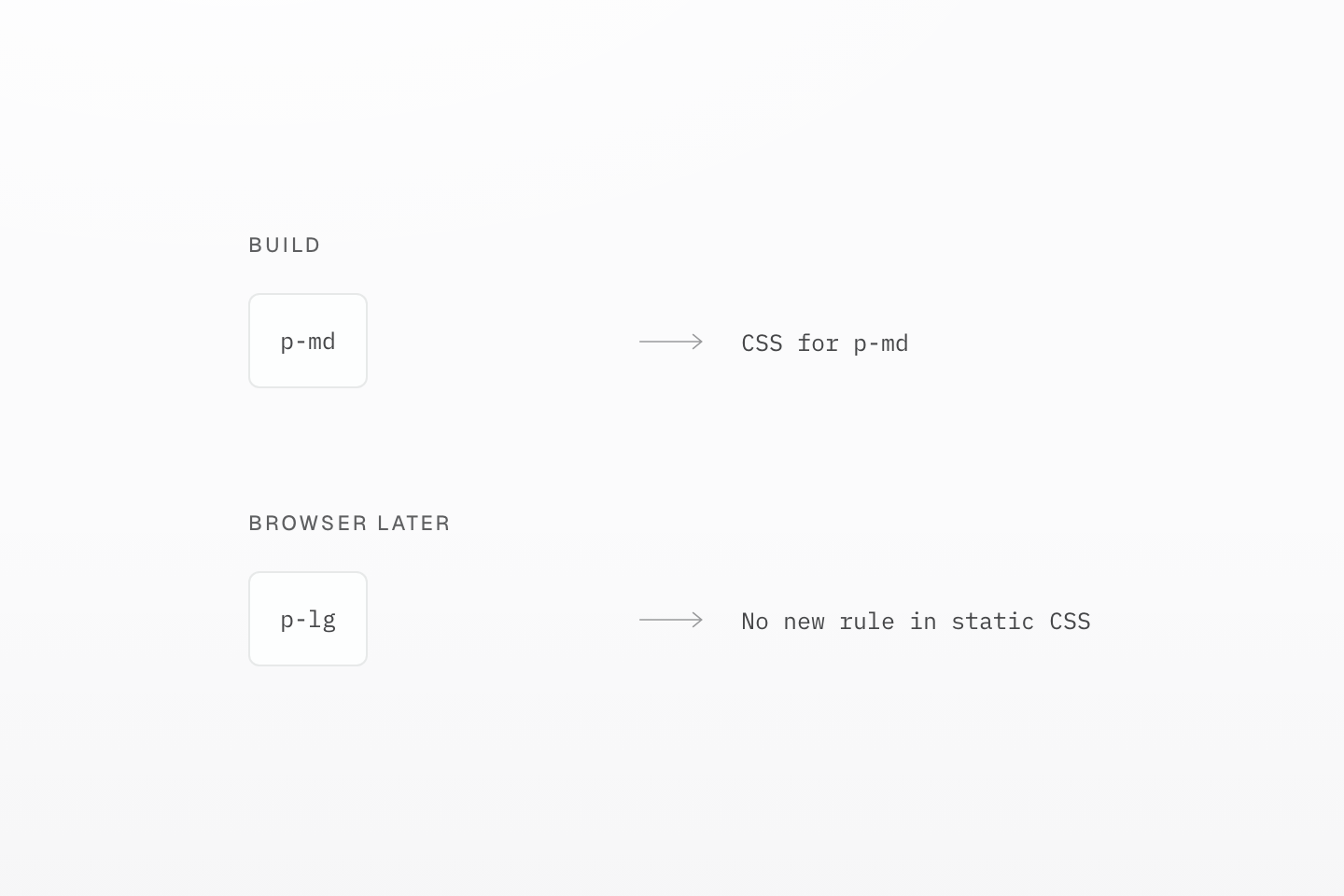
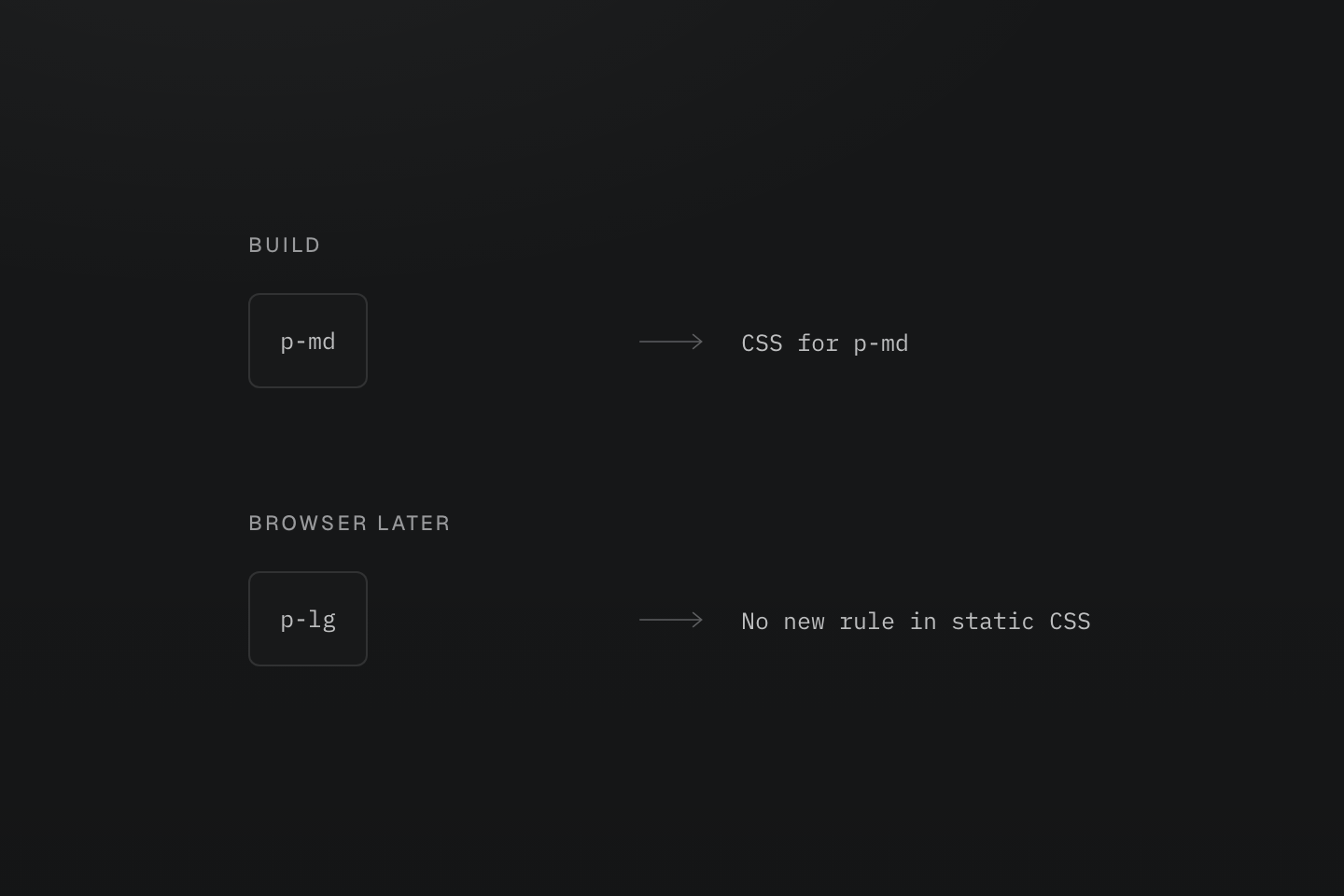
This example assumes p-lg was absent from all build inputs and safelists. Dynamic values can use custom properties without changing classes.
Text description
A static build sees p-md and emits its rule. A later browser change introduces p-lg, which has no rule in that output.
#Runtime rendering
Use runtime rendering when class names become known in the browser, such as in a visual editor or content loaded after the build. The runtime uses MutationObserver to track connected elements and their class changes, then inserts or reuses the matching CSS rules.
Runtime delivery
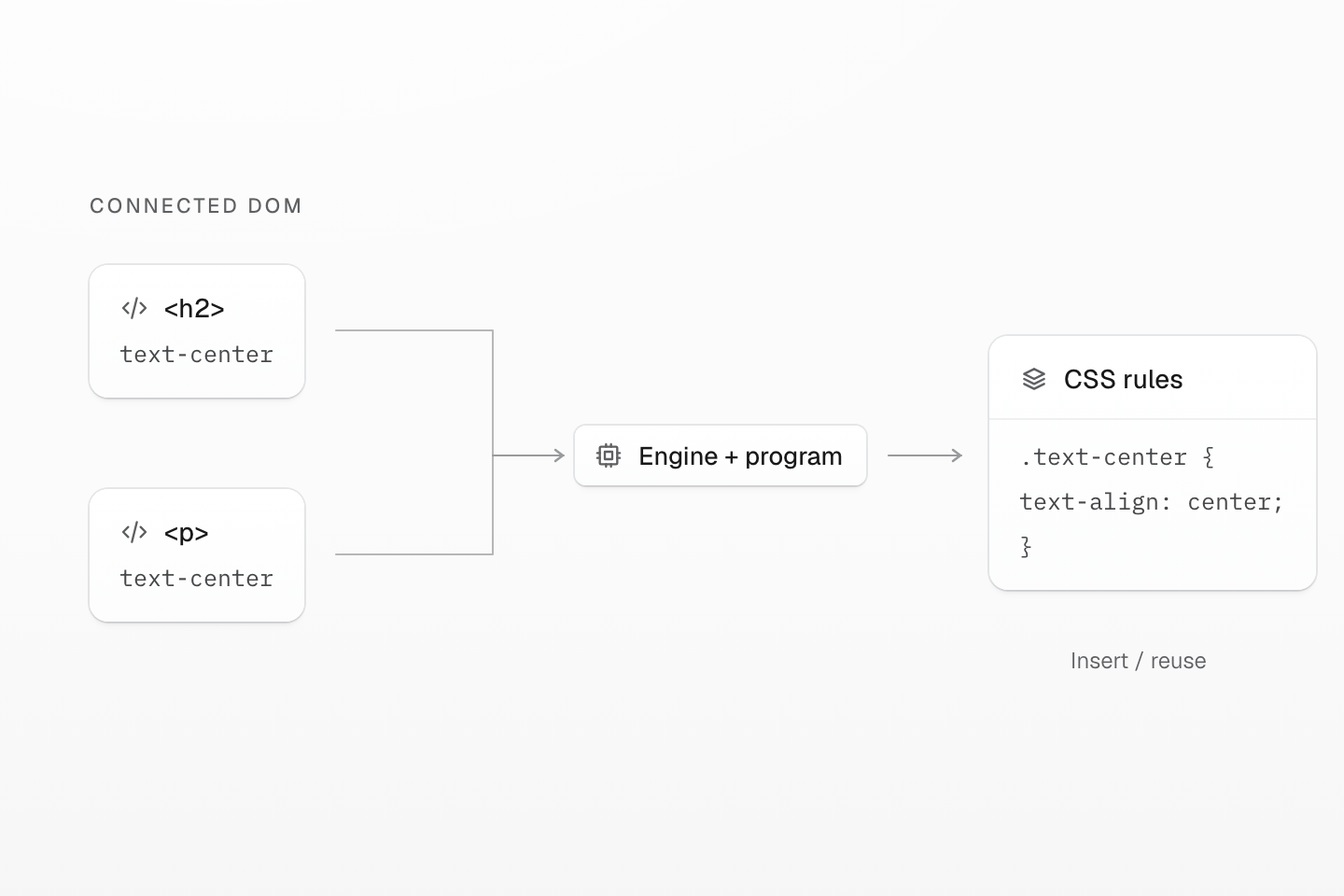
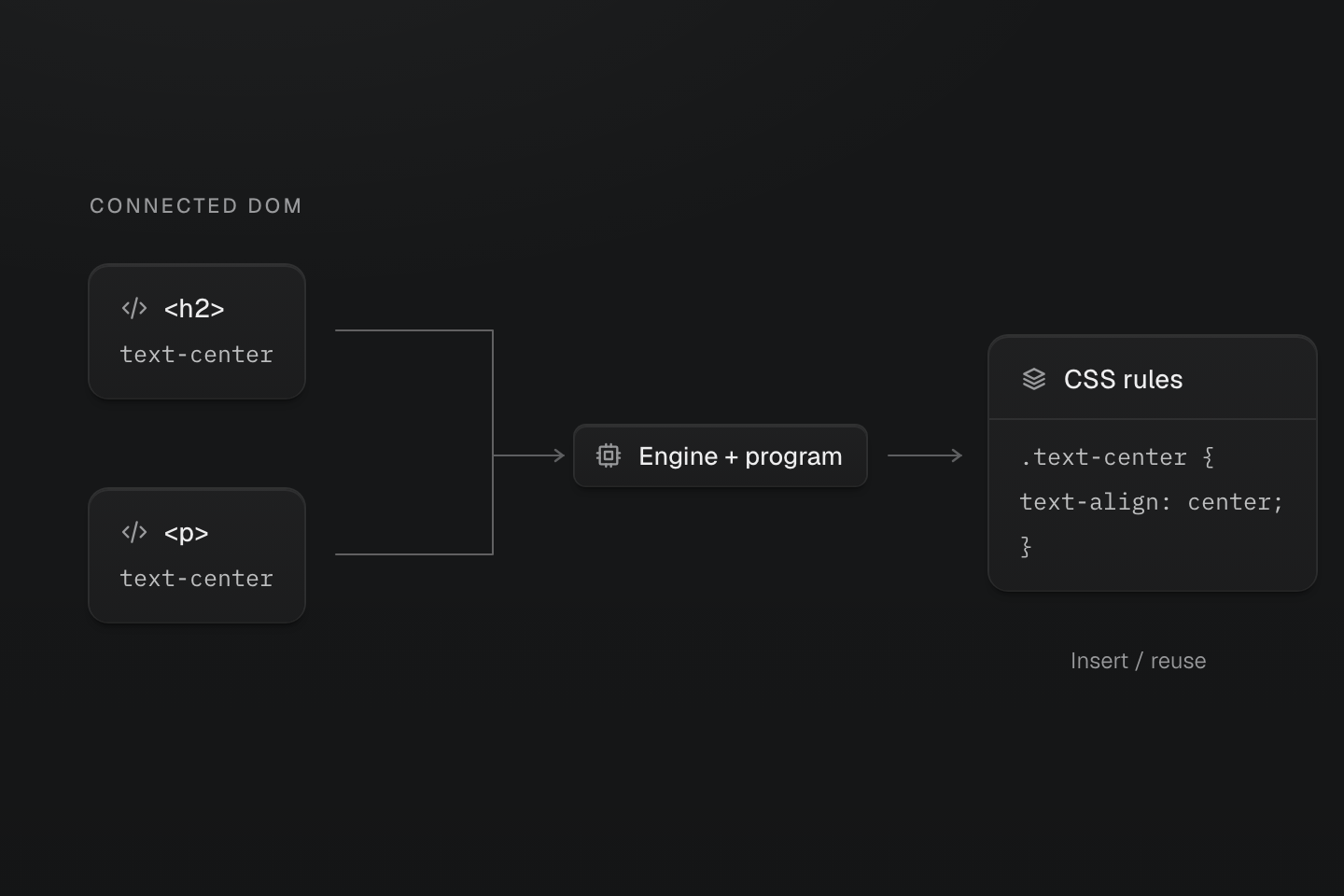
The browser engine inserts or reuses CSS rules. Cached rules can outlive their connected DOM usage.
Text description
- Observe. Read connected elements and receive DOM class changes.
- Ensure. Execute complete classes with the compiled project program.
- Update. Insert or reuse native CSS rules in the runtime stylesheet.
Select runtime mode through your integration, for example the Vite runtime setup. Once it is running, execute these snippets one at a time in the browser console:
Insert an element
const h1 = document.createElement('h1')h1.className = 'text-center'h1.textContent = 'Hello World'document.body.append(h1)The connected heading becomes centered when the runtime generates its rule.
Add a class
h1.classList.add('(font-size:3rem)')The heading grows to
3rem. Its existing alignment rule remains in use.Remove a class
h1.classList.remove('text-center')The heading stops matching the alignment rule. It returns to its inherited alignment, even if the runtime temporarily retains the unused rule.
Remove the element
h1.remove()Neither class is used by this heading anymore. If no other connected element uses them, their rules can be removed during idle cleanup.
These are the rules used while both classes are present:
Generated CSS
@layer utilities { .text-center { text-align: center } .\(font-size\:3rem\) { font-size: 3rem }}Runtime generation depends on JavaScript startup. Use pre-rendered CSS when the page's initial rules must already be available in the response, and runtime support only when later class names require it.
#Hide the page until the runtime starts
A runtime-only page has no rules until the runtime generates them. Add hidden to the root element so it is not painted unstyled:
<html lang="en" hidden> <!-- Load the stylesheet and runtime using your integration's setup. --></html>The runtime removes hidden after startup; its handled startup error path also unhides the root. If JavaScript is disabled, or the runtime script is blocked or fails to download, the page stays hidden. Use static or pre-rendered CSS for content that must remain readable then. Progressive pages already carry the first screen's CSS and stay visible.
#Preload the runtime program
The engine needs its program before it can generate the first rules. On a runtime-only page, preload the program so its request starts while the document is parsed. Match the runtime's request with as="fetch" and crossorigin, also on the same origin:
<!DOCTYPE html><html lang="en" hidden><head> <link rel="preload" as="fetch" crossorigin href="/master-css/default-program.bin"> <link rel="stylesheet" href="/master-css/base.css"> <script src="/master-css/global.min.js"></script></head></html>| File | Preload? |
|---|---|
CDN default-program.bin | Yes, on CDN runtime-only pages that use the packaged default preset. |
Project program master-css-program.<hash>.bin | Yes, on runtime-only pages; official runtime integrations add the hint. No on progressive pages, where the engine and program wait until a class needs them. |
| Page hydration manifest | No. It is handoff data the browser does not need to paint. |
Confirm in DevTools that the runtime reuses the preloaded response instead of requesting it again. See rel="preload" for the matching rules.
Preloading fetches the program; runtime startup uses it
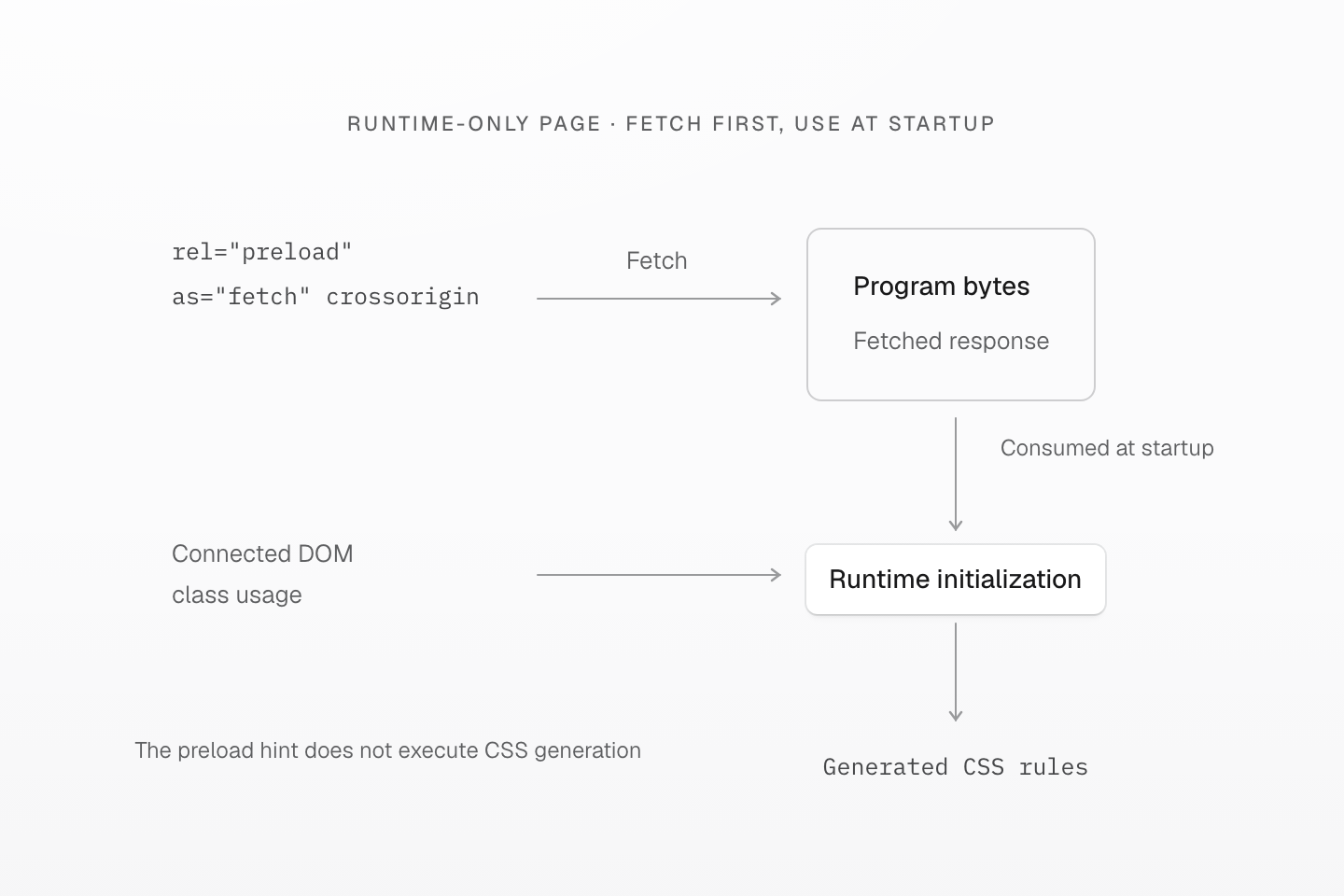
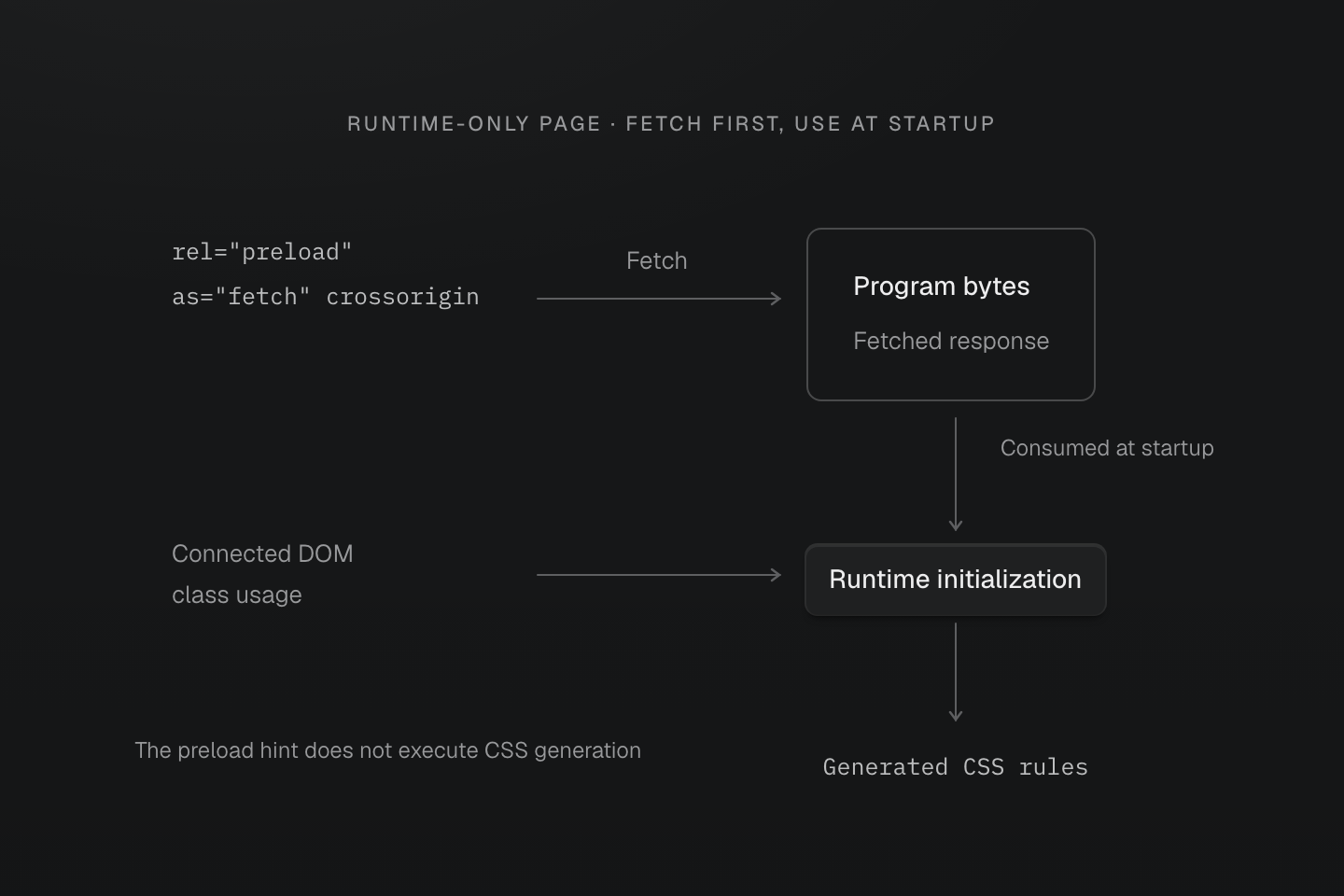
The diagram shows a runtime-only page with a matching fetch preload. Connector lengths do not measure request duration or startup speed.
Text description
- A preload with as="fetch" and matching crossorigin starts the program request while the document is parsed.
- The hint does not execute the engine, inspect DOM classes or generate CSS. Runtime initialization consumes the matching response and performs that work.
- Do not add this program preload to a progressive page that intentionally defers the engine and program. The page hydration manifest is a different resource.
#Pre-rendering — SSG, SSR
Use pre-rendering when your build or server has the final page HTML and you do not need browser generation for later classes. The server renderer reads that HTML, generates its rules, and inserts them into style#master-css. It generates CSS from markup; it does not render your application components into HTML.
Official integrations perform this step for their supported HTML outputs. For a custom server or build pipeline, this example uses virtual:master-css-manifest supplied by a build integration. That virtual module must be resolved by the build tool before the server code runs.
<!doctype html><html lang="en"><head> <meta charset="utf-8"> <meta name="viewport" content="width=device-width, initial-scale=1"></head><body> <h1 class="font-5xl">Hello World</h1></body></html>import { readFileSync } from 'node:fs'import { createServerRenderer } from '@master/css-server'import manifest from 'virtual:master-css-manifest'const indexHTML = readFileSync('./index.html', 'utf-8')const renderer = createServerRenderer({ manifest, maxCachedClasses: Infinity })const { html } = renderer.renderHTML(indexHTML)renderer.dispose()Write or serve the returned html. Its style#master-css contains the heading's rule and the font-size token it needs:
Generated CSS
@layer theme { :root, :host { --font-size-5xl: 2.5rem }}@layer utilities { .font-5xl { font-size: var(--font-size-5xl) }}No Master CSS runtime or hydration manifest is needed for this output. A class that only appears later needs CSS supplied separately, or a mode with runtime support.
The renderer can reuse cached rules across a finite static build while producing page-specific CSS. Recreate it when the manifest changes and dispose it when the build ends. For a long-lived server, choose a bounded maxCachedClasses instead of the build example's Infinity; see the server API.
#Progressive rendering
Use progressive rendering when the server or build can generate the initial page CSS and the browser may later introduce new classes. The response carries that CSS in style#master-css; the runtime reads a page hydration manifest to distinguish covered classes from those that need the engine.
Progressive delivery
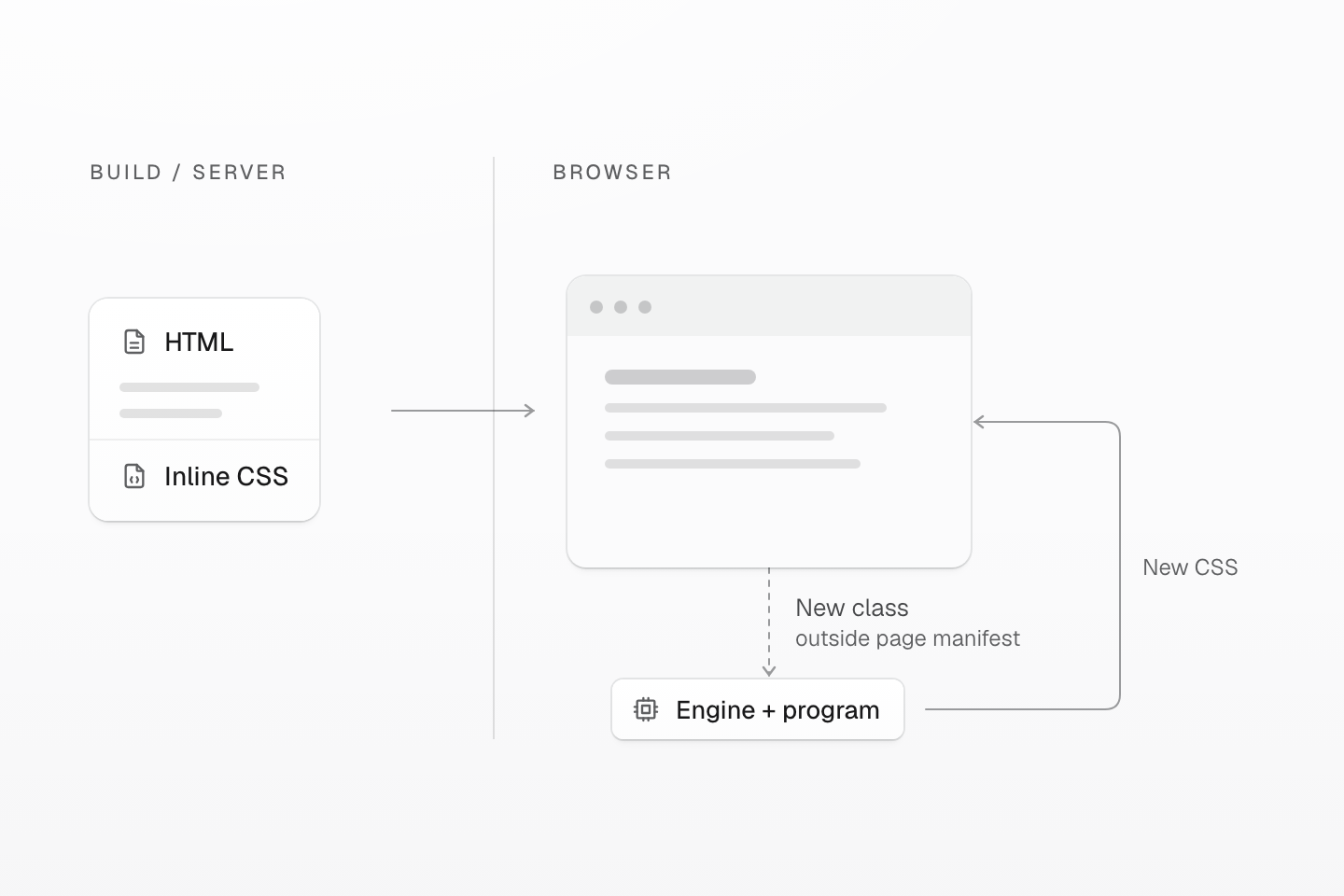
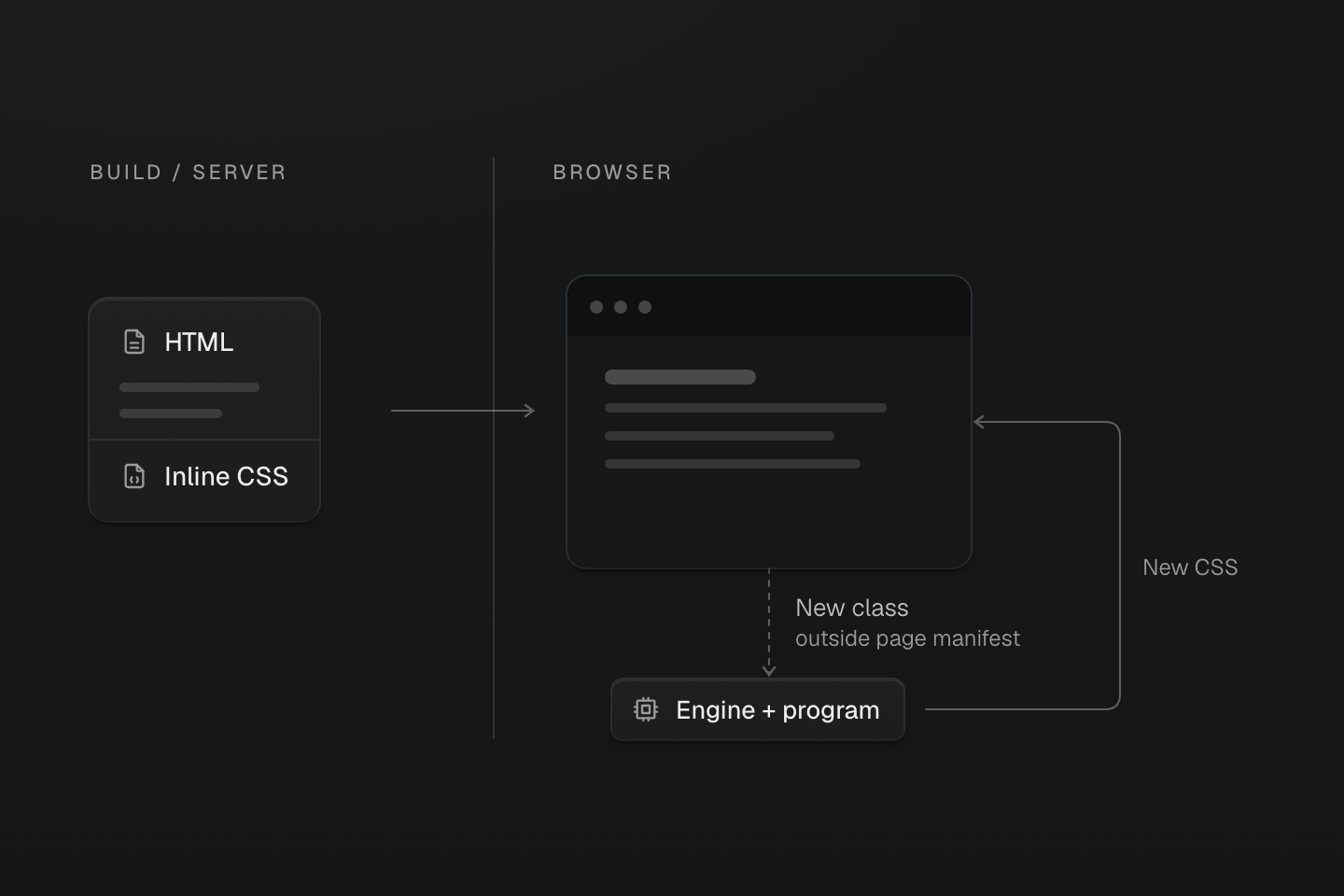
Initial CSS arrives with the HTML. With a valid pre-rendered stylesheet and page manifest, the engine stays deferred until a connected class outside that manifest appears.
Text description
- Render. Generate CSS from the classes in the rendered page HTML.
- Deliver. Send the initial CSS with the HTML so the browser can apply it before runtime startup.
- Continue. Read the page hydration manifest and track connected DOM classes. By default, a class outside that manifest loads the browser engine and project program, adopts matching existing rules, and generates any additional CSS.
A typical output points the style element to an external manifest:
<style id="master-css" data-master-css-hydration-manifest="/_master-css/hydration/master-css-hydration.<hash>.json">...</style>The integration supplies the actual asset URL. Custom SSR hosts that cannot publish a stable JSON asset can use inline script#master-css-hydration-manifest instead. Pages without generated rules or managed resources do not need a manifest pointer.
The browser can apply the inline CSS before the runtime or manifest loads. This describes when CSS is available; actual paint timing still depends on the page's other resources. Do not preload the page hydration manifest or the deferred project program; see preloading.
A class listed in the manifest can be reused without starting the engine. This includes ordinary authored classes and rule-free state or theme classes referenced by generated or project selectors. Changing an attribute used by an already-rendered selector also needs no new class rule. A complete class absent from the manifest starts the engine, even if it appeared elsewhere in the project's source.
A known class reuses delivered CSS
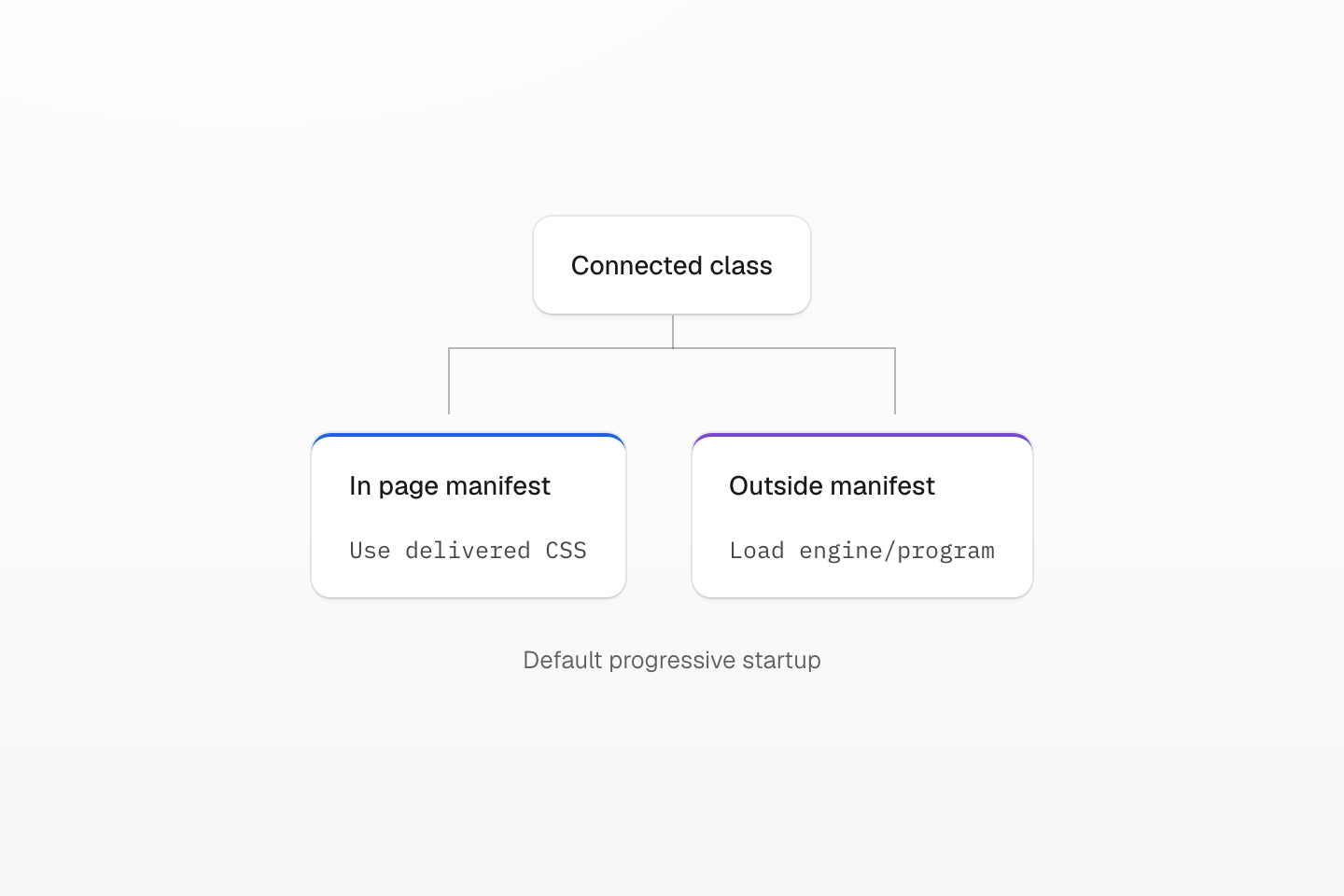
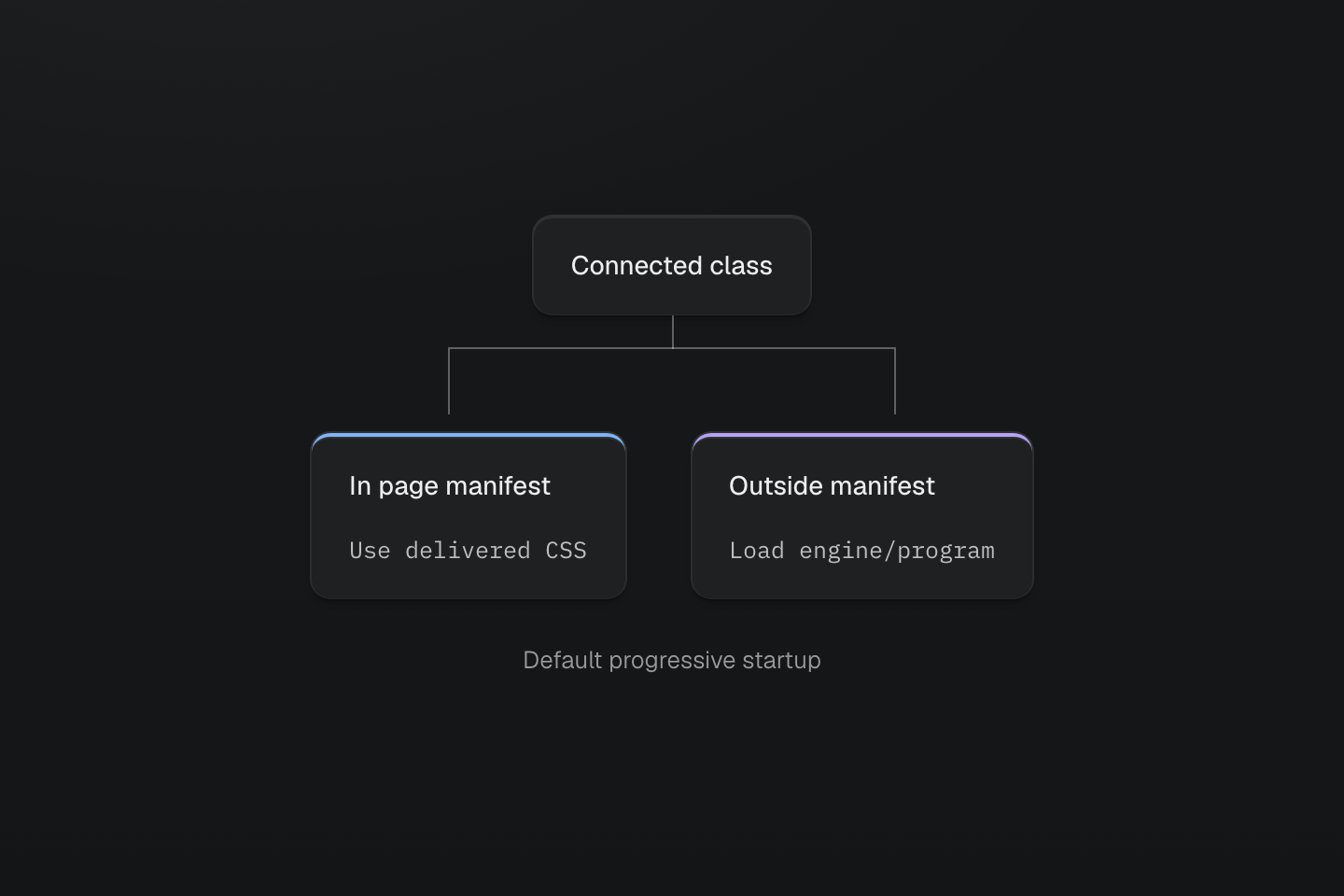
This is the default progressive handoff with valid pre-rendered artifacts. It is not a performance timeline.
Text description
A browser has CSS and a valid page manifest. A known connected class follows the existing CSS path; a class outside the manifest branches to deferred engine loading.
#CSS hydration
Hydration lets the runtime adopt existing CSS rules. At startup it reads the explicit hydrationManifest option, or discovers the inline manifest or the URL on style#master-css. With the engine deferred, it tracks usage without rebuilding the stylesheet.
CSS hydration
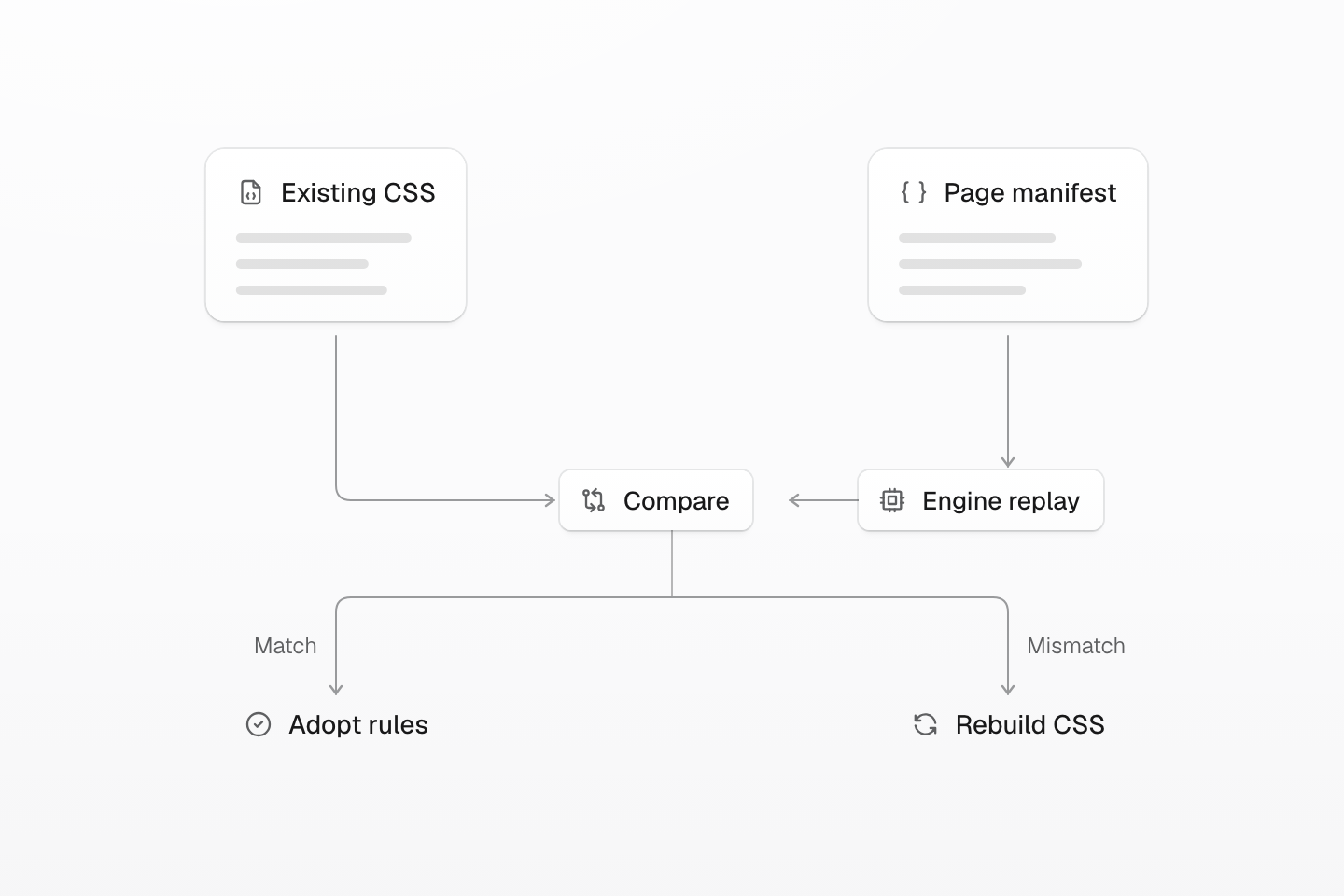
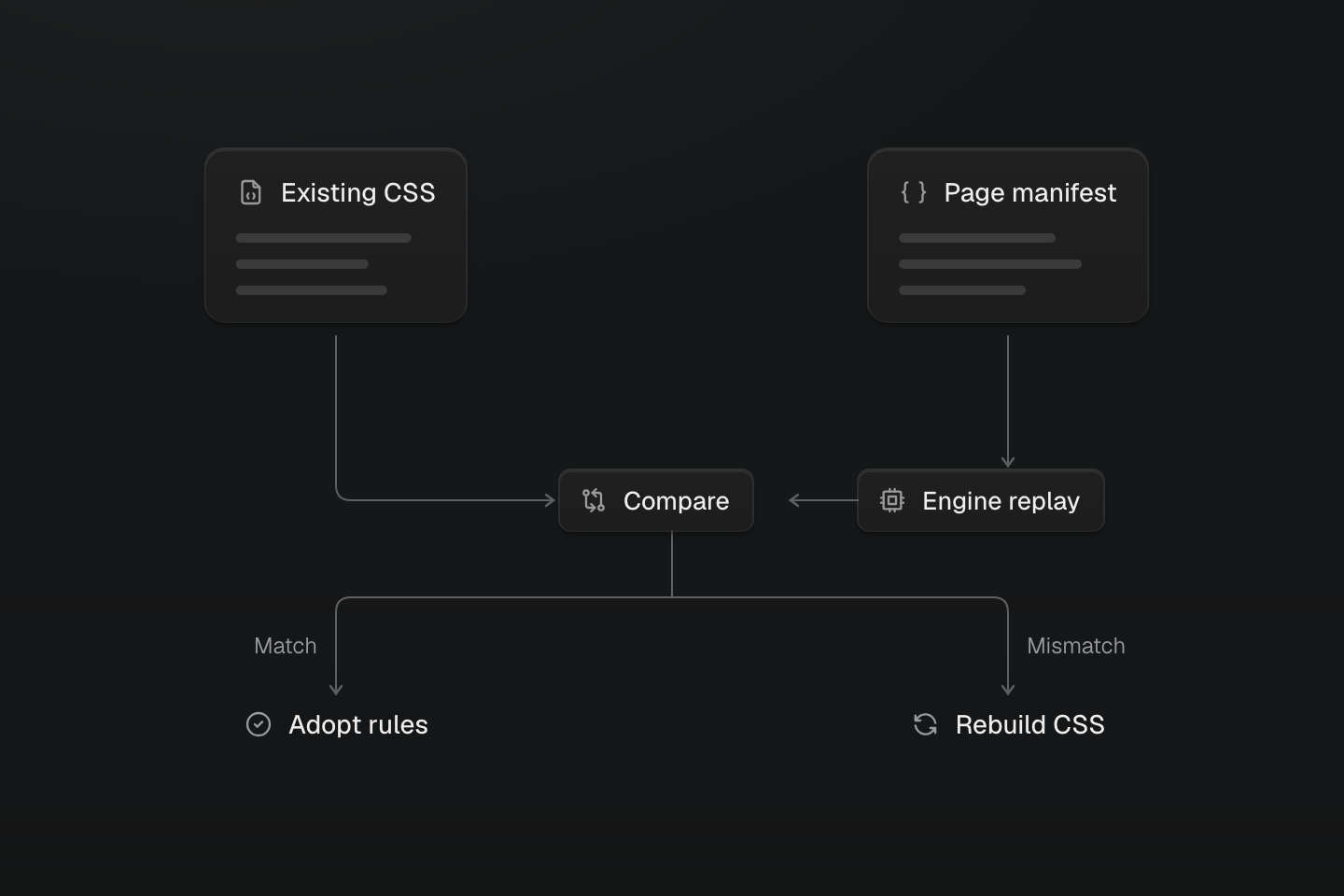
When the engine starts, matching rules are adopted; a mismatch rebuilds CSS. A referenced manifest that cannot load or validate rejects startup before this comparison.
Text description
- Read. Load the page hydration manifest; keep using the existing stylesheet.
- Validate. When the browser engine starts, use the project program to replay manifest classes in server rule order, validate resources, and compare the generated rules with the existing CSSOM.
- Adopt or rebuild. Reuse matching rules as runtime-managed rule objects. A mismatch rebuilds CSS.
When a new class or cssRuntime.ready() starts the engine, the browser engine replays the manifest's classes in server rule order, validates resources, and compares the generated result with the existing CSSOM. Matching rules become runtime-managed rules; new classes can then generate additional CSS. Removed classes may keep their pre-rendered rules until this handoff, then enter the normal retained-rule cleanup path.
The manifest carries resource order and the globals already emitted by the page's stylesheets. It does not repeat the CSS text or replace the project program. Keep it with the HTML and assets from the same build.
#Integration support
Static rendering is the default for these official adapters. Runtime generation is an explicit choice for classes that are unknown at build time. pre-render generates CSS from HTML without a client runtime; progressive combines HTML rendering with a runtime for later classes. The HTML each adapter can process depends on its host:
| Adapter | Static | Runtime | pre-render and server HTML | progressive |
|---|---|---|---|---|
| Vite | Build-time extraction | Injected through Vite's HTML pipeline | HTML processed by Vite hooks; custom SSR needs a server integration | Vite HTML rendering plus runtime; custom SSR needs its own HTML rendering |
| Webpack | Build-time extraction | Injected into compilation HTML assets | Your HTML host must call @master/css-server; the plugin has no request-time server hook | Runtime delivery is provided; your host supplies rendered HTML and hydration data |
| Next.js | Build-time extraction | Client instrumentation | HTML outputs processed after the build; dynamic request-time SSR is not transformed | Build-rendered HTML plus runtime; dynamic SSR has no automatic server CSS injection |
| Astro | Build-time extraction through Vite | Injected page script | Astro middleware processes prerendered pages and server HTML responses | Middleware rendering plus runtime |
| Nuxt | Build-time extraction through Vite | Nuxt client plugin | Nitro HTML responses with string bodies; streaming bodies are not transformed | Nitro HTML rendering plus client runtime |
| SvelteKit | Build-time extraction through Vite | Requires the documented client hook | Requires the Master CSS server handle; it processes page chunks during SSR and prerendering | Requires both the server handle and client hook |
Vite and Webpack cannot add server behavior to a framework merely because it uses that bundler. Webpack's HTML injection also does not rewrite files served directly from a development server's static directory. Astro middleware reads the complete HTML response before returning it; SvelteKit uses its page-chunk hook. Follow the framework guide when choosing the delivery path. PHP, Rails, CMS and .NET hosts build the asset with Vite and load it from their templates; see Server-rendered apps.
#Native pruning is a separate choice
Progressive rendering can use native pruning without changing when initial CSS is delivered or later utilities are generated. Pruning requires a known usage set and a build path that supplies it; runtime generation cannot restore an arbitrary native selector removed from delivery. See Optimizing CSS delivery for a reproducible comparison.
#Verify the selected mode
Test a production build as well as development: an integration may use runtime generation during development even when production pre-renders CSS.
| Mode | What to verify |
|---|---|
| Static | The generated HTML loads the stylesheet, and representative complete source classes have rules in it. Those styles remain with JavaScript disabled. |
| Pre-render | The response source contains style#master-css with the page's rules. Verify before running JavaScript; the live DOM alone cannot prove pre-rendering occurred. |
| Runtime | Insert a class absent from the initial DOM and check its computed style and generated CSS rule after the runtime observes it. |
| Progressive | Verify pre-rendered CSS first, then introduce a class absent from the page manifest and check that its rule is generated. Test dynamic SSR routes separately if the adapter only processes build-time HTML. |
#Inspect the running stylesheet
The runtime owns style#master-css and updates its CSSOM. The element's text content is not a reliable live view after startup. Inspect the stylesheet's cssRules instead:
const sheet = document.querySelector('style#master-css').sheetconsole.log(sheet.cssRules)#Diagnose progressive startup
| Observation | Meaning and next check |
|---|---|
| CSS is rebuilt after a warning | The existing rules do not match the hydration data, or the style has no manifest pointer. Check that HTML, CSS and manifest assets belong to the same build. |
Startup rejects with INVALID_HYDRATION_MANIFEST | A referenced inline or external manifest could not be loaded or validated. Check the asset URL, response and deployed files. |
| Initial CSS works but new classes do not | The deferred engine may have failed to load. Inspect onDiagnostic, the program request and cssRuntime.snapshot().engine. Existing pre-rendered CSS is retained; refresh() or a new start() can retry. |
When new classes are likely soon after load, enginePrefetch: 'idle' starts the engine during idle time. Use engine: 'eager' to start it during start(). Both change the default deferral tradeoff and should be chosen for the page's actual interactions.
#Interaction-heavy screens
An interaction that adds many first-time classes asks the browser to process both DOM changes and new stylesheet rules. For editors, data grids, builders, or other large dynamic views:
- Keep stable layout, typography and component states in shared classes.
- Warm predictable runtime classes before inserting the view, after the engine is ready.
- Use CSS variables or inline styles for volatile per-element values such as coordinates or user-generated colors.
- Use native selectors for repeated states that do not need a distinct generated class for every value.
To warm the predictable classes for a view, use the handle returned by MasterCSSRuntime.start():
await cssRuntime.ready()cssRuntime.ensureClassRules(['grid', 'gap-md'])Measure runtime JavaScript, program delivery, initialization, DOM observation, and CSSOM work together. Compressed JavaScript size alone does not describe interaction cost. See Benchmarks for measurements and their conditions.
#User-generated markup
Every class the runtime observes or the server renders becomes CSS, so a class attribute is as powerful as a style attribute: native declarations, url() and selectors such as :has() included. When pages render markup other people write, such as comments, CMS rich text or chat messages, treat class in your HTML sanitizer the way you treat style: remove it, or allow only classes you choose. Escaping the attribute value is not enough, because the class name itself is the input.
For runtime state, delivery artifacts, custom startup entries and engine hosts, see the runtime, server and engine packages.