Language service for Master CSS
Set up VS Code, confirm project-aware token completion, inspect generated CSS, and configure class sources and workspaces.
On this page
#Overview
Use the Master CSS Language Service to discover the classes your project actually supports and inspect their CSS while you edit. Its suggestions read the project's tokens and definitions, including your own utilities, mixins, selectors and conditions.
Start with a project that has Master CSS installed. The extension helps author source; your framework integration still delivers the stylesheet to the browser.
#Set up VS Code
Install the official Master CSS extension, open the project folder in VS Code, and enable completion inside strings:
{ "editor.quickSuggestions": { "strings": true }}The extension discovers project context from a CSS entry importing @master/css or a package.json declaring a Master CSS package. In a repository with several apps, open a source file in the app whose theme you want to use.
#Check a project token
Add a spacing token after the existing import in your app's CSS entry:
@import '@master/css';@theme { --spacing-card: 1.5rem;}In an HTML file, type p-ca inside a class attribute. Choose p-card from the suggestions, then hover the completed class:
<article class="p-card">Field notes</article>Project definitions become editor vocabulary
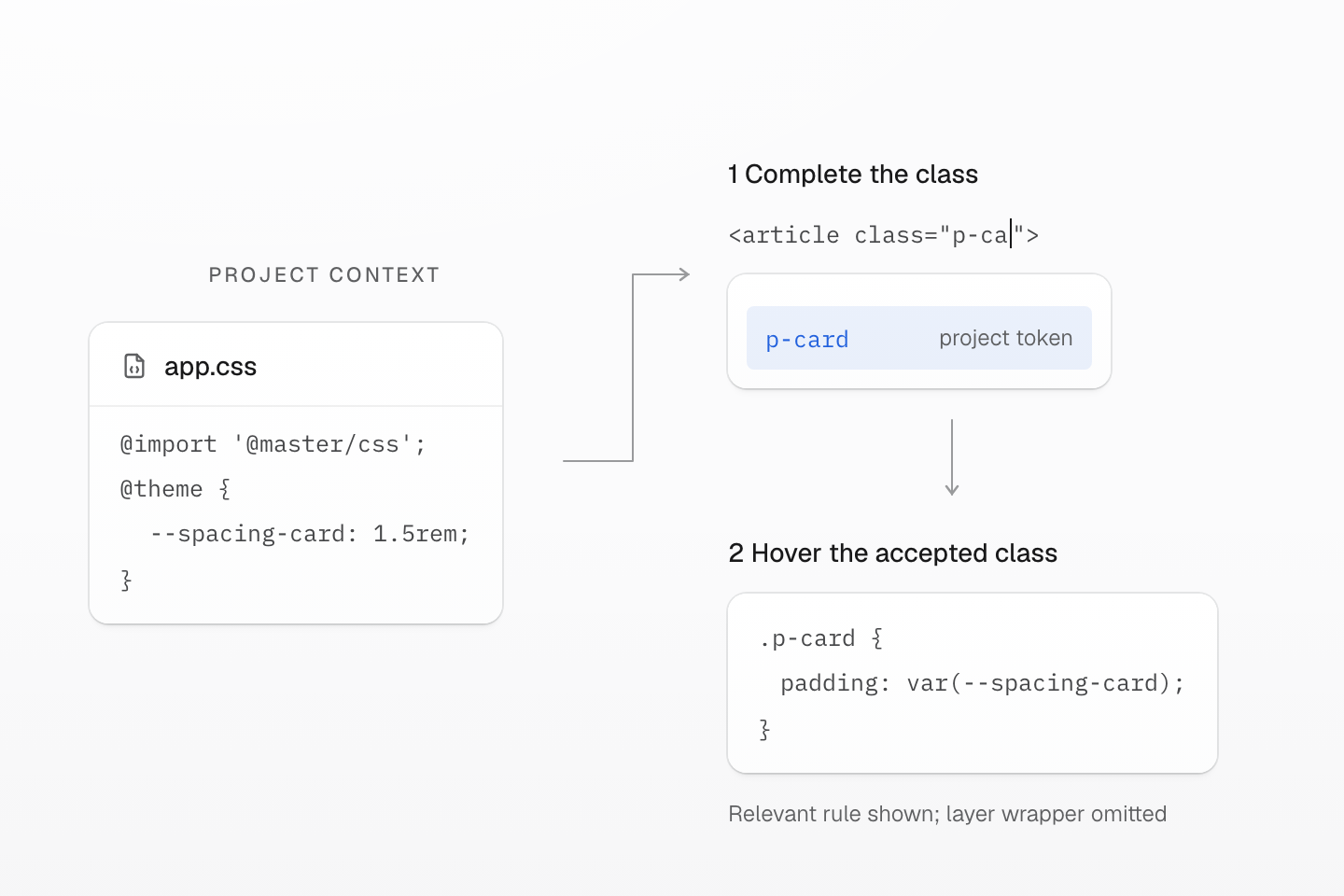
One project token, two editor checks: complete its class name, then inspect the declaration. The editor preview does not establish what wins in the browser.
Text description
- Define. The app stylesheet imports @master/css and declares --spacing-card: 1.5rem in @theme.
- Complete. Inside an HTML class attribute, p-ca receives the project-aware completion p-card.
- Inspect. Hovering p-card shows its generated padding: var(--spacing-card) declaration. The framework integration still supplies CSS to the page; verify the rendered result separately.
The hover's generated rule should contain padding: var(--spacing-card). The class name comes from your project token; the declaration keeps a variable reference. Check the page in your browser to see the resulting padding. If p-card is missing, resolve the workspace context before adding more editor settings.
An editor preview does not deliver a stylesheet
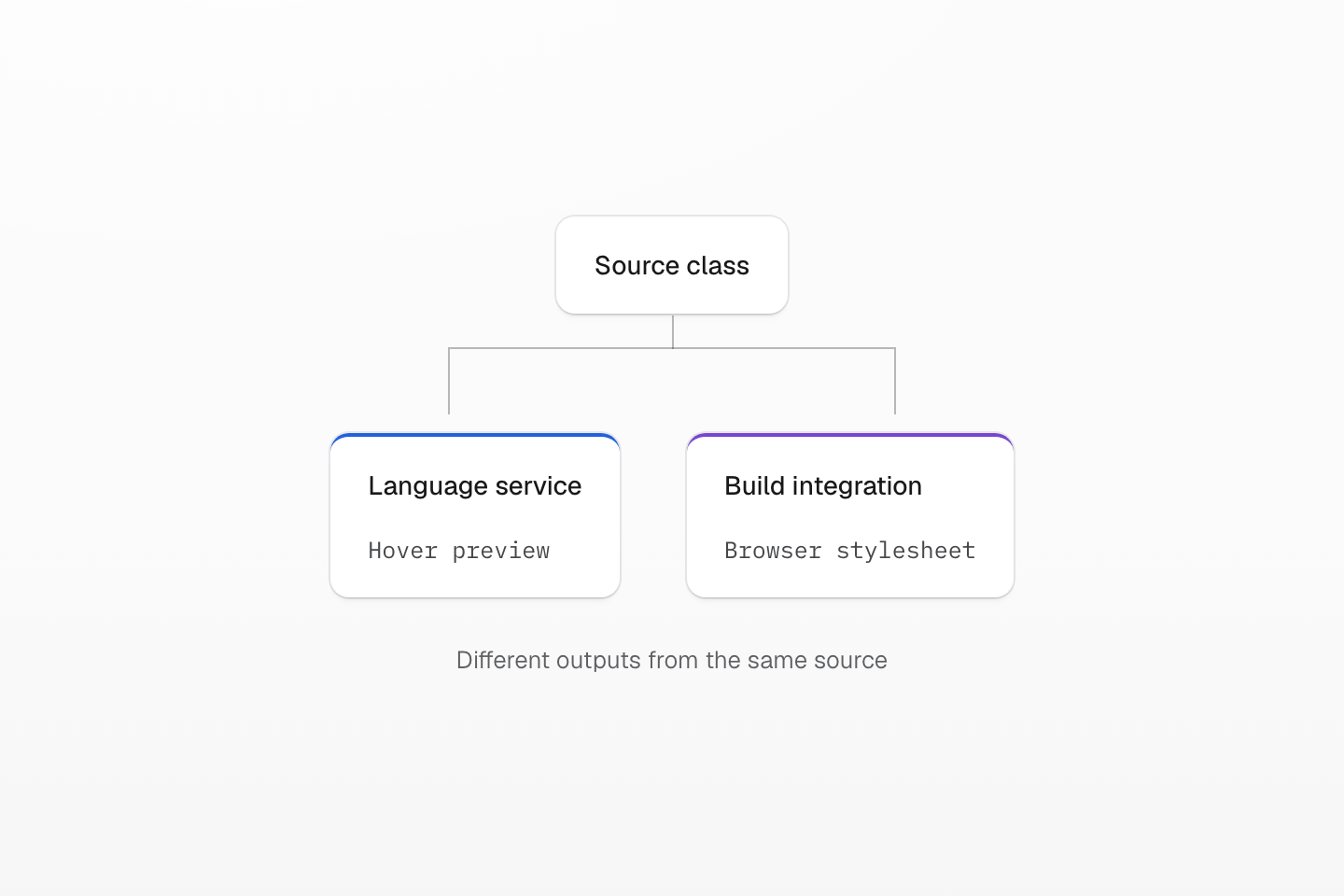
Completion and hover verify authoring context. Verify the actual page through its build and browser as well.
Text description
One source class has two branches: the language service shows generated CSS to the author, while the integration delivers CSS to the browser.
#Add class sorting on save
For class policy diagnostics and sort-on-save, first set up Code linting and install the ESLint extension. Add these options alongside editor.quickSuggestions:
{ "editor.codeActionsOnSave": { "source.fixAll.eslint": "explicit" }, "eslint.codeActionsOnSave.rules": [ "@master/css/sort-classes" ]}Now an explicit save can sort classes using the project's ESLint configuration. The rule list alone does not enable the save action. Keep eslint.codeActionsOnSave.mode at its default all: the extension's problems mode ignores this rule filter. See the ESLint extension settings.
#Inspect styles as you edit
#Complete classes and conditions
Completion works inside configured class sources: markup attributes, bound framework attributes, JavaScript helper calls, tagged templates and project-specific class declarations. Suggestions include utilities, property values, color tokens, selectors, queries and directive syntax, and project tokens appear once the workspace manifest loads.
#Read the generated rule
Hover a class such as fg-blue-60:hover@sm to inspect its declaration, selector state and query. This example applies the preset blue token only for the hover state at sm and above:
<a class="fg-text-body fg-blue-60:hover@sm" href="/notes"> Field notes</a>#Syntax highlighting
The extension highlights directive syntax in CSS-family documents and uses semantic tokens for class-list spans: declaration, value, selector, query, unit, important marker, quoted segment and component boundaries. By default it highlights only the class string under the cursor, keeping long markup calm. If semantic colors do not appear, enable semantic highlighting in the active VS Code theme.
Shiki code examples use the same quiet default for markup class attributes, with pointer hover in place of the cursor. Import the public stylesheet alongside transformerMasterCSS:
import '@master/css-language-service/shiki.css'import { transformerMasterCSS } from '@master/css-language-service/shiki'#Color tools
Master CSS color utilities and manifest colors use VS Code color decorators and the color picker. Keep both masterCSS.renderSyntaxColors and VS Code's editor.colorDecorators enabled.
#Directive formatting
Document and range formatting repairs directive source in CSS, SCSS and LESS documents and in CSS-family <style> blocks in Vue, Svelte and Astro, without changing generated CSS. For class-list directives it keeps important markers attached to their class: @safelist "(background-color:transparent) !"; becomes @safelist "(background-color:transparent)!";.
#Diagnostics
The language server reports directive errors in the same documents and project manifest loading errors. Class-string syntax, policy and sorting diagnostics belong to Code linting and are not duplicated. Language-server clients can also opt into token-reference checks for open managed CSS files with the designSystem setting, which takes the same design-system options as master-css inspect.
#Recognize your class sources
Built-in sources include class and className, framework bindings, common helper calls and tagged templates. When your project uses another helper or attribute, add its name:
{ "masterCSS.classAttributes": ["ui"], "masterCSS.classDeclarations": ["classes", "styles"], "masterCSS.classFunctions": ["cn"]}For example, cn("p-card") now receives class completion. Language-service arrays extend the built-in class sources, so clsx still works. ESLint source settings replace their defaults instead; configure both tools when introducing a project convention.
Available VS Code settings
Set options in .vscode/settings.json or VS Code user settings. The defaults cover HTML, PHP, JavaScript, TypeScript, JSX, TSX, CSS, SCSS, LESS, Vue, Svelte, Rust, Astro, Markdown and MDX.
- master
CSS.included Languages Default: Common web and template language IDs.
Languages that receive language-service features.
- master
CSS.class Attributes Default:
class,className.Markup attributes whose values contain class strings.
- master
CSS.class Attribute Bindings Default: Framework binding defaults.
Bound attributes such as
:class,v-bind:class,[ngClass]andclass:list.- master
CSS.class Functions Default:
clsx,cva,ctl,cv,class,classnames,classVariant,styled,classList.add/remove/toggle/replace.Callees whose string arguments contain class strings;
styledalso accepts member forms such asstyled.button.- master
CSS.class Declarations Default:
[].Variables or object properties whose strings are class declarations.
- master
CSS.exclude Default:
.git,node_modules,.hg.Files excluded from all features.
- master
CSS.suggest Syntax Default:
true.Completion items.
- master
CSS.inspect Syntax Default:
true.Hover inspection and generated CSS previews.
- master
CSS.render Syntax Colors Default:
true.Color decorators for Master CSS color syntax.
- master
CSS.format Directives Default:
true.Directive formatting.
- master
CSS.embedded Syntax Highlighting Default:
active.activehighlights the class under the cursor,alwaysevery embedded class,offnone; directive syntax stays highlighted.- master
CSS.workspaces Default:
auto.Workspace detection for project manifests.
#Workspace-aware manifests
In auto mode the language server detects a workspace for each CSS file importing @master/css and each package.json declaring a Master CSS package, and gives each its own manifest. In a monorepo, completions, hover previews, colors and diagnostics follow the nearest Master CSS project. List workspace directories when detection does not match the repository layout, and see Monorepo for project boundaries:
{ "masterCSS.workspaces": ["apps/admin", "apps/shop", "packages/design-system"]}Run Master CSS: Restart Language Server after dependency changes, workspace-layout changes or manifest edits that VS Code has not picked up.
#Troubleshooting
| Symptom | Fix |
|---|---|
| Completions do not show inside strings. | Enable editor.quickSuggestions.strings. |
| Project tokens or utilities are missing. | Confirm the token is in the detected CSS entry or one of its imports, fix manifest errors, then restart the language server if needed. |
| The wrong monorepo package is used. | Set masterCSS.workspaces to explicit workspace directories. |
| Color decorators do not appear. | Enable masterCSS.renderSyntaxColors and editor.colorDecorators; check language-specific overrides. |