Monorepo
Give each application its own project context and share CSS vocabulary across workspace packages.
On this page
#Overview
Give each application its own project boundary, then share CSS vocabulary through imports. The Language Service, code linting, and build integrations can use the same app-specific project context.
A project CSS entry importing @master/css or a package declaring Master CSS dependencies identifies a workspace. These boundaries are independent of the package manager's workspace list. Start each app's build from its project directory and keep its CSS entry there. Package-manager workspace membership alone does not create a shared Master CSS configuration.
Share a source, keep two project contexts
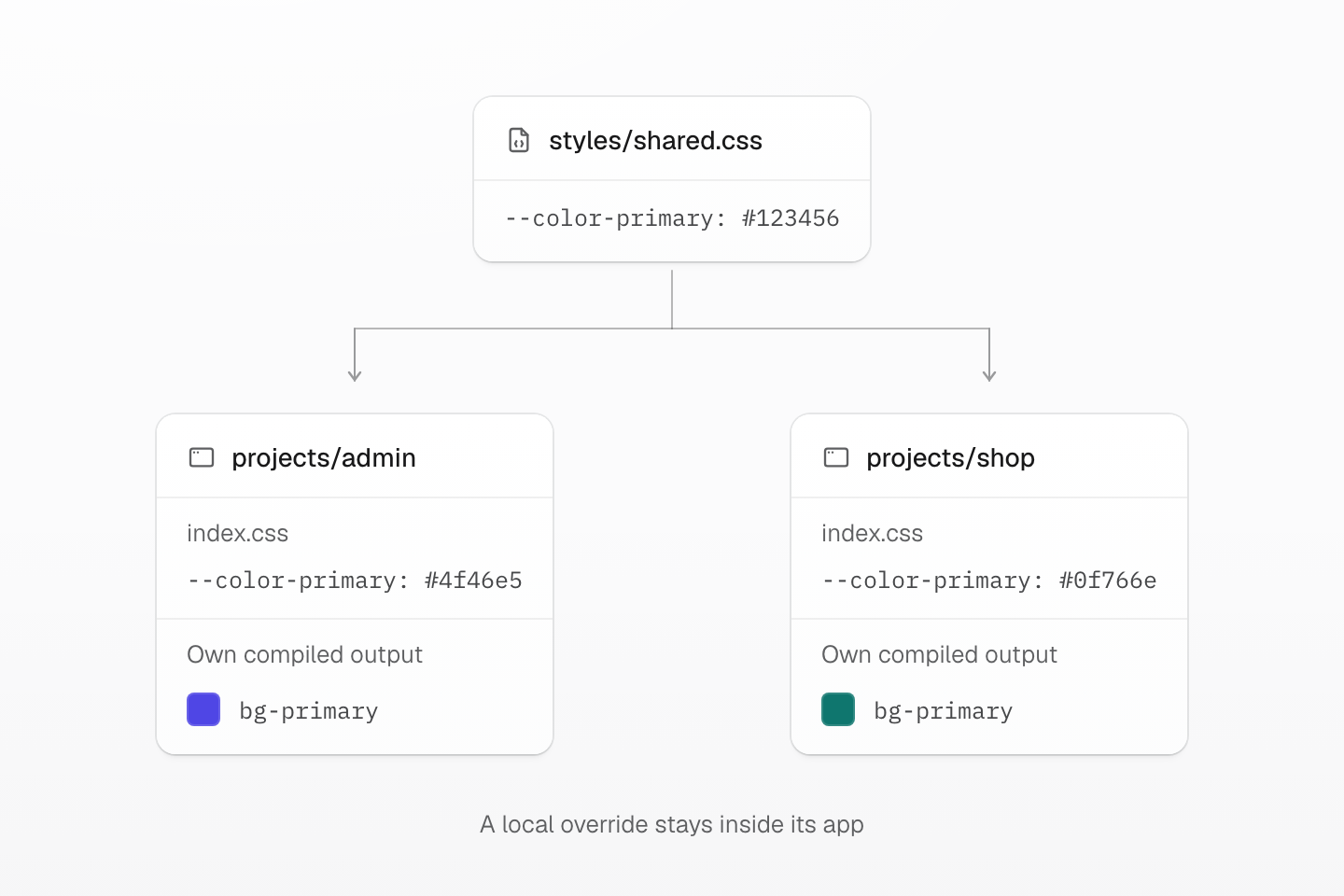
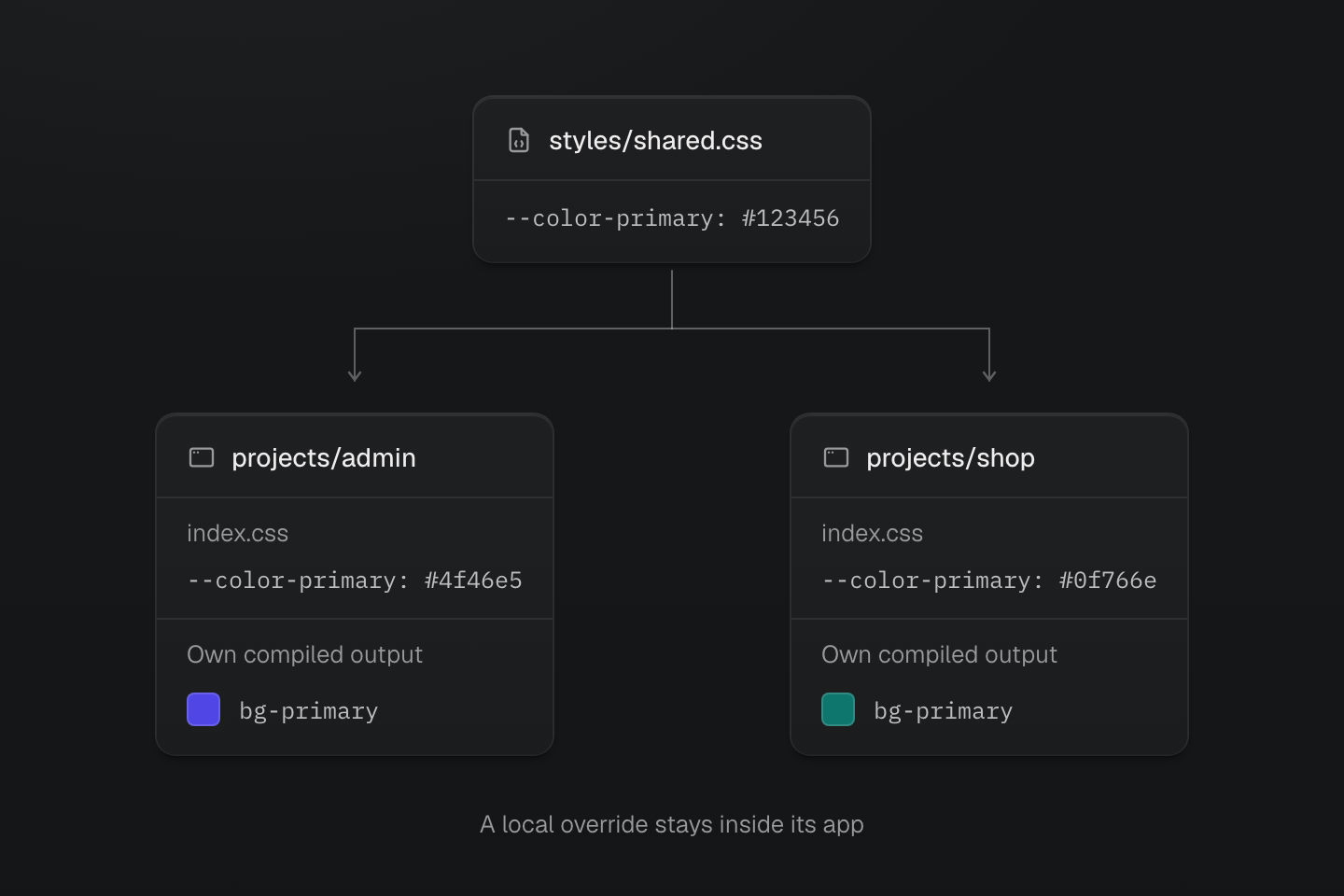
An import shares definitions. Each app still owns its entry, overrides, source selection and generated output.
Text description
- Share definitions. Both application entries import styles/shared.css.
- Admin context. projects/admin/index.css overrides color-primary with #4f46e5. Its bg-primary class uses that purple value.
- Shop context. projects/shop/index.css overrides color-primary with #0f766e. Its bg-primary class uses that teal value independently.
#One project, one workspace
Each package.json project has one Master CSS workspace: one project manifest graph, source-scanning context, and set of tool integrations.
For independent applications, use separate package projects such as projects/admin and projects/shop. Each owns its CSS entry and application setup:
- projects
- admin
- package.json
- eslint.config.js
- index.css
- shop
- package.json
- eslint.config.js
- index.css
- package.json
- styles
- shared.css
 package.json
 eslint.config.js
 index.css
Complete the appropriate framework setup in each application. Start its development server and production build from that app's directory. This keeps generated CSS, source scanning, diagnostics and editor state aligned with its project root.
Keep shared definitions in a dedicated source file. In this example it supplies tokens, while each application imports the full Master CSS entry itself:
@theme { --color-primary: #123456;}#Share CSS definitions
In each workspace, import shared project CSS files and add workspace-specific definitions after them.
@import '@master/css';@import '../../styles/shared.css';@theme { --color-primary: #4f46e5;}@layer components { .app-shell { background-color: var(--color-surface-base); min-height: 100vh; }}Definitions after the shared import can override shared tokens and utilities. Native component rules in the same layer follow CSS source order.
The shop imports the same shared source and makes its own color choice:
@import '@master/css';@import '../../styles/shared.css';@theme { --color-primary: #0f766e;}Both applications can use the same class:
<p class="flex items-center gap-xs text-sm"> <span aria-hidden="true" class="h(8) w(8) pill bg-primary"></span> Workspace</p>The admin build emits its #4f46e5 primary value; the shop build emits #0f766e. Changing the admin override should not change the shop output. Build both apps and inspect --color-primary in each generated stylesheet to check that the boundary is working.
Shared files define the vocabulary; each app's entry decides what to import. Keep app-specific scanning directives and delivery choices in the owning app rather than the shared stylesheet.
#Include shared component sources
A shared CSS import supplies definitions. Class strings inside a shared component still need to reach the consuming app's scanner. Vite can scan imported workspace modules, while a CLI build started inside an app does not follow JavaScript imports into sibling packages.
If components live in packages/ui, add @source "../../packages/ui/**/*.{js,jsx,ts,tsx}"; to each consuming app's CSS entry. This explicit path includes the shared source in the app's build. It is relative to the CSS file that declares it, so adjust the path when the entry moves.
A source path starts at the stylesheet that declares it
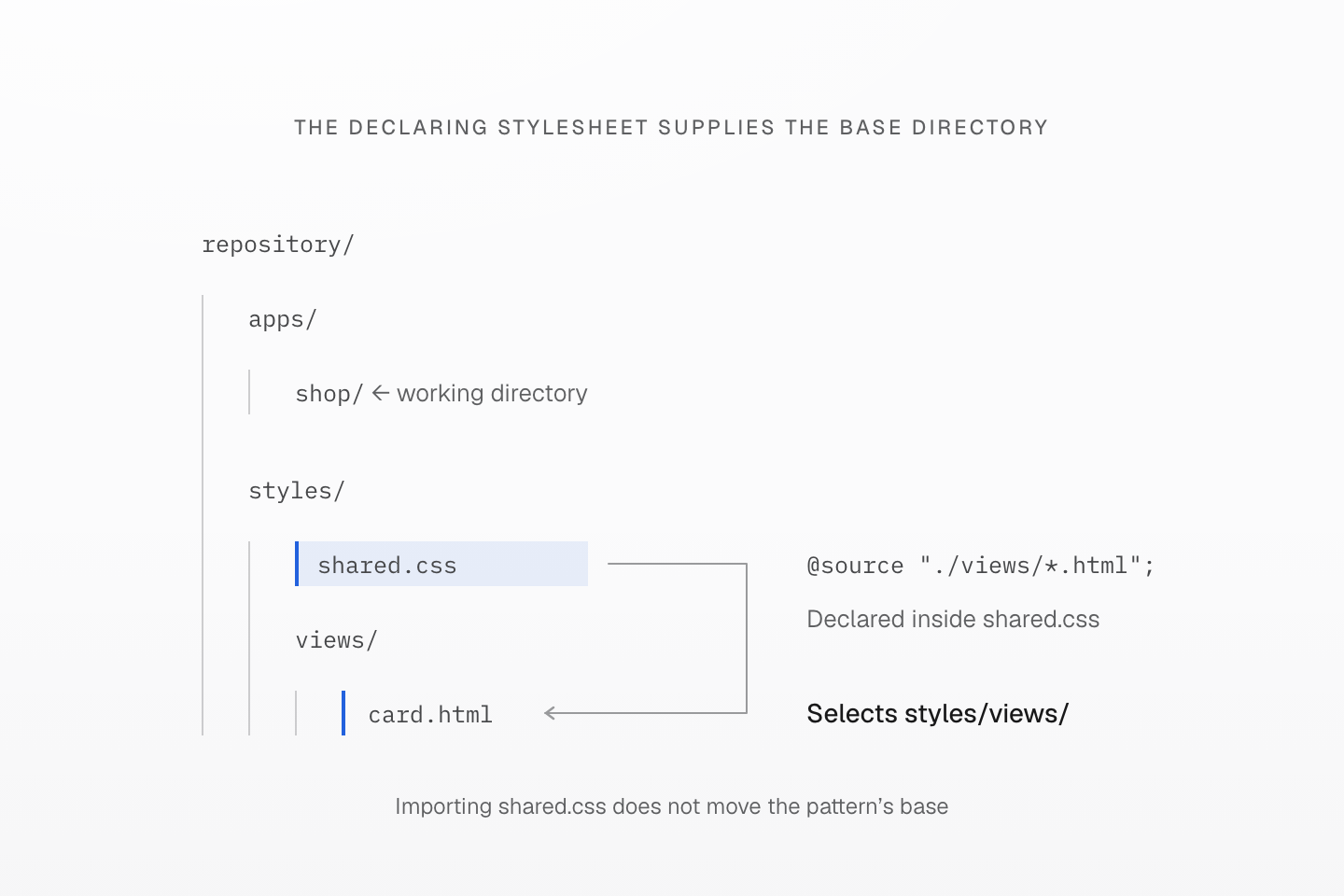
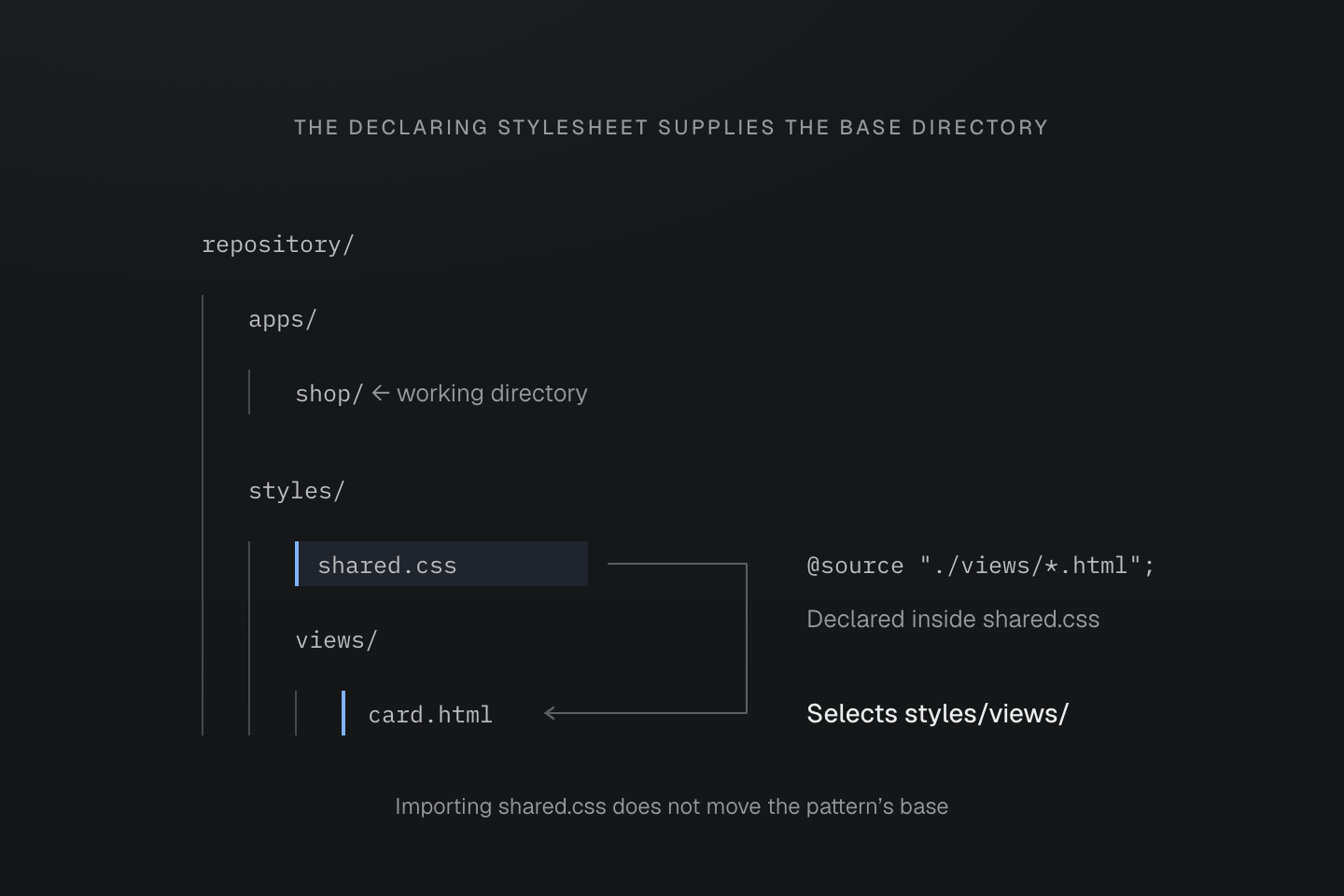
The tree depicts one filesystem. Importing the stylesheet from apps/shop does not rebase its authored @source pattern onto that app.
Text description
- The repository contains styles/shared.css and styles/views/card.html. shared.css declares @source "./views/*.html".
- The relative pattern resolves from styles/shared.css, so it includes styles/views/card.html even when the consuming app runs in apps/shop.
- The scanner’s separately supplied programmatic cwd option has its own contract; this figure explains the CSS-authored directive.
Installed dependency directories are excluded from automatic scanning. A packaged component library may need a narrow @source pattern targeting its distributed source files. Check a class that appears only in that package against the app's production output. See source boundaries for exclusions and other source types.
Shared CSS and shared markup are separate inputs
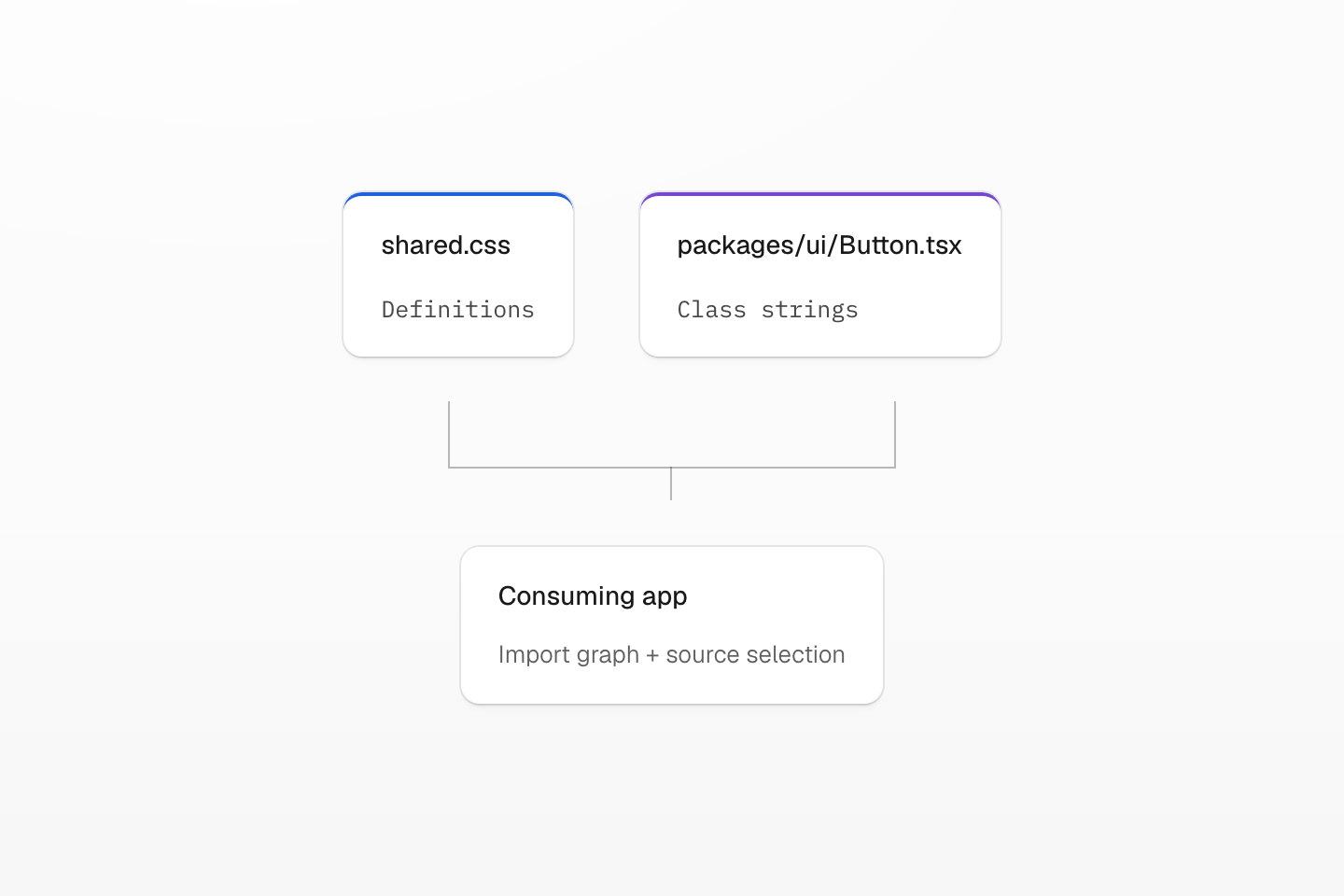
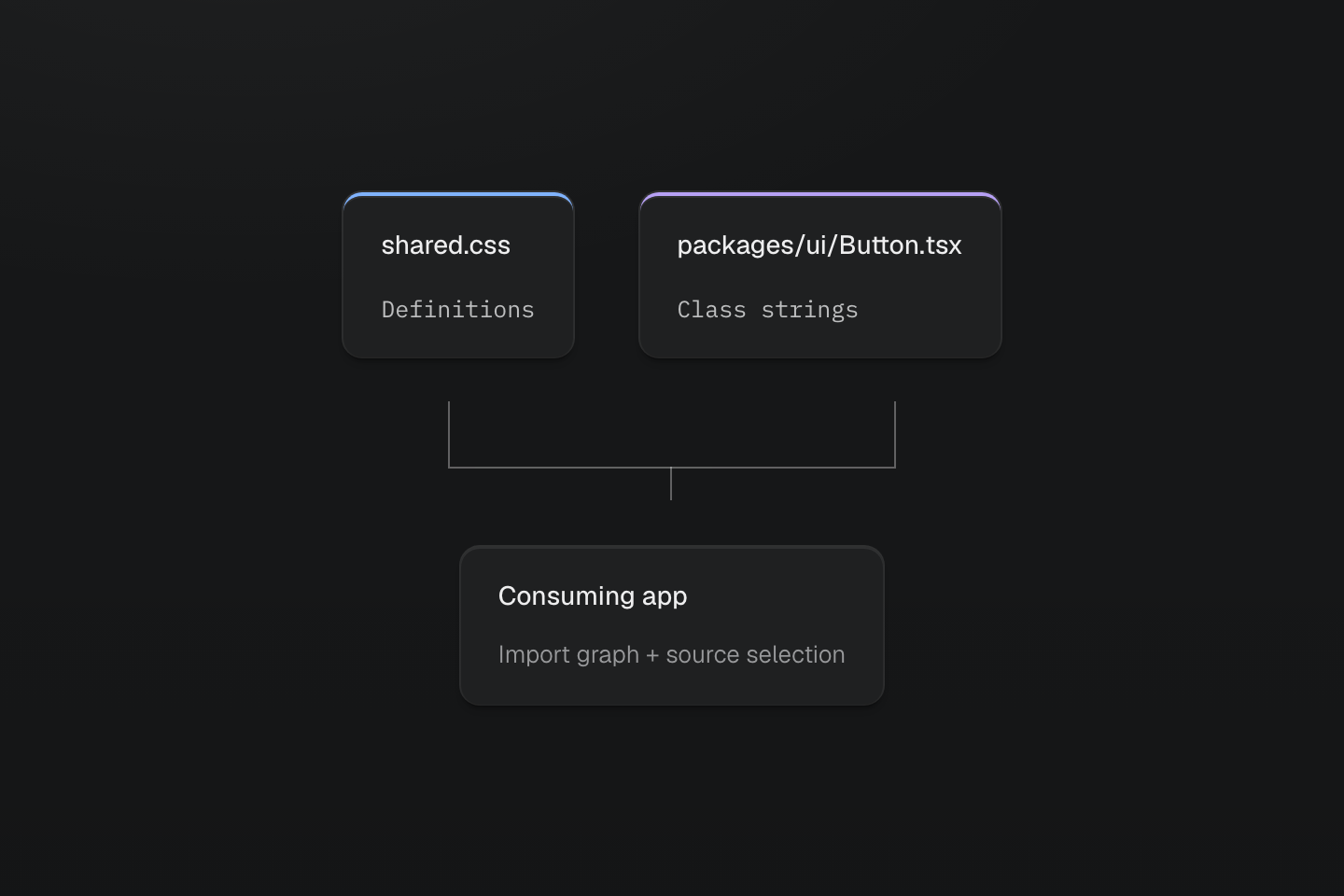
A shared CSS import does not automatically select every sibling component file for scanning.
Text description
A CSS definition file and a component source file enter the consuming app through separate import and source-selection paths.
#Verify the boundary before sharing more
From each application's directory, run its production build. Check both outputs after changing one local override: the admin value should change only in admin. Then add a complete class used only by a shared component and confirm the consuming app emits its rule.
If a token is missing, check the CSS import graph. If the definition is available but a shared component's utility is absent, check source selection. These are separate inputs: importing the shared CSS does not automatically include every sibling component file.
Use Authoring packages when this vocabulary needs a versioned package contract. Use Scanning class names to define the files each app scans, and Optimizing CSS delivery to decide which native rules it can remove.