Cascade layers
Generated layer selection, native rule ownership, importance and rule ordering.
On this page
Master CSS emits generated style rules into utilities unless a class explicitly selects another supported layer. Managed theme declarations use theme. Native CSS keeps its authored layer, including native rules that expand a mixin with @apply.
This page defines layer ownership and generated rule ordering. For a component override and a DevTools diagnosis workflow, see Cascade layers in Guide.
Establishing the order
The base stylesheet, exposed as @master/css/base.css and included by the full @master/css import, declares:
@layer theme, base, defaults, components, utilities;Load it before other rules establish these layers. CSS determines layer order by first appearance; a later order statement cannot rearrange layers already established. Generated layer blocks do not insert this statement themselves.
Normal and important declarations
For competing normal declarations in these layers, utilities has the highest priority and theme the lowest. Normal unlayered author rules take precedence over all of them. !important reverses the order between layers and places important layered rules above important unlayered rules. This comparison is within author stylesheets; it is not the complete cascade across origins, inline styles, animations or transitions. See CSS layer ordering.
Importance reverses layer precedence
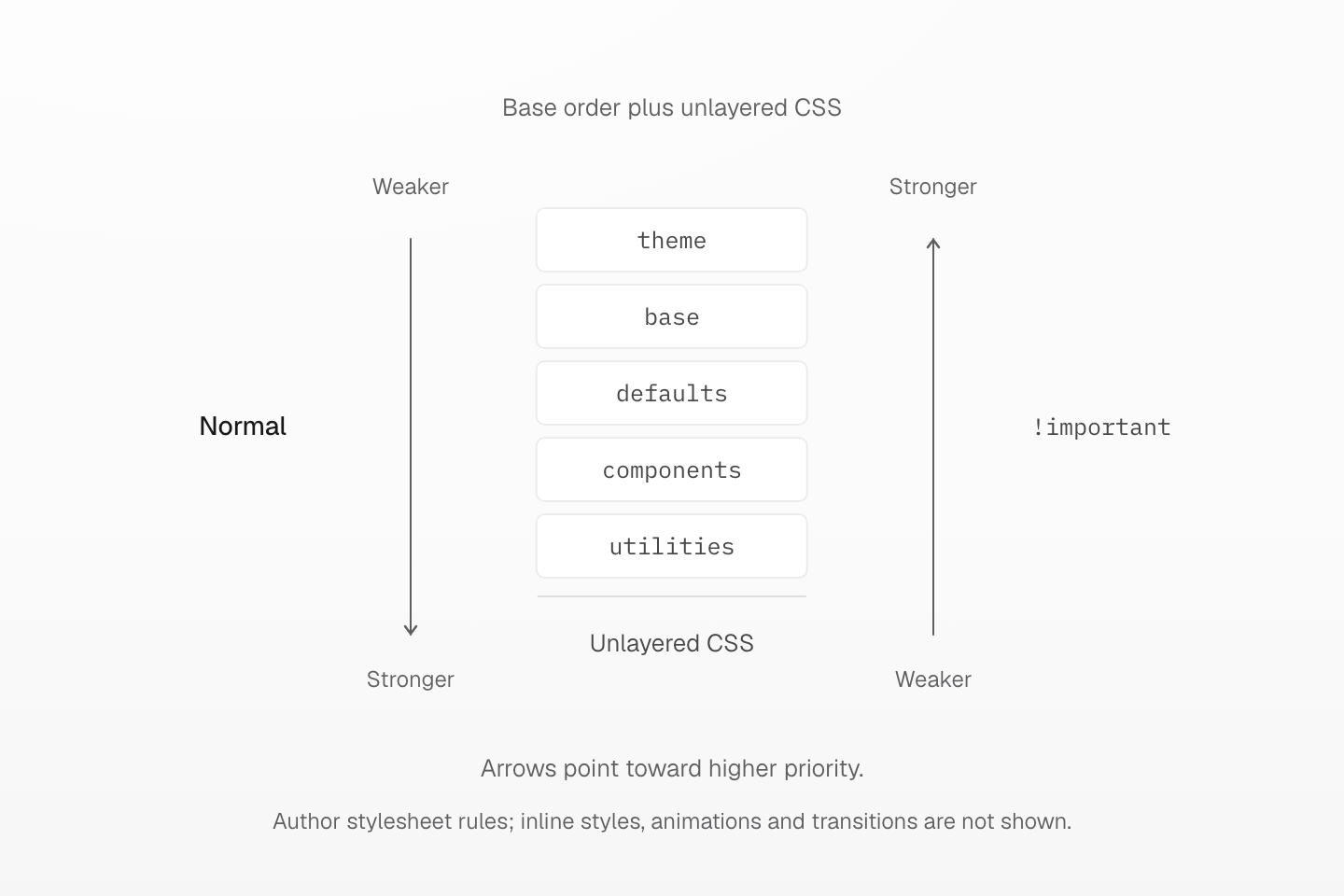
Compare declarations of the same importance within author stylesheets. Normal unlayered rules outrank named layers; important named layers outrank important unlayered rules.
Text description
- The base stylesheet declares theme, base, defaults, components and utilities in that order.
- For normal author stylesheet declarations, priority increases from theme toward utilities, with unlayered declarations above every named layer.
- For important author stylesheet declarations, priority increases in the opposite direction: theme is strongest among these layers, and unlayered important declarations are weakest.
- Layer precedence is compared before selector specificity. The diagram compares each importance group separately, not normal declarations against important declarations or other cascade origins.
Layer precedence is considered before selector specificity. A more specific component selector therefore cannot defeat a normal utility declaration merely through specificity. Between declarations in the same layer, the remaining cascade criteria still matter; see selector specificity.
Layer ownership
| Layer | Generated content | Native CSS convention |
|---|---|---|
theme | Retained managed token declarations under :root, :host | Token defaults |
base | Classes with @layer(base) | Normalization and document baselines |
defaults | Classes with @layer(defaults) | Broad project or content defaults |
components | Classes with @layer(components) | Reusable product classes |
utilities | Ordinary utilities, recipes and native declaration classes; explicit @layer(utilities) | Local utility rules |
The native CSS column describes intended responsibilities, not a restriction on which properties CSS permits in a layer. defaults is a project layer, not the browser's user-agent stylesheet. Token dependency delivery is covered by Variables and modes.
Selecting a generated layer
The class suffix accepts exactly four layer names:
@layer(base)@layer(defaults)@layer(components)@layer(utilities)It selects the layer for the entire generated class. It does not create a sublayer or move the theme variables that class depends on. Place it with the other suffixes, before a trailing !.
| Form | Result |
|---|---|
block@layer(defaults) | The display rule goes into defaults |
block@layer(base)@layer(base) | One base-layer rule; repeating the same choice is allowed |
block@layer(base)@layer(utilities) | CLASS_SYNTAX_ERROR: a class cannot select different layers |
block@layer(theme) | UNKNOWN_CONDITION: theme is not a generated style-layer target |
block@layer(custom) | UNKNOWN_CONDITION: arbitrary native layer names are not class suffix targets |
Use native @layer syntax for project-specific layers and sublayers. Their order follows native CSS; the class suffix does not register new layer names.
Selecting a style layer does not move its token
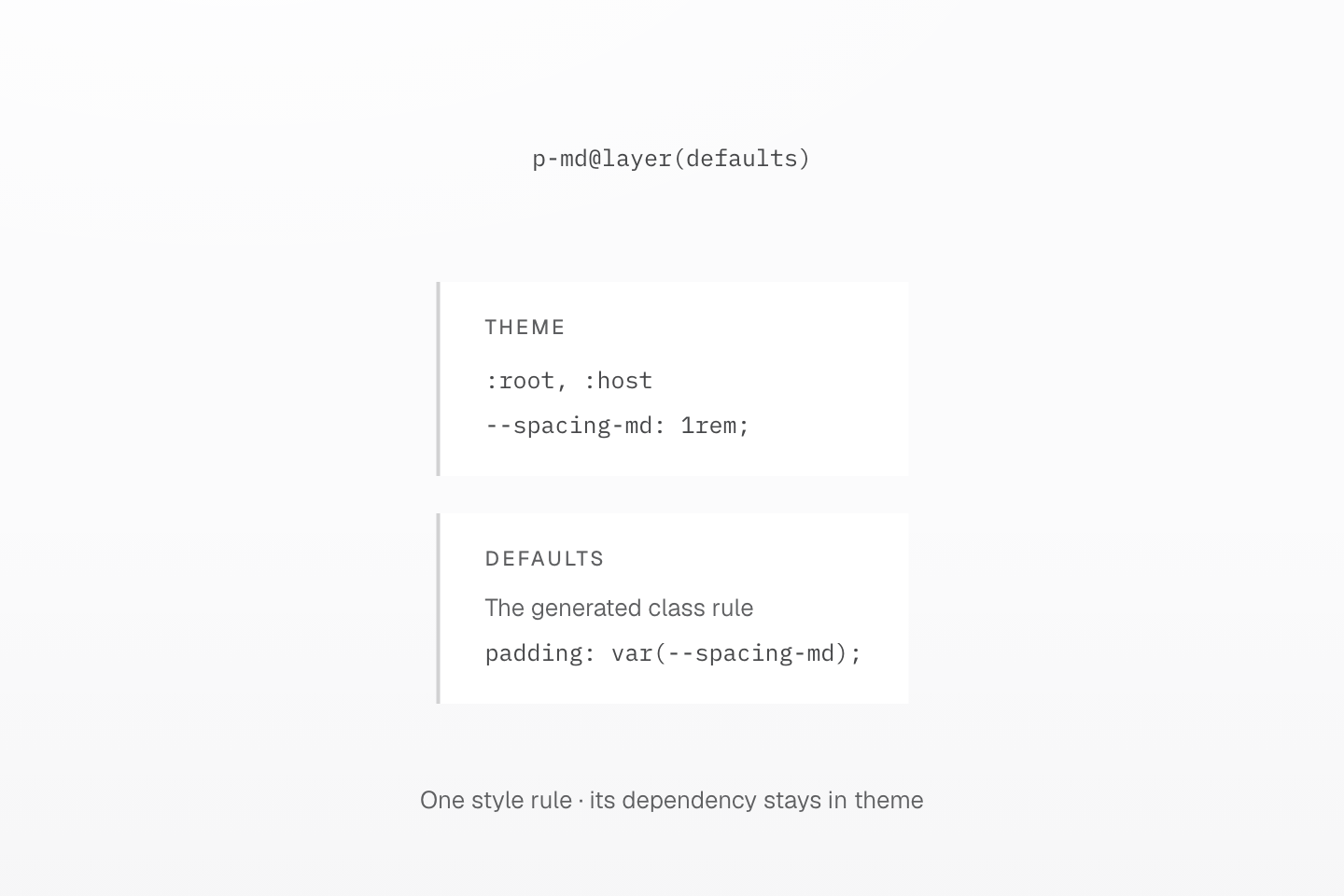
The two layer bands show output ownership. Their positions are not a complete cascade comparison.
Text description
- p-md@layer(defaults) emits the generated padding declaration in the defaults layer.
- Its --spacing-md dependency still emits under :root,:host in the theme layer. @layer(defaults) selects the class rule’s layer, not its dependency’s layer.
Base and defaults
A base-layer descendant rule can establish a structural baseline:
<body class="(list-style:none)_ul@layer(base)">…</body>Generated CSS
@layer base { .\(list-style\:none\)_ul\@layer\(base\) ul { list-style: none }}A defaults-layer descendant rule can establish code typography while leaving local component and utility decisions stronger:
<body class="font-mono_:is(code,pre)@layer(defaults)">…</body>Generated CSS
@layer theme { :root, :host { --font-family-mono: var(--font-mono, ui-monospace), SFMono-Regular, Menlo, Monaco, Consolas, "Liberation Mono", "Courier New", monospace }}@layer defaults { .font-mono_\:is\(code\,pre\)\@layer\(defaults\) :is(code, pre) { font-family: var(--font-family-mono) }}The font-mono class stays in defaults; its required font token remains in theme. The selector suffix determines the descendants that receive the declaration, independently of the layer choice.
Defaults stay below local decisions
Here both rules target the first paragraph. Its own native declaration class goes into utilities, so it overrides the article's defaults-layer font size:
<article class="(font-size:1rem)_p@layer(defaults)"> <p class="(font-size:1.5rem)">24</p> <p>16</p></article>Generated CSS
@layer defaults { .\(font-size\:1rem\)_p\@layer\(defaults\) p { font-size: 1rem }}@layer utilities { .\(font-size\:1\.5rem\) { font-size: 1.5rem }}Native rules and managed utilities
A native class inside @layer components remains native CSS. It is delivered by default and follows native source order within that layer; it does not gain Master selector or condition suffixes. @prune native controls whether unused native selectors may be removed.
In this example .btn declares inline-flex, while flex generates a normal utility declaration. With the base order established, the button uses display: flex:
@layer components { .btn { display: inline-flex; }}<button type="button" class="btn flex">Save</button>Generated CSS
@layer components { .btn { display: inline-flex; }}@layer utilities { .flex { display: flex }}An on-demand @utility instead registers a managed class. Its ordinary output belongs to utilities, but a suffix can select another supported layer:
@utility flow { display: grid; gap: var(--spacing-md);}<div class="flow@layer(defaults)">Example</div>Generated CSS
@layer theme { :root, :host { --spacing-md: 1rem }}@layer defaults { .flow\@layer\(defaults\) { display: grid; gap: var(--spacing-md) }}For utility definitions and native preservation, see Utilities and mixins.
Mixin expansion keeps the surrounding layer
An @apply inside a native rule expands declarations where it appears. It does not move that rule into utilities:
@mixin --inset { padding: 1.5rem;}@layer components { .card { @apply --inset; }}<div class="card p(8)">Example</div>Generated CSS
@layer components { .card { padding: 1.5rem }}@layer utilities { .p\(8\) { padding: calc(8 * 1px) }}With the base order established, the utility's 8px padding wins over the component's 1.5rem. Without an enclosing layer, the native .card rule would remain unlayered and its normal padding would take precedence over the normal utility.
Keep layer blocks outside mixin bodies and @apply contents; those positions do not accept them. A layer selects ownership of the whole generated rule, rather than wrapping a fragment of declarations.
Priority within a layer
HTML class order does not choose the winner. Master CSS gives generated rules a stable order; the browser then applies the cascade to matching declarations. Within comparable layer, selector and condition contexts, generated rules are ordered as follows:
Recipes with multiple declarations or inner selectors and conditions.
Single-declaration utilities, including fixed, token-backed and direct-value utilities.
Native declaration classes.
Single-declaration utilities sort by property family and coverage: a side or axis follows the whole family. For the same property and scope, named token values precede direct values. Importance, selector specificity and conditions still participate; a direct value does not universally defeat a token in another scope or layer.
The examples below use the preset, the base layer statement and a 16px root font size. Competing declarations target the same element and their conditions match.
| Competing classes or rules | Result | Reason |
|---|---|---|
p-md p(8), in either order | padding: 8px | Direct value follows a token in the same property and scope |
p(8) (padding:2rem), in either order | padding: 2rem | Native declaration follows a single-declaration utility |
m-md mt(0), in either order | Top margin 0; other margins 1rem | Side follows the whole margin family |
b(2) bt(0) b-solid b-red-60 | Top width 0; other widths 2px; solid red border | Width, style and color are independent families |
p-md! p(8) | padding: 1rem | Importance precedes value-source ordering |
p-md! p(8)! | padding: 8px | Equal importance; direct value follows token |
p(8)@layer(base) p(12) | padding: 12px | Normal utilities outrank base |
p(8)@layer(base)! p(12)! | padding: 8px | Important declarations reverse layer precedence |
Unlayered .outside { padding: 32px; } and p(8) | padding: 32px | Normal unlayered declaration outranks layered declaration |
Component-layer padding: 24px !important and p(8)! | padding: 24px | Earlier layer wins between important declarations |
Native rules in a layer retain their authored order; the generated-utility ordering above does not reorder those rules. Inspect the emitted CSS when declarations overlap, and use Code linting to catch conflicting classes during authoring.