主題
註冊主題 token,並透過 static 與 inline 控制保留與代入方式。
本頁目錄
@theme 為 utility 定義註冊 token。其修飾詞分別控制哪些 token 宣告會交付,以及生成值使用 var() 或代入原始宣告值。主題 token說明專案設定;變數與模式說明作用範圍、繼承與解析。
@theme
以自訂屬性宣告 utility token。主題區塊必須位於頂層,且只接受自訂屬性 token 宣告。關鍵影格請在區塊外的原生 CSS 中宣告。
@theme { --color-brand: #4f46e5; --spacing-card: 1.5rem;}未知或重複的修飾詞會產生錯誤。static 與 inline 的順序不限。
| 宣告 | token 交付 | 生成值 |
|---|---|---|
@theme | 依需求 | var(--token) |
@theme static | 一律交付 | var(--token) |
@theme inline | 僅在其他參照或相依關係保留時 | 宣告值 |
@theme static inline | 一律交付 | 宣告值 |
token 會輸出於 @layer theme 中的 :root, :host。編譯器保留宣告順序與重複值。已使用的 token 會保留遞移變數相依關係。選擇器與條件規則應置於區塊外的原生 CSS。
只有 @theme 會為 utility 模式註冊具名 token。:root { --app-brand: red; } 這類原生宣告仍是一般 CSS;可直接以 (color:var(--app-brand)) 使用,或透過 inline 主題 token 橋接。
static 控制保留,inline 控制生成值
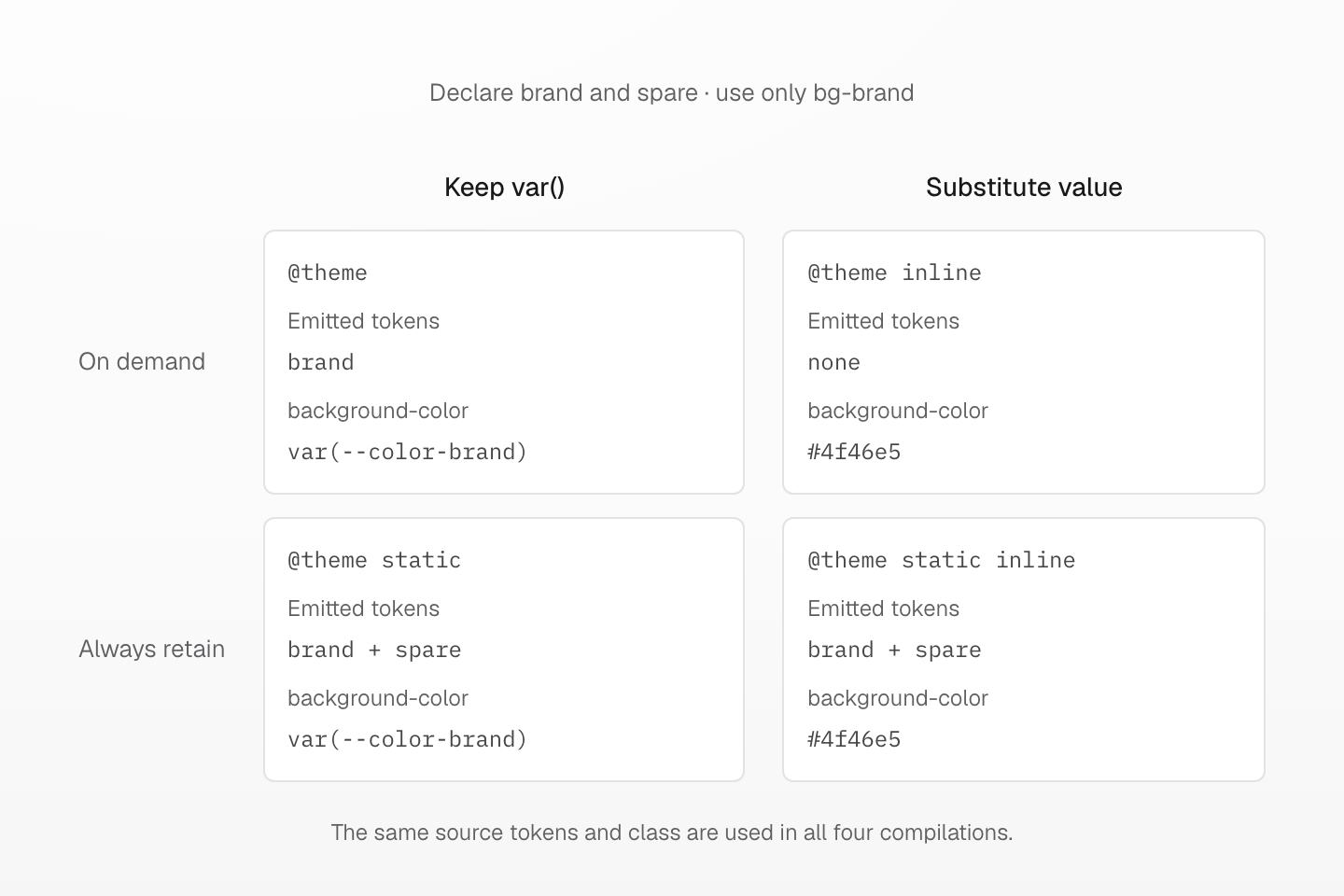
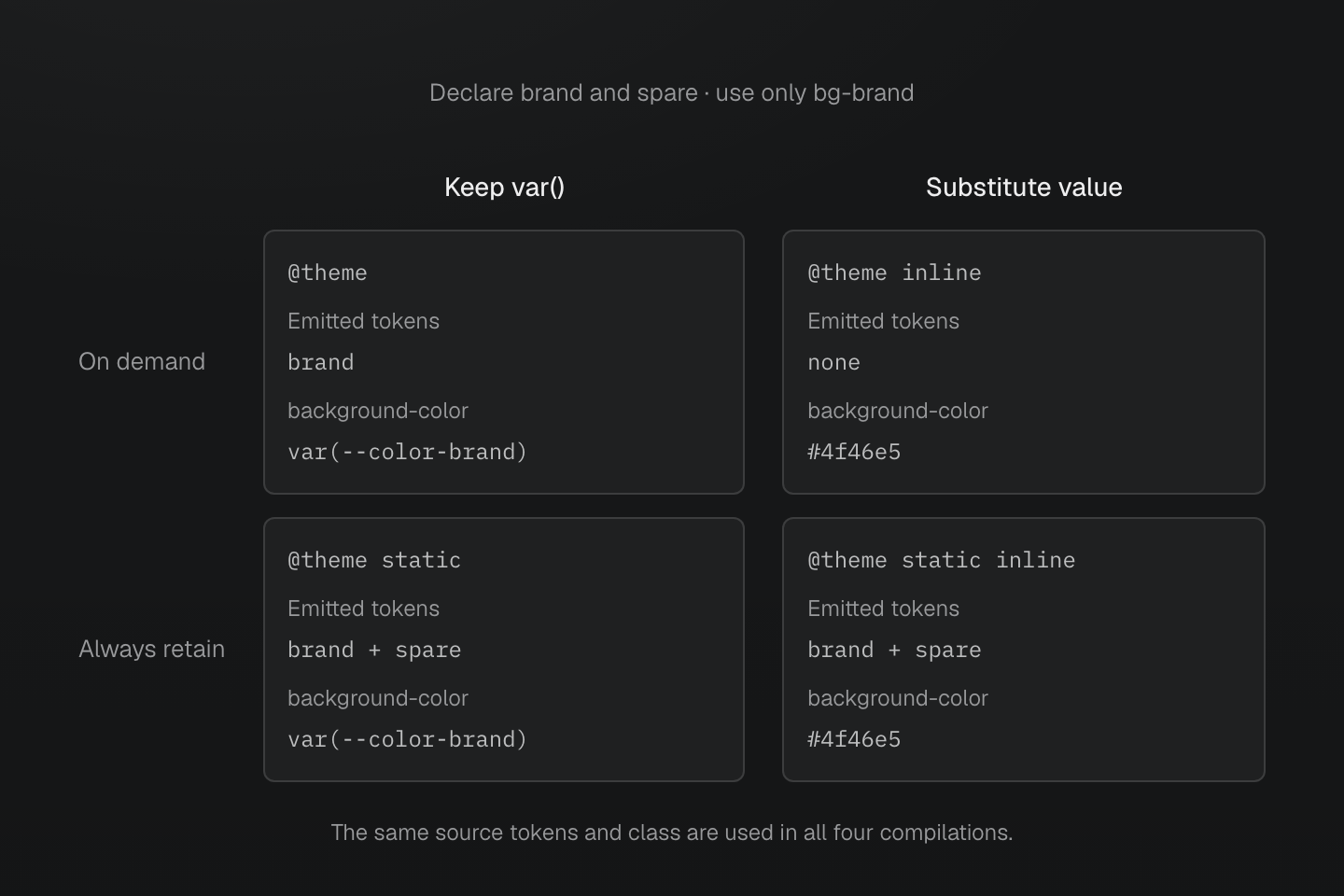
每種情況都宣告 brand 與 spare,但只使用 bg-brand。僅有 inline 時,兩個 token 都不需要宣告。加入 static 會保留兩者,但不改變代入後的 class 值。
文字說明
- 四種情況都宣告 --color-brand: #4f46e5 與 --color-spare: #0d9488。bg-brand 是唯一使用端,沒有原生 token 參照。
- 一般 @theme 輸出已使用的 brand token 與 background-color: var(--color-brand),省略未使用的 spare token。
- @theme inline 將 #4f46e5 代入生成宣告。utility 不再讀取任何一個 token,因此這種情況不輸出兩個 token 的宣告。
- @theme static 保留兩個 token。@theme static inline 也保留兩者,但生成的 background-color 仍是 #4f46e5。保留與代入彼此獨立。
@theme inline
使用 inline,將 token 的宣告值代入 Master 生成的宣告:
@theme inline { --color-brand: var(--app-brand);}:root { --app-brand: #4f46e5;}[data-theme="ocean"] { --app-brand: #0369a1;}bg-brand 輸出 background-color:var(--app-brand),在使用該 class 的元素上解析原生變數。直接宣告 class、utility class 與原生 @apply 展開,都會套用相同代入方式。手寫的原生宣告保留原本的 var() 參照。
代入只執行一次。替換值中的變數、函式與備援值保留原生 CSS 語意。相依關係從代入後的宣告收集;僅使用 inline utility,不會強制輸出被替換的 token。直接以原生方式參照該 token,仍可保留它的宣告。
重複的主題定義會先依重要性、再依來源順序選擇 inline 值與模式。自訂屬性的 !important 不會讓生成的 utility 也變成重要。一般別名在宣告的作用範圍解析;橋接值需要在使用處讀取其他變數時,請用 inline。
@theme static
即使沒有 class 或原生參照也必須輸出 token 時,請用 static:
@theme static { --color-integration: #4f46e5;}@theme static inline { --color-brand: var(--app-brand);}static 控制 token 交付,inline 控制生成值,兩者可依任意順序組合。只要 token 有任何 static 宣告,就會與其相依資源一起保留,直到定義移除。被參照樣式表不會只因 token 是 static 就成為輸出根節點。
原生主題覆寫
在 @theme 註冊預設值,再使用原生選擇器或查詢覆寫變數:
@theme { --color-panel: white;}[data-theme="ocean"] { --color-panel: #082f49;}@media (prefers-color-scheme: dark) { :root { --color-panel: #111827; }}原生覆寫保留原本的作用範圍、串接層與樣式表交付方式。同一元素上,不在串接層中的一般覆寫優先於 theme 層的一般宣告。defaults 這類較後的串接層,也能讓覆寫優先,同時仍讓 components 與 utilities 層取得更高優先順序。需要覆寫的地方都要匯入原生樣式表;@reference 只提供定義,不交付這些規則。
預設集使用原生 light-dark() 提供自適應色彩與陰影。兩個變數分支都保留為相依關係。其原生基礎 CSS 在根元素設定 color-scheme: light dark,並提供適用元素與 shadow host 的明暗 data-theme 選擇器。請見色彩。
Scoped tokens in native CSS
@theme { --color-brand: #4f46e5; } .dark { --color-brand: #111827; } .card { color: var(--color-brand); }產生的 CSS
.dark { --color-brand: #111827;}.card { color: var(--color-brand);}@layer theme { :root, :host { --color-brand: #4f46e5 }}