選擇器
選擇器的附加方式、關聯元素、清單、字面值編碼與選擇器權重。
本頁目錄
選擇器後綴決定哪個元素或偽元素會套用 class 的宣告。帶有完整 class 的元素是起點:後綴可以檢查該元素、選取相關元素,或同時進行兩者。
本頁定義選擇器的附加方式、編碼、分組與選擇器權重。語法教學說明如何為元件加入 hover 與鍵盤焦點樣式;CSS 選擇器則定義原生比對行為。
附加選擇器
將選擇器接在已註冊的 utility 後方,或原生宣告的右括號之後。條件放在選擇器之後,重要性標記放在最末端:
utility<selector><conditions>!(property:value)<selector><conditions>!上方角括號內的部分與 ! 是可省略的語法佔位符。例如,underline:hover@sm 會在帶有 class 的元素處於 hover,且檢視區符合 @sm 時套用底線。條件不會改變選擇器指向的元素。
產生的 CSS
@layer utilities { @media (width >= 52.125rem) { .underline\:hover\@sm:hover { text-decoration-line: underline } } @media (width >= 52.125rem) { .\(text-decoration-thickness\:2px\)\:hover\@sm:hover { text-decoration-thickness: 2px } }}Master CSS 會在生成的 CSS 選擇器中跳脫完整 class 名稱。.underline\:hover 中的冒號是字面 class 名稱的一部分;後接的 :hover 才是真正的偽類別。HTML 中請像範例一樣,撰寫未跳脫的 class。
比對帶有 class 的元素
沒有組合器時,後綴會為帶有 class 的元素增加條件。underline.active 只會比對 class 清單同時含有 underline.active 與 active 的元素。
<a class="underline.active active" href="/guide/installation">Installation</a>| class | 帶有 class 的元素須符合的條件 |
|---|---|
underline.active | 也帶有 active class |
underline#current | ID 為 current |
underline[data-current] | 帶有 data-current 屬性 |
underline:hover | 符合瀏覽器的 hover 狀態 |
underline:is(a) | 是 a 元素 |
產生的 CSS
@layer utilities { .underline\#current#current { text-decoration-line: underline } .underline\:is\(a\):is(a) { text-decoration-line: underline } .underline\[data-current\][data-current] { text-decoration-line: underline } .underline\:hover:hover { text-decoration-line: underline } .underline\.active.active { text-decoration-line: underline }}若要檢查同一元素的型別,請用 :is(a) 或 :where(a)。若要選取其子元素,請用 >a 或 >*。直接接在 utility 名稱後的裸標籤名稱,不是獨立的選擇器後綴。
組合條件
相鄰的簡單選擇器描述同一個元素。underline:hover:not([aria-disabled=true]) 要求 hover,並排除 aria-disabled 屬性為 true 的元素;它不會設定或更新該屬性。
產生的 CSS
@layer utilities { .underline\:hover\:not\(\[aria-disabled\=true\]\):hover:not([aria-disabled=true]) { text-decoration-line: underline }}選擇器會回應 DOM 與瀏覽器狀態,不會建立互動行為。原生屬性與 ARIA 保有各自的語意。尤其 aria-disabled="true" 只描述停用狀態,本身不會阻止啟動操作。
相關元素
組合器會從帶有 class 的元素移向另一個元素。宣告會套用到選擇器末端的元素,而非從帶有 class 的元素繼承而來。
| class | 目標 |
|---|---|
underline_a | 任意深度的後代連結 |
underline>a | 直接子連結 |
underline+a | 下一個同層元素,且該元素為連結 |
underline~a | 同一父元素下、位於後方的所有同層連結 |
underline>* | 每個直接子元素 |
_ 編碼選擇器之間的後代空白。HTML 中真正的空白會開始另一個 class。>、+ 與 ~ 保留 CSS 原生意義。
產生的 CSS
@layer utilities { .underline\+a + a { text-decoration-line: underline } .underline\>\* > * { text-decoration-line: underline } .underline\>a > a { text-decoration-line: underline } .underline_a a { text-decoration-line: underline } .underline\~a ~ a { text-decoration-line: underline }}子元素選擇器只到第一層
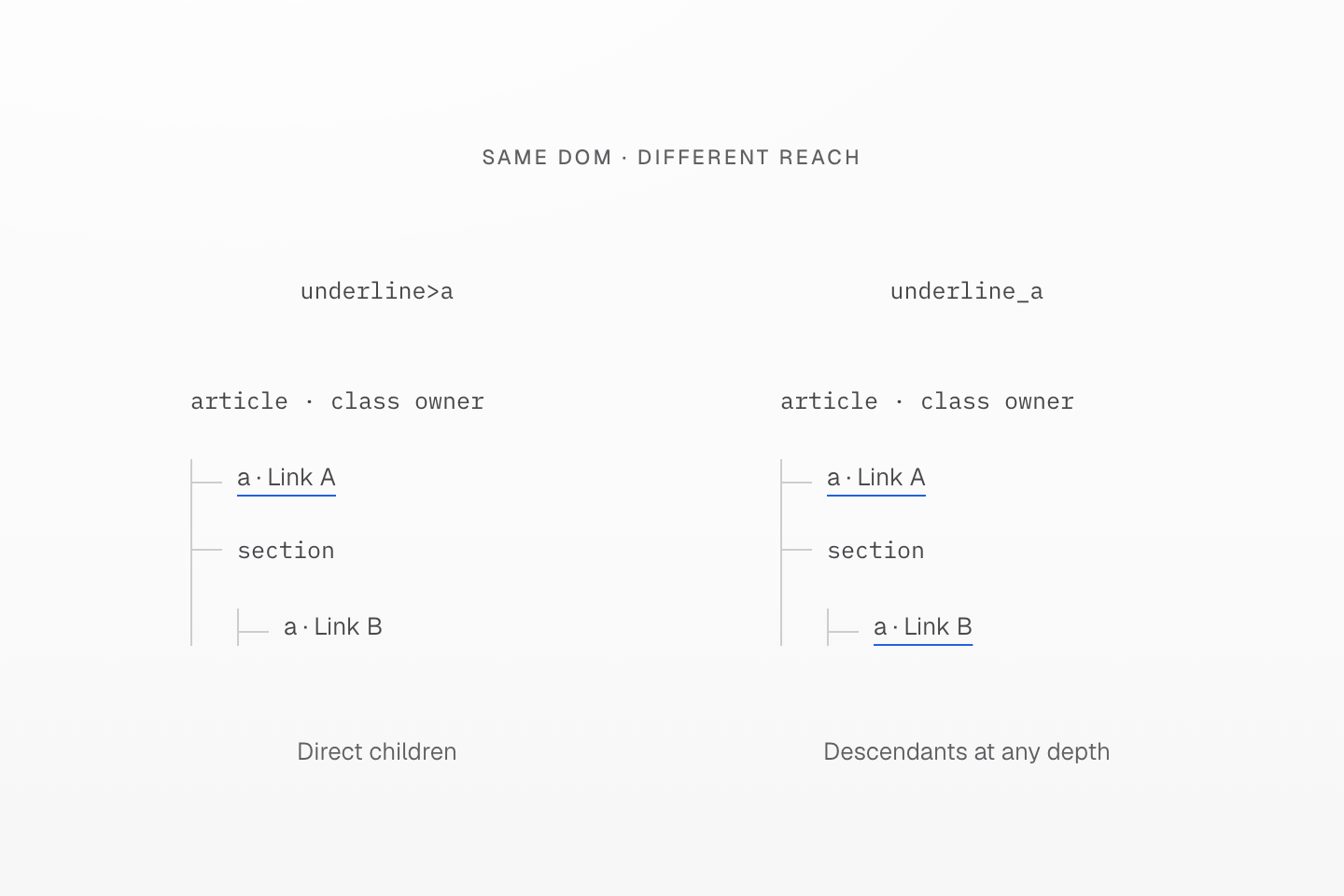
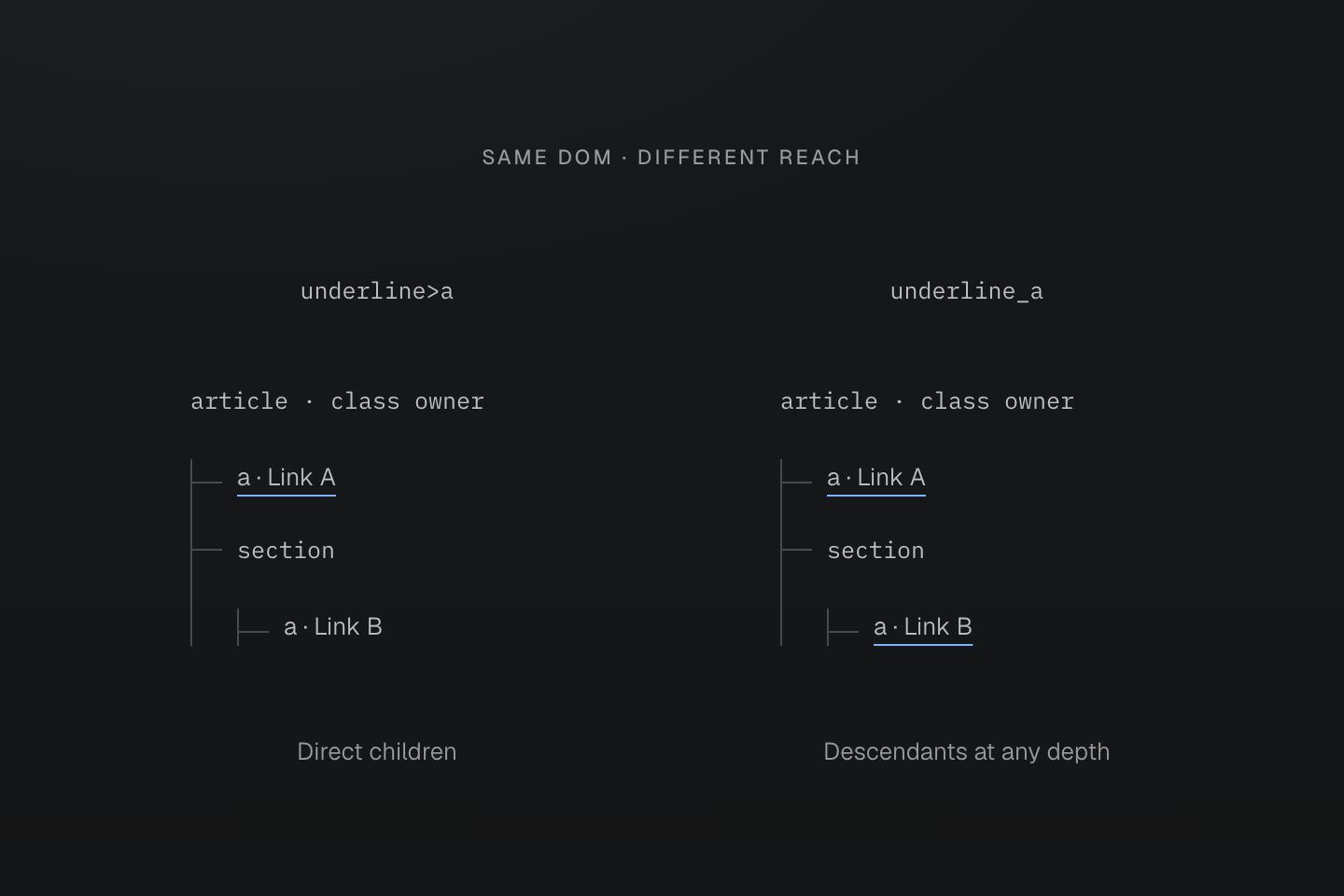
兩棵樹的結構相同。底線標示實際目標連結;縮排與連線分支呈現深度。
文字說明
- 帶有 class 的 article 包含連結 A,以及內含連結 B 的 section。
- underline>a 只為直接子連結 A 加底線。underline_a 為 A、B 都加底線,因為兩者都是後代連結。
- 宣告直接指向這些連結;圖示不是表達從 article 繼承文字裝飾。
同層選擇器從所屬元素向後選取
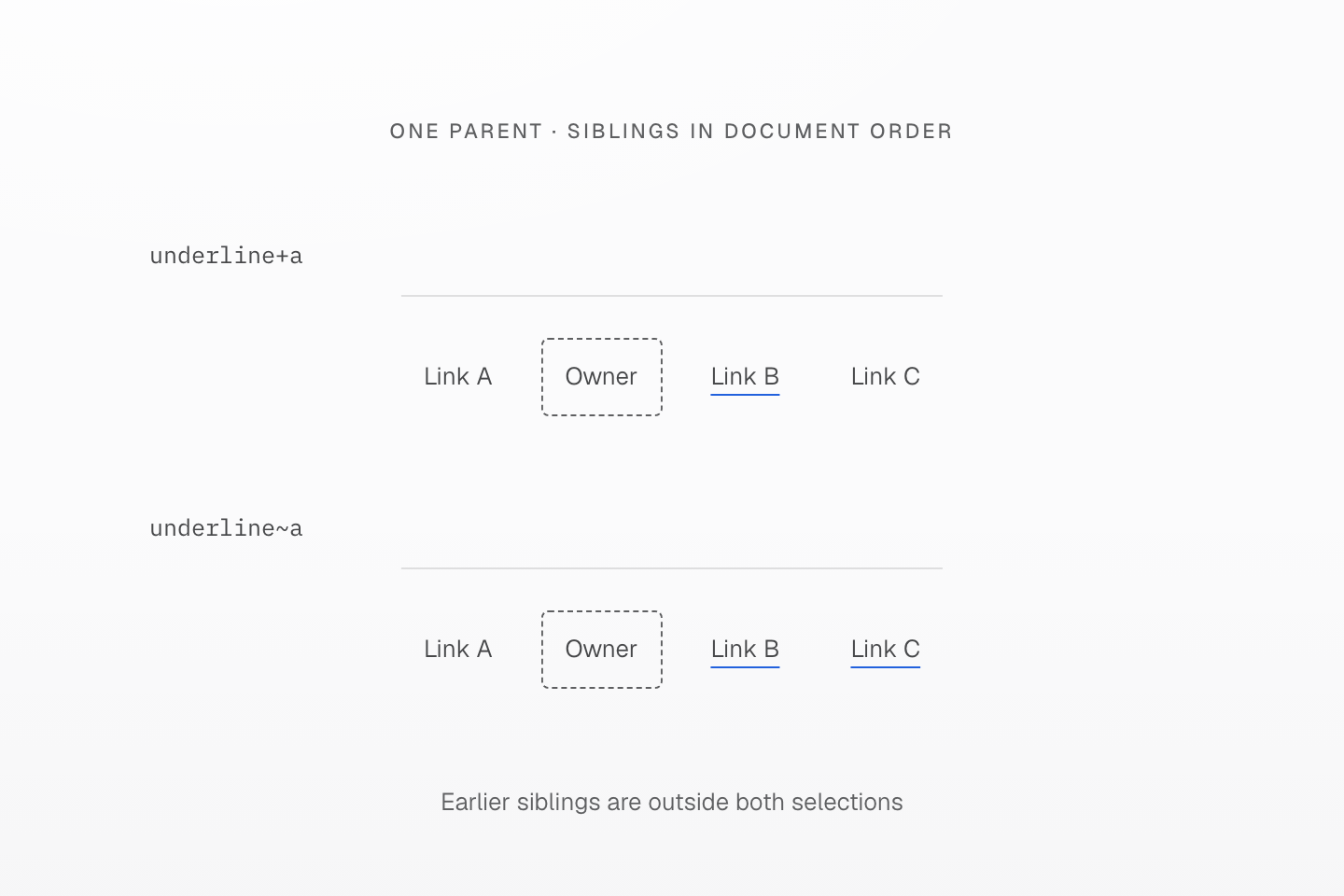
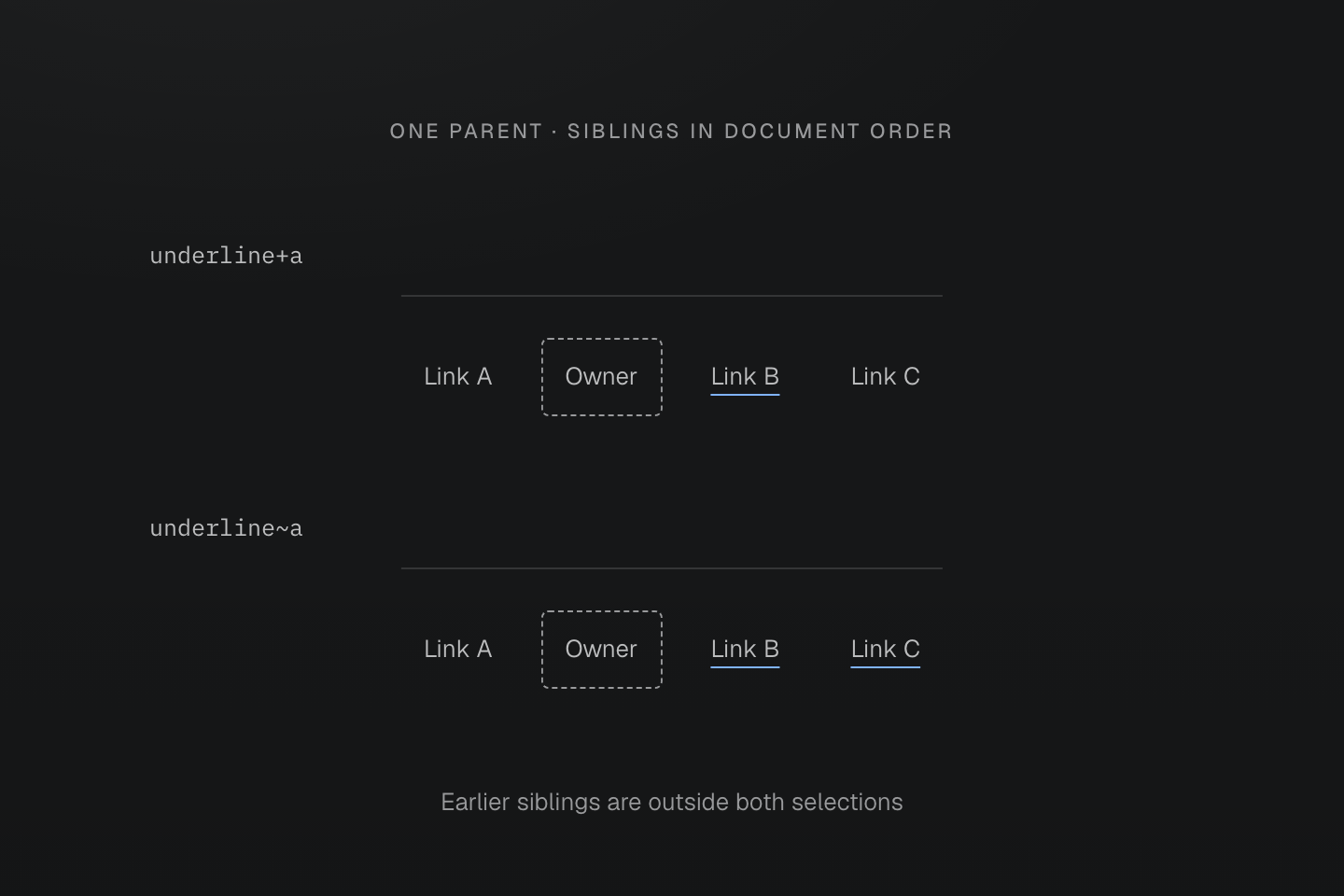
每排所有節點具有同一個父元素。外框標出的所屬元素帶有 class;底線標示被選取的連結。
文字說明
- 同層順序為連結 A、帶有 class 的元素、連結 B、連結 C。
- underline+a 選取下一個同層元素 B。underline~a 選取後方的同層連結 B 與 C。
- 兩個選擇器都不會選取前方的同層元素 A。若下一個元素不是連結,+a 就不會選取任何元素。
狀態的位置
狀態的位置決定哪個元素必須符合該狀態。這兩個 class 具有相同的父子關係,但在不同位置檢查 hover:
| article 上的 class | hover 條件 | 加上底線的連結 |
|---|---|---|
underline:hover>a | article 處於 hover | 所有直接子連結 |
underline>a:hover | 直接子連結處於 hover | 只有該連結 |
同樣的 hover,不同的目標
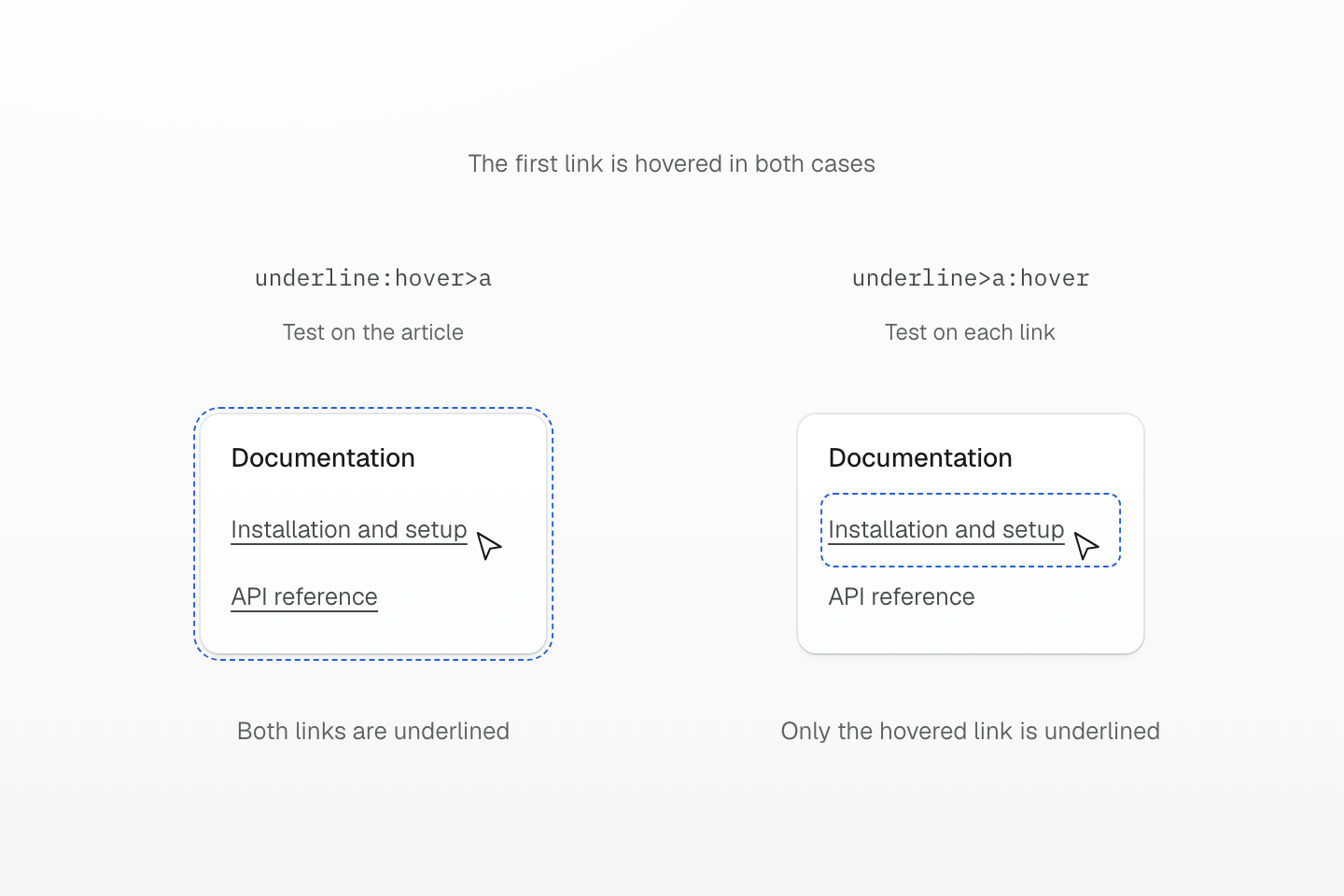
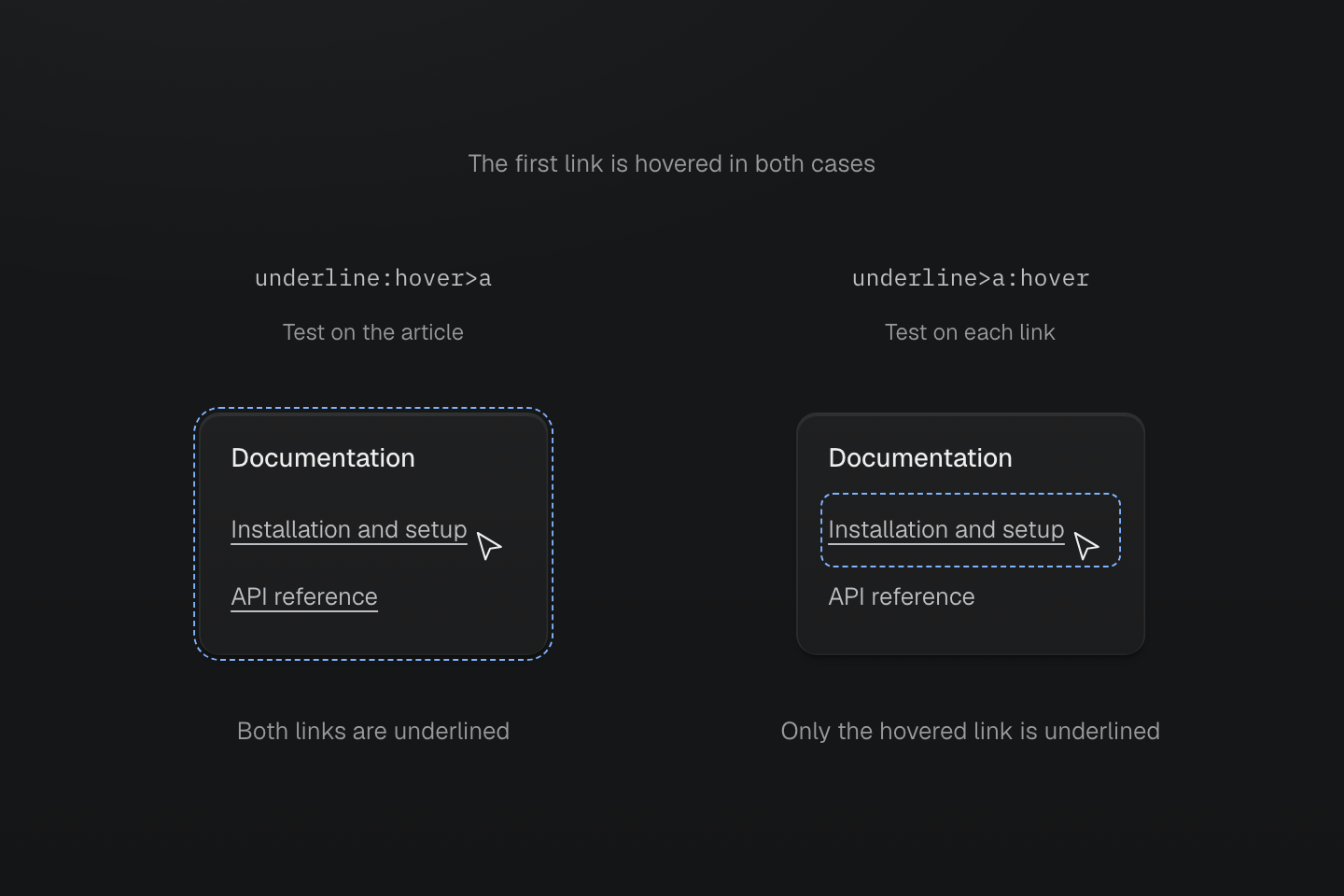
兩個範例的第一個連結都處於 hover。藍色虛線輪廓標示符合後綴 :hover 檢查的元素,並非生成的邊框。
文字說明
- 兩個 article 都帶有 utility class,並包含相同的兩個直接子連結。第一個連結處於 hover,因此兩個祖先 article 也都符合 :hover。
- underline:hover>a 先檢查 article,再選取直接子連結。兩個連結都套用 text-decoration-line: underline。
- underline>a:hover 先選取直接子連結,再逐一檢查。只有處於 hover 的第一個連結會套用宣告。
- 藍色虛線輪廓標示符合 hover 檢查的元素。它們不代表生成的邊框,也不表示第二個 article 未處於 hover。
<article class="underline:hover>a"> <p>Documentation</p> <a class="(text-decoration-line:none)" href="/guide/installation">Installation and setup</a> <a class="(text-decoration-line:none)" href="/reference/packages">API reference</a></article><article class="underline>a:hover"> <p>Documentation</p> <a class="(text-decoration-line:none)" href="/guide/installation">Installation and setup</a> <a class="(text-decoration-line:none)" href="/reference/packages">API reference</a></article>產生的 CSS
@layer utilities { .\(text-decoration-line\:none\) { text-decoration-line: none } .underline\:hover\>a:hover > a { text-decoration-line: underline } .underline\>a\:hover > a:hover { text-decoration-line: underline }}連結處於 hover 時,其祖先 article 也會處於 hover。第一個範例因此讓兩個連結都符合條件;第二個範例中,另一個連結仍未通過自己的 :hover 檢查。各 class 都屬於 article,但宣告指向它的連結。連結自身的 class 先移除預設底線;權重較高的父子選擇器會在 hover 檢查符合時恢復底線。
選擇器清單
頂層逗號會從同一個帶有 class 的元素開始另一個分支。每個分支都要重複組合器:block>div,>span 會選取直接的 div 子元素與直接的 span 子元素。第二個分支不會接續第一個分支的目標。
<section class="block>div,>span"> <div>First child</div> <span>Second child</span></section>產生的 CSS
@layer utilities { .block\>div\,\>span > div, .block\>div\,\>span > span { display: block } .\(content\:\'“\'\)\:\:before\,\:\:after::before, .\(content\:\'“\'\)\:\:before\,\:\:after::after { content: '“' }}函式或引號屬性值中的逗號仍留在該結構內。underline:is(:hover,:focus-visible) 是一個含有兩種選項的選擇器後綴,而非兩個頂層分支。
產生的 CSS
@layer utilities { .underline\[data-label\=\'draft\,review\'\][data-label='draft,review'] { text-decoration-line: underline } .underline\:is\(\:hover\,\:focus-visible\):is(:hover, :focus-visible) { text-decoration-line: underline }}選擇器清單從 class 所屬元素重新起算
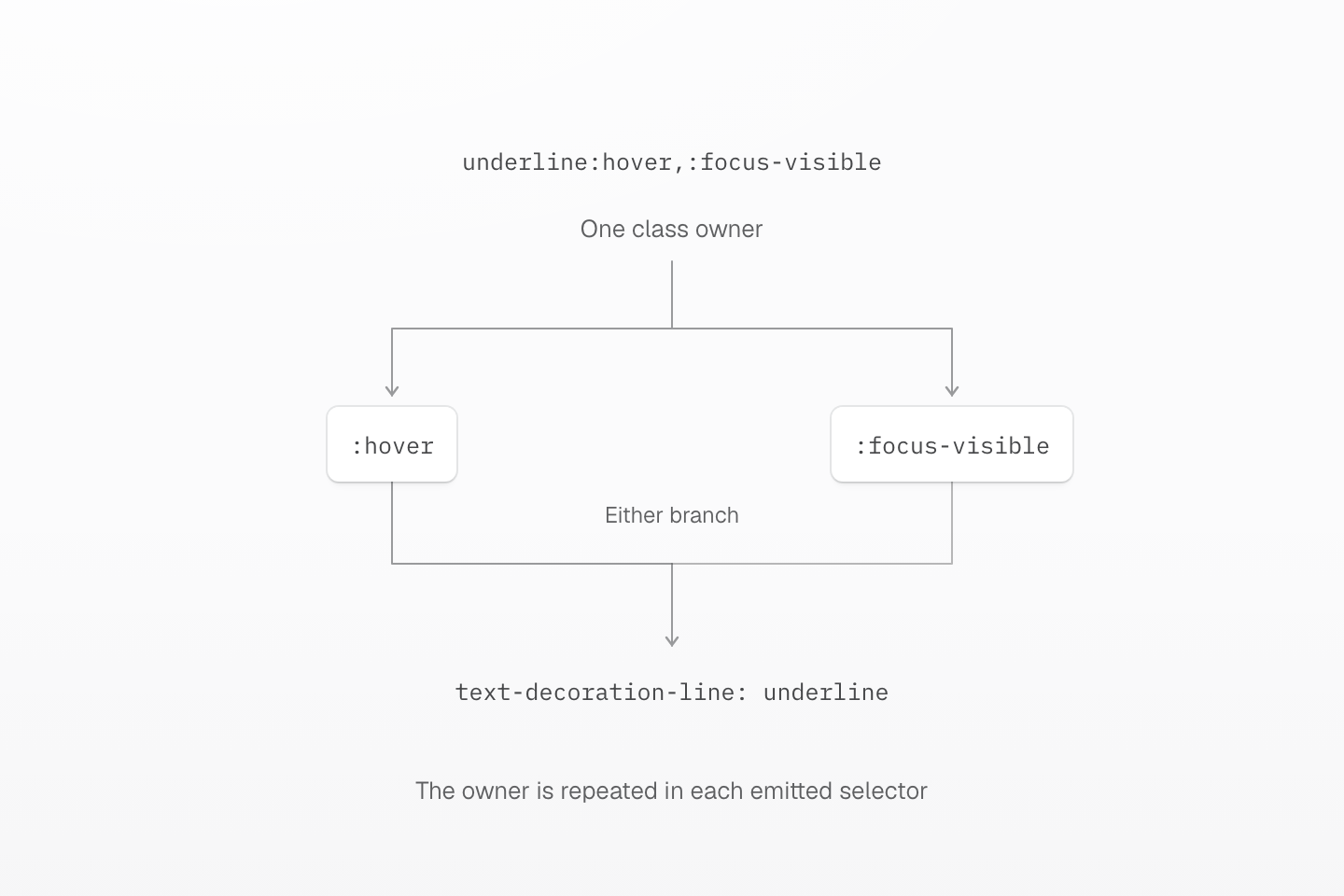
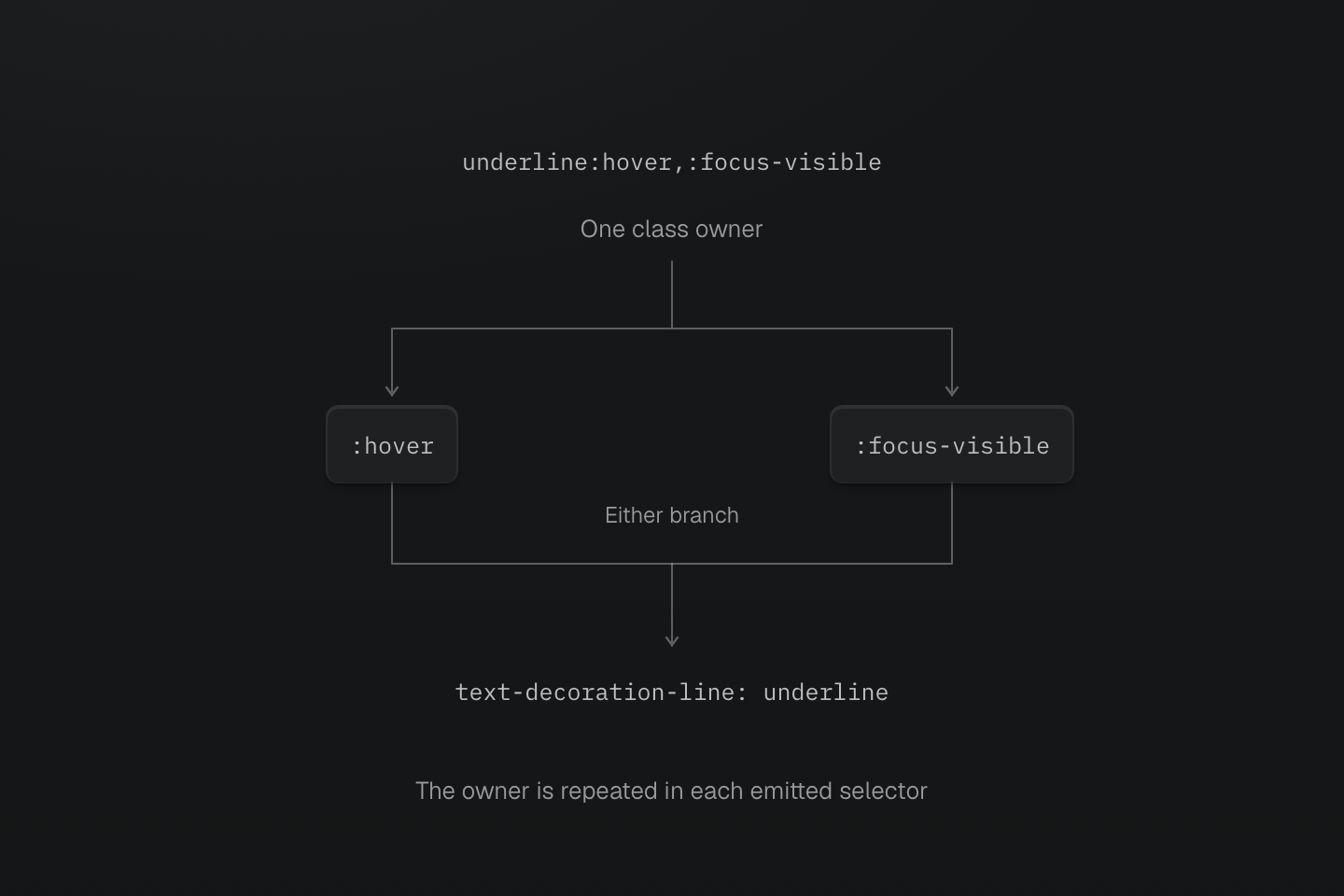
逗號分隔不同選項。每個選擇器都從帶有 class 的元素開始;任一狀態皆可符合。
文字說明
- underline:hover,:focus-visible 生成選擇器清單,每個分支都重複完整、跳脫後的 class 所屬元素選擇器。
- hover 與 focus-visible 是可擇一的狀態,不要求同時符合。兩條分支共用宣告。
選擇器函式
| 函式 | 比對行為 |
|---|---|
:is(...) | 符合清單中至少一個選擇器 |
:where(...) | 與 :is() 相同,但函式及其引數的選擇器權重為零 |
:not(...) | 排除符合清單中任一選擇器的元素 |
:has(...) | 從目前選取的元素檢查相對關係是否符合 |
:has() 檢查關係,但不會將宣告移到符合的相關元素。b-blue-60:has(>input:checked) 會在 label 的直接子 input 被勾選時,設定 label 的邊框色彩:
<label class="b(1) b-solid b-line-control b-blue-60:has(>input:checked)"><input type="checkbox" />Include archived items</label>產生的 CSS
@layer theme { :root, :host { --color-blue-60: oklch(51.83% .2687 266.1) }}@layer utilities { .b-blue-60\:has\(\>input\:checked\):has(>input:checked) { border-color: var(--color-blue-60) } .underline\:has\(\+input\:checked\):has(+input:checked) { text-decoration-line: underline }}相對比對也可以是同層元素:underline:has(+input:checked) 會在下一個同層元素是已勾選的 input 時,為帶有 class 的元素加上底線。原生 :has() 限制仍適用;將 :has() 巢狀放在自身內部是無效的。可運作的核取方塊範例與實用備援方式,請見相容性。
has() 檢查子元素,替所屬元素套用樣式
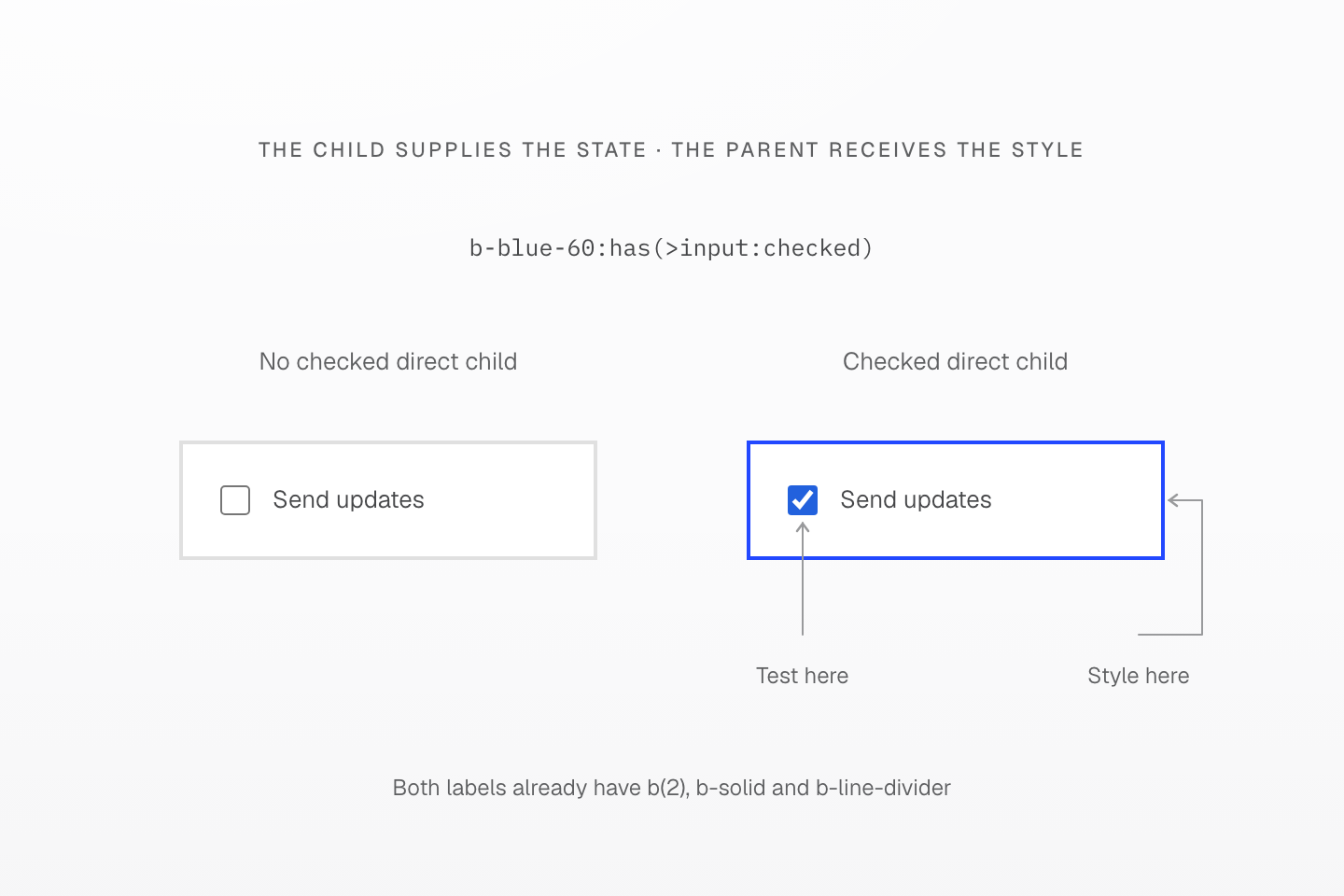
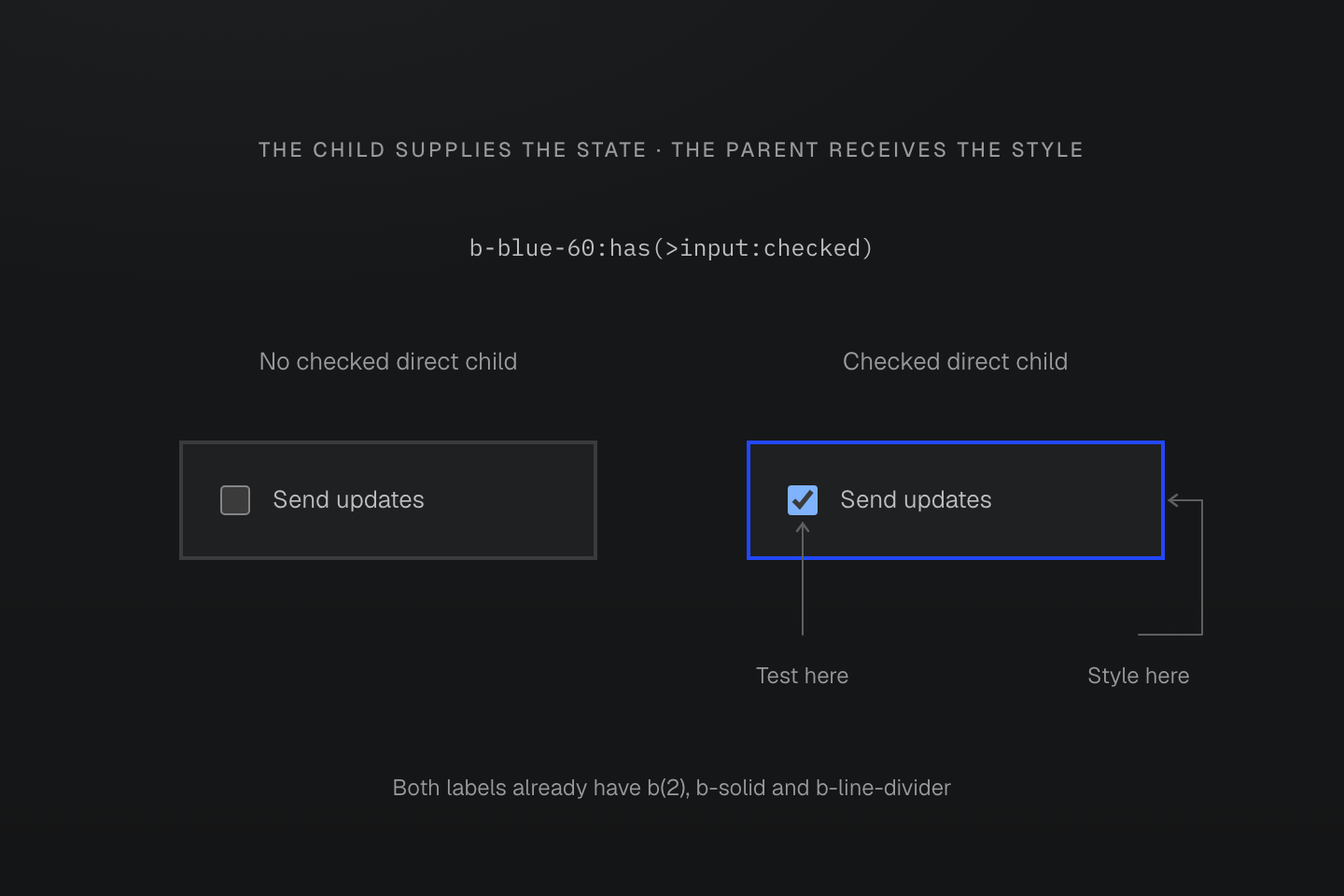
class 位於 label 上。檢查的是 input 的勾選狀態,套用 border-color 的則是 label。
文字說明
- b-blue-60:has(>input:checked) 檢查帶有 class 的元素是否具有已勾選的直接子 input。
- 符合時,改變的是所屬 label 的邊框色彩,而非 input。input 畫在同一邊界內,以區分檢查位置與樣式目標。
原生狀態
Master CSS 保留原生偽類別名稱。以下列出常用後綴,並非完整的狀態註冊表:
| 後綴 | 原生比對情境 |
|---|---|
:hover, :active | 指標懸停或啟動狀態 |
:focus, :focus-visible, :focus-within | 元素取得焦點、顯示焦點指示,或其內部有焦點 |
:first-child, :last-child, :nth-child(even) | 同層元素間的位置 |
:valid, :invalid, :required | 原生表單限制 |
:disabled | 停用的表單控制項 |
:checked, :indeterminate | 原生控制項狀態 |
:dir(rtl), :dir(ltr) | 解析後的文字方向 |
請使用 :first-child、:nth-child(odd) 這類完整名稱。即使 Master CSS 能輸出某種拼法,瀏覽器仍可能不支援或視為無效。各狀態的詳細行為以原生偽類別參考為準。
<ul> <li class="bg-surface-inset:nth-child(even)">Draft</li> <li class="bg-surface-inset:nth-child(even)">In review</li> <li class="bg-surface-inset:nth-child(even)">Published</li></ul>產生的 CSS
@layer theme { :root, :host { --color-zinc-5: oklch(96.5% .0011 265); --color-zinc-100: oklch(15% .0016 265) } :root, :host { --color-surface-inset: light-dark(var(--color-zinc-5), var(--color-zinc-100)) } :root, :host { --spacing-xs: .5rem }}@layer utilities { .bg-surface-inset\:nth-child\(even\):nth-child(even) { background-color: var(--color-surface-inset) } .mr-xs\:dir\(rtl\):dir(rtl) { margin-right: var(--spacing-xs) } .\(opacity\:\.5\)\:disabled:disabled { opacity: .5 }}屬性選擇器
屬性後綴會檢查 DOM 值。布林形式的屬性選擇器檢查屬性是否存在:[open] 比對展開的 details 元素,[data-active] 則在該屬性存在時符合。若要檢查特定狀態值,請包含該值,例如 [aria-pressed=true]。
| 後綴 | 比對條件 |
|---|---|
[data-active] | 屬性存在,即使值為空 |
[aria-pressed=true] | 值恰為 true |
[href^=https] | 值以 https 開頭 |
[href$='.pdf'] | 值以 .pdf 結尾 |
[title*=master] | 值包含 master |
[lang|=en] | 值為 en 或以 en- 開頭 |
[title~=css] | 以空白分隔的值包含單字 css |
屬性值完全相等與單字比對不同
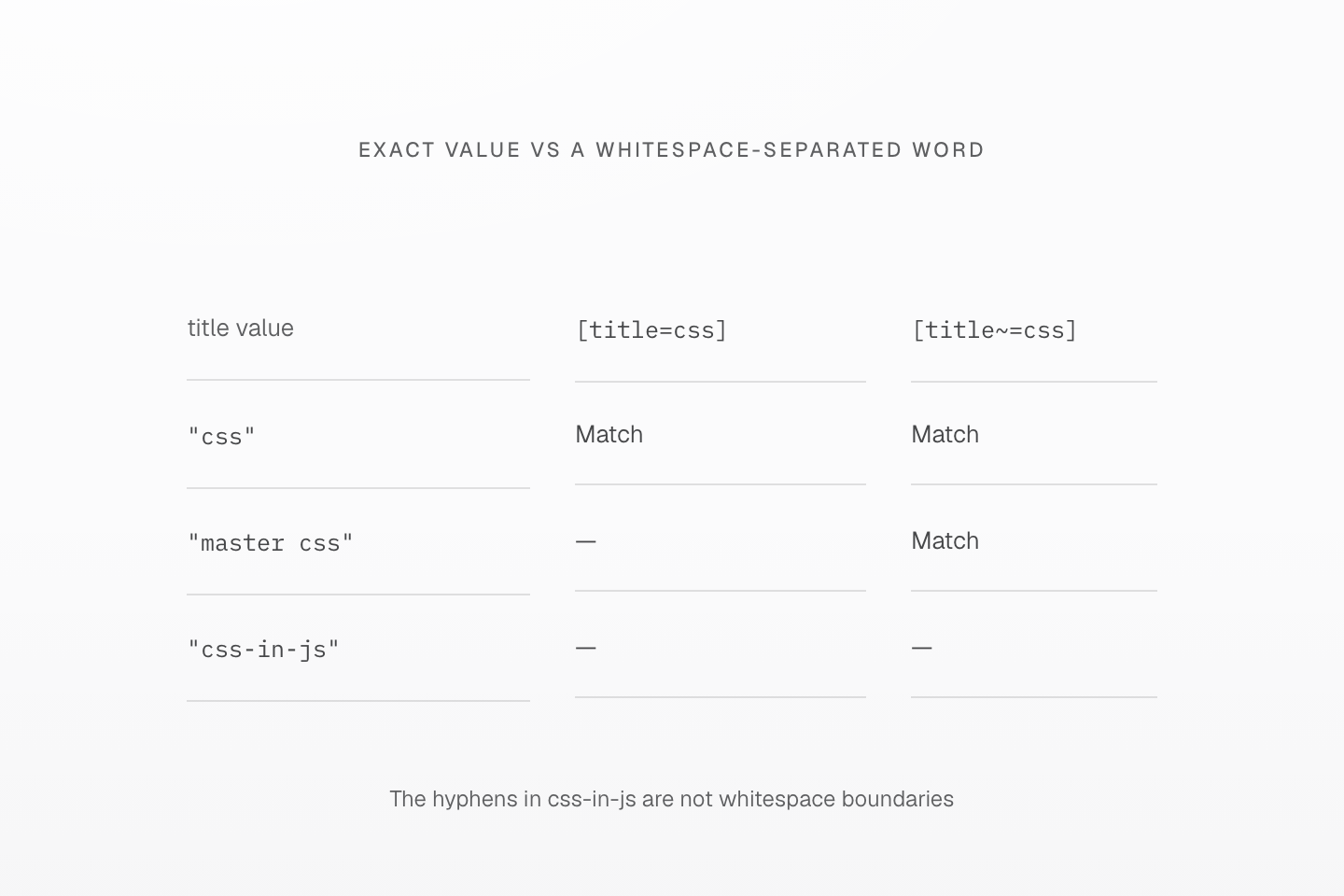
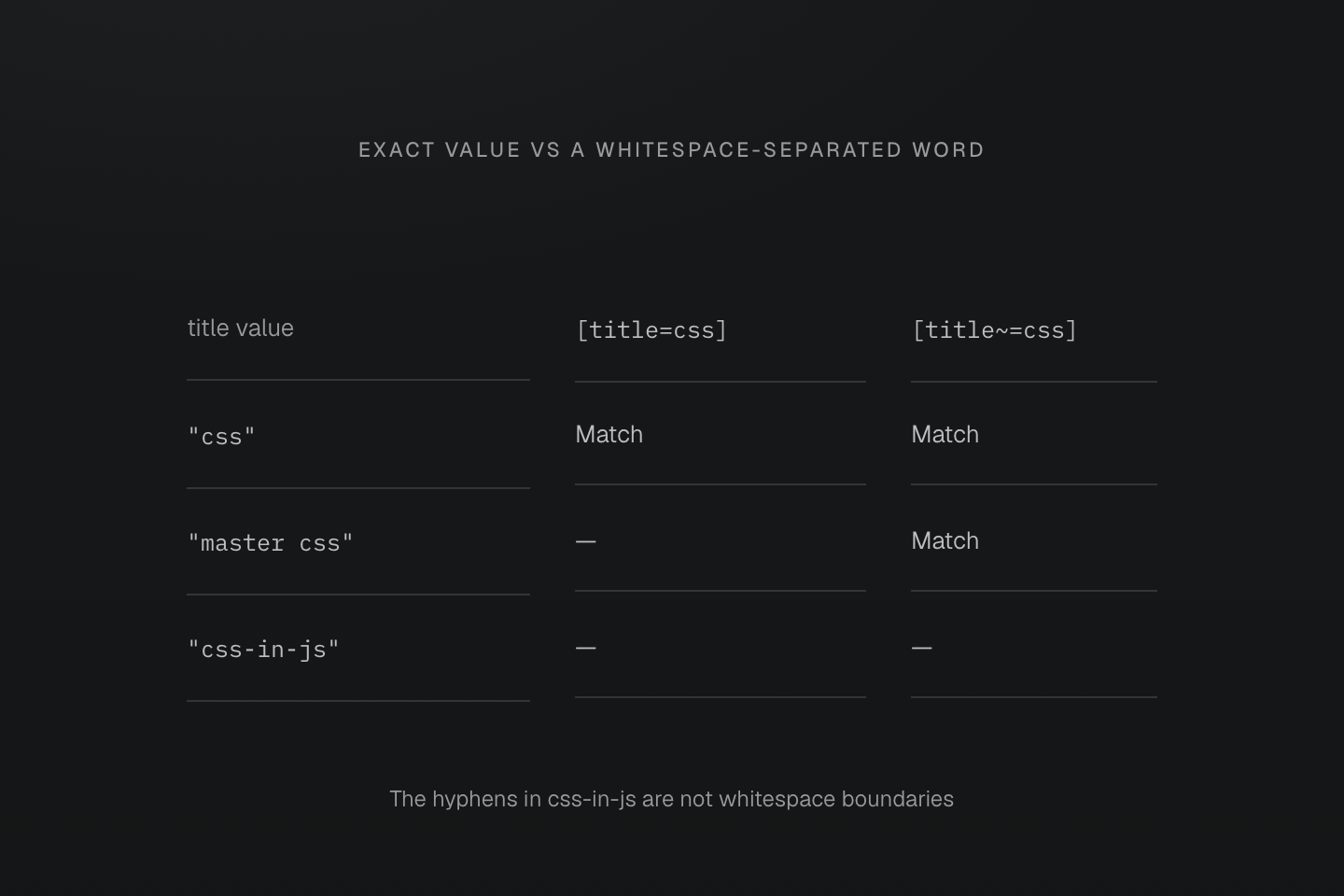
每列以兩個後綴檢查同一個 DOM 屬性值。連字號不構成以空白分隔的單字邊界。
文字說明
- [title=css] 只符合恰為 css 的值。[title~=css] 則符合以空白分隔、且等於 css 的單字。
- 兩個選擇器都符合 css。只有單字選擇器符合 master css。兩者都不符合 css-in-js。
- 選擇器檢查屬性,不會分割 class 字串,也不會編輯屬性值。
引號內的屬性文字保留字面意義:underline[data-state=':first']:first-child 會檢查值 :first,並另外檢查元素位置。[data-id='a_b'] 中的底線留在值內;.is\_active 中跳脫的底線則留在 class 識別名稱內。
<a class="underline[data-state=':first']:first-child" data-state=":first" href="/guide">Guide</a><a class="underline.is\_active is_active" href="/reference">Reference</a>產生的 CSS
@layer utilities { .underline\.is\\_active.is\_active { text-decoration-line: underline } .underline\[data-id\=\'a_b\'\][data-id='a_b'] { text-decoration-line: underline } .underline\[data-state\=\'\:first\'\]\:first-child[data-state=':first']:first-child { text-decoration-line: underline }}CSS 引號無法阻止 HTML 空白分隔 class。屬性值中若需要真正的空白,請用 CSS 跳脫,例如 [data-label='New\000020collection']。引號值後可直接接大小寫旗標,例如 [data-kind='draft'i] 代表 ASCII 不分大小寫比對。原生運算子與大小寫比對請見屬性選擇器。
產生的 CSS
@layer utilities { .underline\[data-kind\=\'draft\'i\][data-kind='draft' i] { text-decoration-line: underline } .underline\[data-label\=\'New\\000020collection\'\][data-label='New\000020collection'] { text-decoration-line: underline }}偽元素
偽元素後綴指向該偽元素,而非產生它的元素。使用生成內容時,請明確撰寫 content 宣告:
<span class="(content:open-quote)::before (content:close-quote)::after">Keep the interface clear.</span>產生的 CSS
@layer utilities { .\(background-color\:currentcolor\)\:\:-webkit-scrollbar-thumb::-webkit-scrollbar-thumb { background-color: currentcolor } .\(content\:close-quote\)\:\:after::after { content: close-quote } .\(content\:open-quote\)\:\:before::before { content: open-quote }}生成內容屬於偽元素
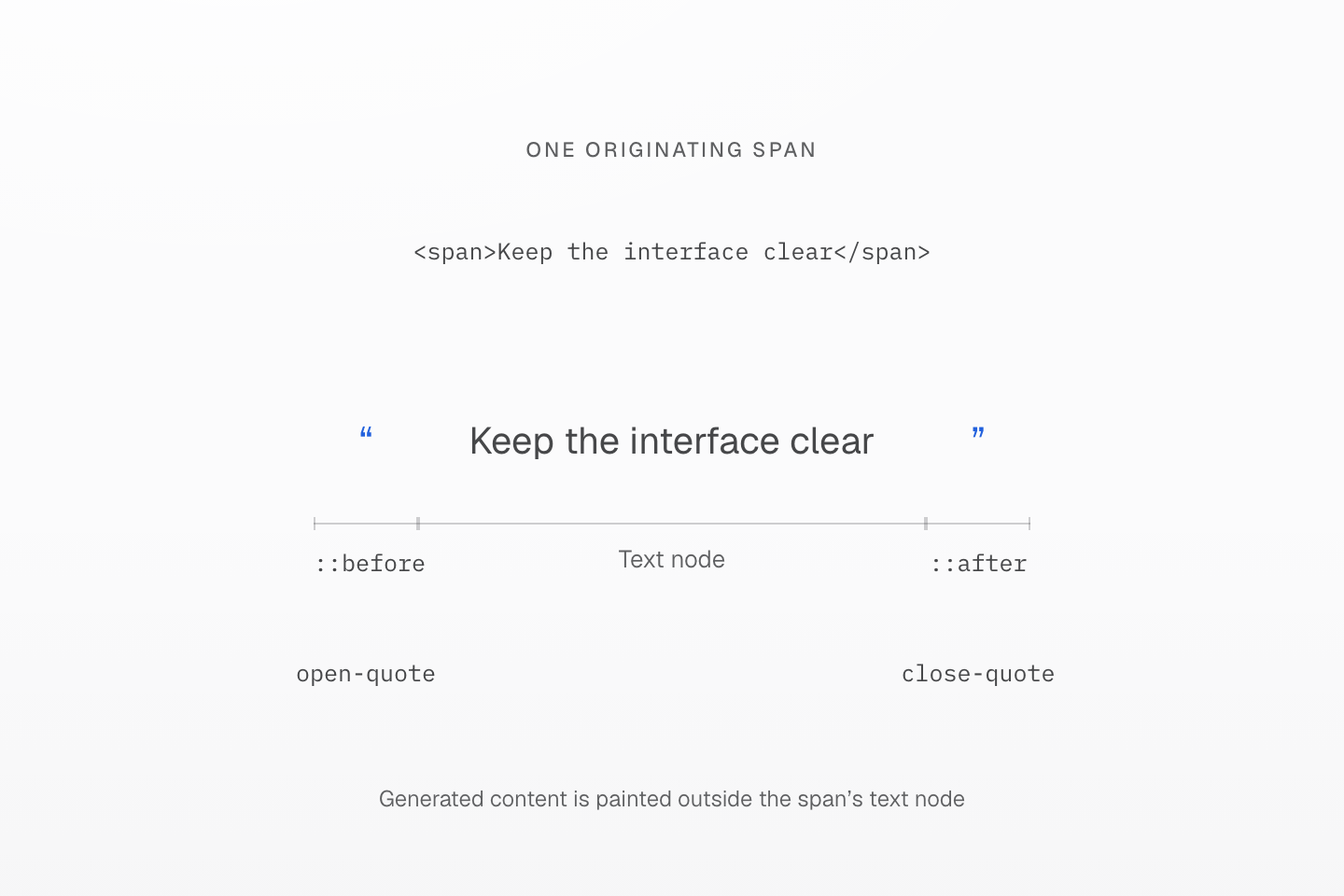
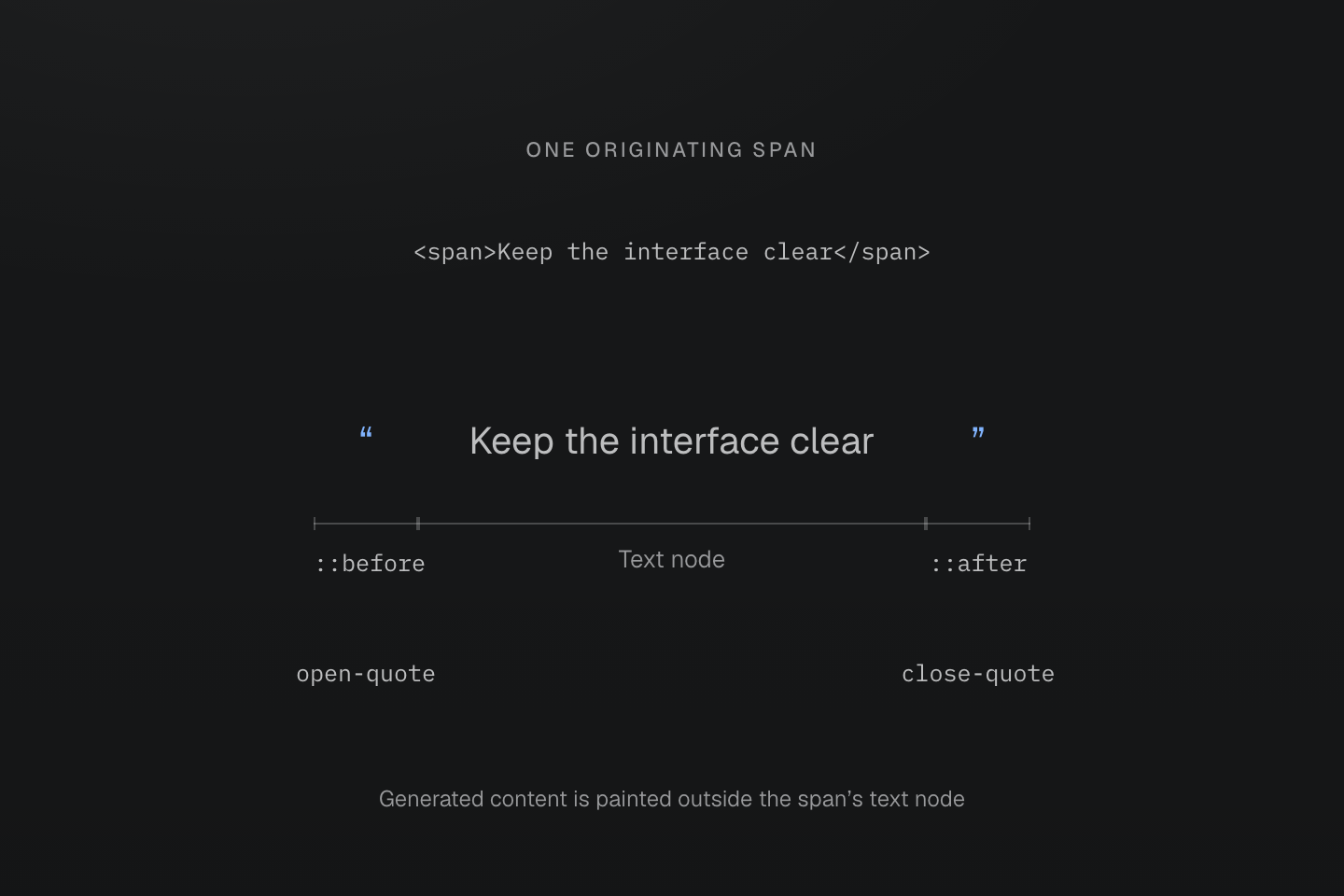
引號由真正的 ::before 與 ::after content 宣告生成。三個括弧標示同一個渲染元素的各部分,不代表三個 DOM 子元素。
文字說明
- span 內含文字 Keep the interface clear。其 (content:open-quote)::before 與 (content:close-quote)::after class 提供可見的引號。
- 每個宣告都指向自己的偽元素。Master CSS 不會建立獨立子元素,也不會只因存在偽元素後綴就加入 content 宣告。
廠商專屬選擇器須明確撰寫。Master CSS 會保留其拼法,不會將偽元素展開成廠商變體,也不會補上瀏覽器支援。引號值中含有括號的情況,請見原生宣告邊界。
選擇器權重
生成的選擇器遵循瀏覽器的選擇器權重規則。無論名稱內有多少標點,跳脫後的 class 名稱都只貢獻一個 class 選擇器的權重。附加的後綴則另外計算。
| class, ID-class/屬性/狀態-型別/偽元素 | CSS |
|---|---|
underline | 0-1-0 |
underline:hover | 0-2-0 |
underline>a | 0-1-1 |
underline:where(:hover,#selected) | 0-1-0 |
underline:is(:hover,#selected) | 1-1-0 |
:is()、:not() 與 :has() 採用其選擇器清單中最高的權重。:where() 不增加權重,包含其引數也是如此。組合器與通用選擇器也不增加權重。這些權重是在階層串接已決定來源、重要性與串接層優先順序後才適用;較高權重的選擇器不會自動勝過另一個串接層中的規則。
產生的 CSS
@layer utilities { .underline\:is\(\:hover\,\#selected\):is(:hover, #selected) { text-decoration-line: underline } .underline\:where\(\:hover\,\#selected\):where(:hover, #selected) { text-decoration-line: underline }}where() 與 is() 可比對相同狀態,但權重不同
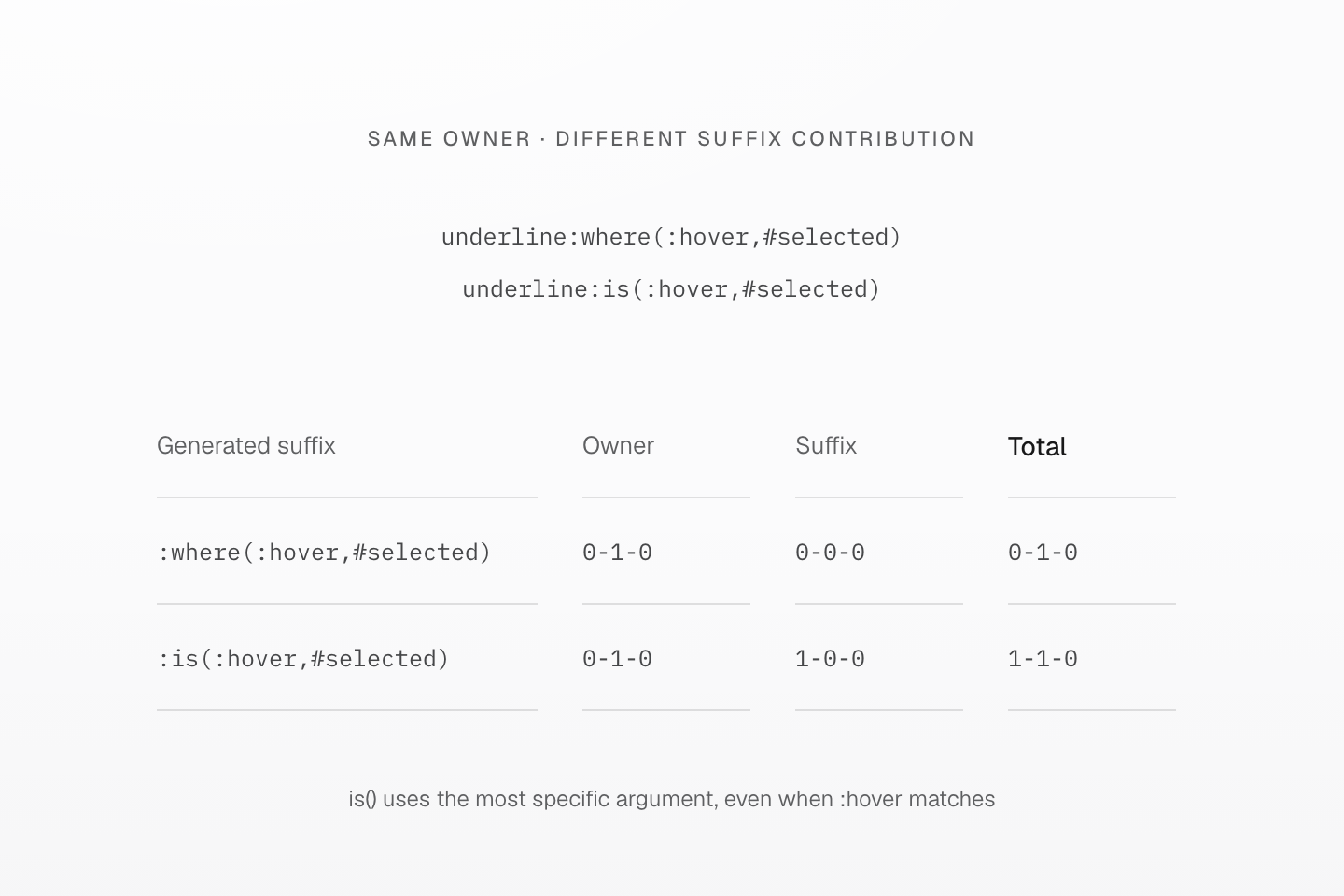
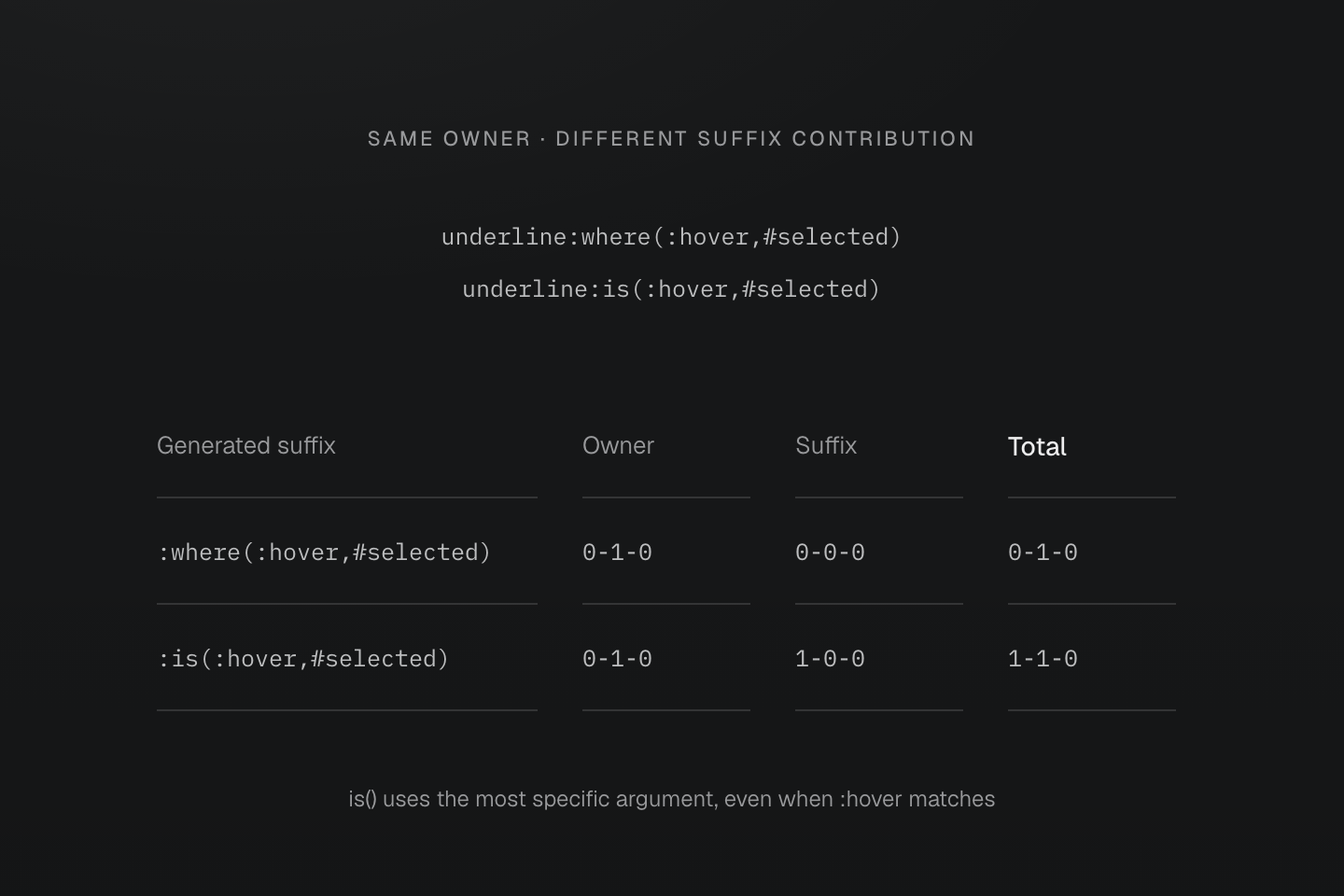
圖示只比較選擇器權重。階層串接會先考量來源、重要性與串接層優先順序。
文字說明
- 兩個生成選擇器中,跳脫後的完整 class 所屬元素都貢獻 0-1-0。
- :where(:hover,#selected) 的後綴貢獻 0-0-0,因此總計為 0-1-0。
- 對 :is(:hover,#selected) 而言,ID 引數提供最高引數權重 1-0-0,所以即使符合的是 hover 選項,總計仍為 1-1-0。
規則排序請見串接層,實務決策請見 指南的覆寫流程。重新排列 HTML class 不會改變選擇器權重。
外部情境
後綴以帶有 class 的元素為起點。目標需要依祖先或前方同層元素套用樣式時,可以用原生 CSS 規則直接表達關係:
@layer components { .active .contextual { display: none; } .active > .child-contextual { display: none; } .active + .adjacent-contextual { display: none; } .active ~ .sibling-contextual { display: none; }}若要將數個 utility 宣告包在相同關係中,請用含有原生選擇器與 @contents 的 mixin。mixin 內容契約定義展開與轉送方式;重複使用樣式說明何時適合選用此形式。
生成 CSS 證明已輸出規則,不代表瀏覽器一定支援或符合該選擇器。請檢查 DOM 關係、實際狀態與原生選擇器合法性。在一般 CSS 選擇器清單中,無效分支可能使整份清單失效;:is() 與 :where() 則使用容錯清單。瀏覽器檢查與備援設計請見相容性。