选择器
选择器的附加方式、关联元素、列表、字面值编码和选择器优先级。
本页内容
选择器后缀决定哪个元素或伪元素应用该类的声明。带有完整类名的元素是起点:后缀可以检查该元素、选择相关元素,或同时执行两者。
本页定义选择器的附加方式、编码、分组与优先级。语法教程说明如何为组件添加悬停与键盘焦点样式;CSS 选择器则定义原生匹配行为。
附加选择器
将选择器接在已注册工具类后,或原生声明的右括号之后。条件放在选择器之后,重要性标记放在最末尾:
utility<selector><conditions>!(property:value)<selector><conditions>!上方尖括号中的部分和 ! 是可省略的语法占位符。例如,underline:hover@sm 在带有类的元素处于悬停状态且视口匹配 @sm 时应用下划线。条件不会改变选择器的目标元素。
生成的 CSS
@layer utilities { @media (width >= 52.125rem) { .underline\:hover\@sm:hover { text-decoration-line: underline } } @media (width >= 52.125rem) { .\(text-decoration-thickness\:2px\)\:hover\@sm:hover { text-decoration-thickness: 2px } }}Master CSS 在生成的 CSS 选择器中转义完整类名。.underline\:hover 中的冒号是字面类名的一部分,后接的 :hover 才是真正的伪类。HTML 中请像示例一样编写未转义的类名。
匹配带有类的元素
没有组合器时,后缀为带有类的元素增加条件。underline.active 仅匹配类列表同时包含 underline.active 与 active 的元素。
<a class="underline.active active" href="/guide/installation">Installation</a>| 类 | 带有类的元素须满足的条件 |
|---|---|
underline.active | 也带有 active 类 |
underline#current | ID 为 current |
underline[data-current] | 带有 data-current 属性 |
underline:hover | 匹配浏览器的悬停状态 |
underline:is(a) | 是 a 元素 |
生成的 CSS
@layer utilities { .underline\#current#current { text-decoration-line: underline } .underline\:is\(a\):is(a) { text-decoration-line: underline } .underline\[data-current\][data-current] { text-decoration-line: underline } .underline\:hover:hover { text-decoration-line: underline } .underline\.active.active { text-decoration-line: underline }}检查同一元素的类型请用 :is(a) 或 :where(a)。选择其子元素请用 >a 或 >*。直接接在工具类名称后的裸标签名不是独立的选择器后缀。
组合条件
相邻的简单选择器描述同一个元素。underline:hover:not([aria-disabled=true]) 要求悬停,并排除 aria-disabled 属性为 true 的元素;它不会设置或更新该属性。
生成的 CSS
@layer utilities { .underline\:hover\:not\(\[aria-disabled\=true\]\):hover:not([aria-disabled=true]) { text-decoration-line: underline }}选择器响应 DOM 与浏览器状态,不会创建交互行为。原生属性与 ARIA 保留各自的语义。尤其 aria-disabled="true" 只描述禁用状态,本身不会阻止激活操作。
相关元素
组合器从带有类的元素移向另一个元素。声明应用于选择器末端的元素,而非从带有类的元素继承而来。
| 类 | 目标 |
|---|---|
underline_a | 任意深度的后代链接 |
underline>a | 直接子链接 |
underline+a | 下一个兄弟元素,且该元素为链接 |
underline~a | 同一父元素下后续的所有兄弟链接 |
underline>* | 每个直接子元素 |
_ 编码选择器之间表示后代关系的空格。HTML 中真正的空格会开始另一个类。>、+ 和 ~ 保留 CSS 原生含义。
生成的 CSS
@layer utilities { .underline\+a + a { text-decoration-line: underline } .underline\>\* > * { text-decoration-line: underline } .underline\>a > a { text-decoration-line: underline } .underline_a a { text-decoration-line: underline } .underline\~a ~ a { text-decoration-line: underline }}子选择器只到第一层
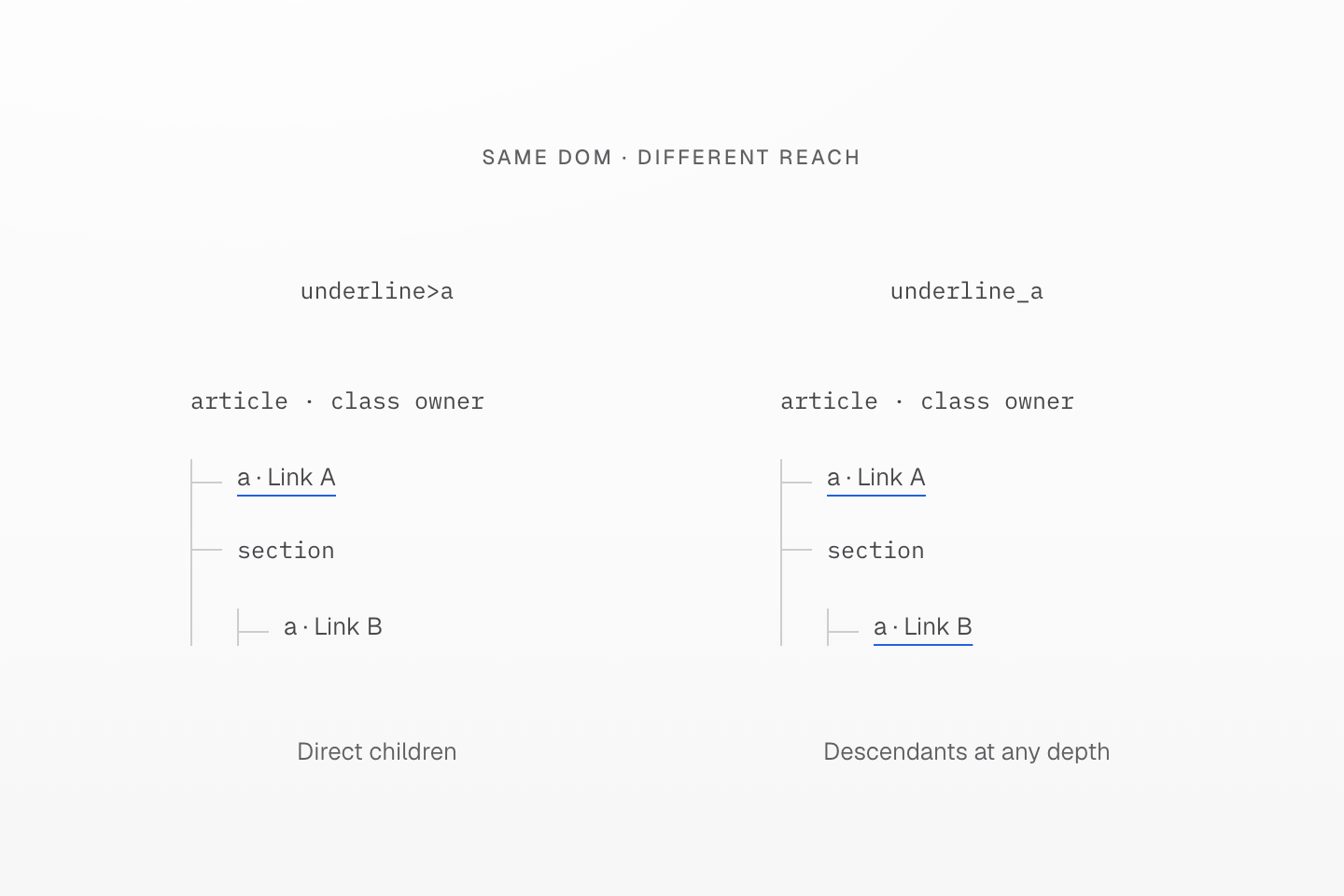
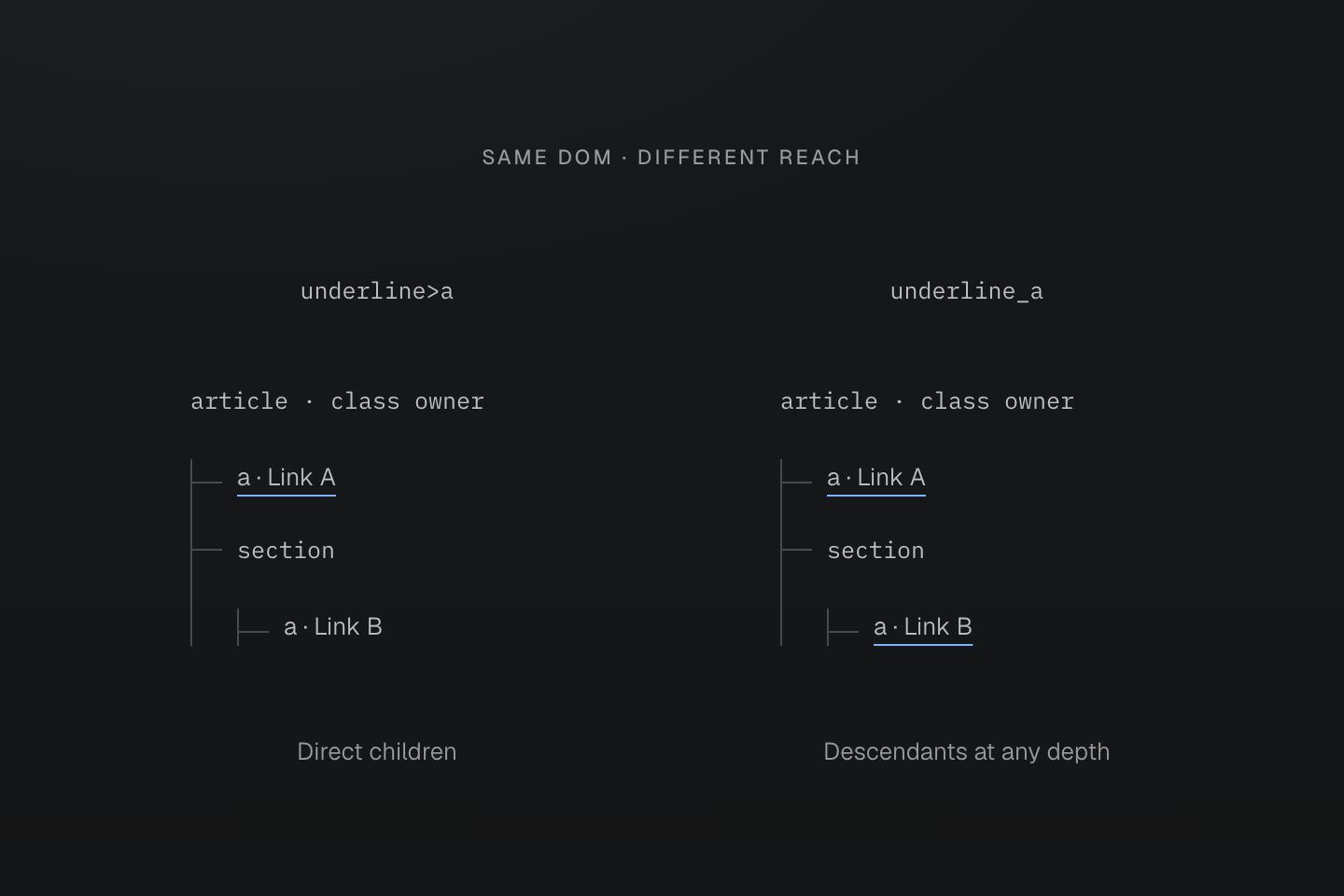
两棵树结构相同。下划线标出实际目标链接,缩进和连接分支表示深度。
文字说明
- 带有类的 article 包含链接 A,以及内含链接 B 的 section。
- underline>a 仅为直接子链接 A 添加下划线。underline_a 为 A、B 均添加下划线,因为两者都是后代链接。
- 声明直接指向这些链接;图示并不表示从 article 继承文字装饰。
兄弟选择器从所属元素向后选择
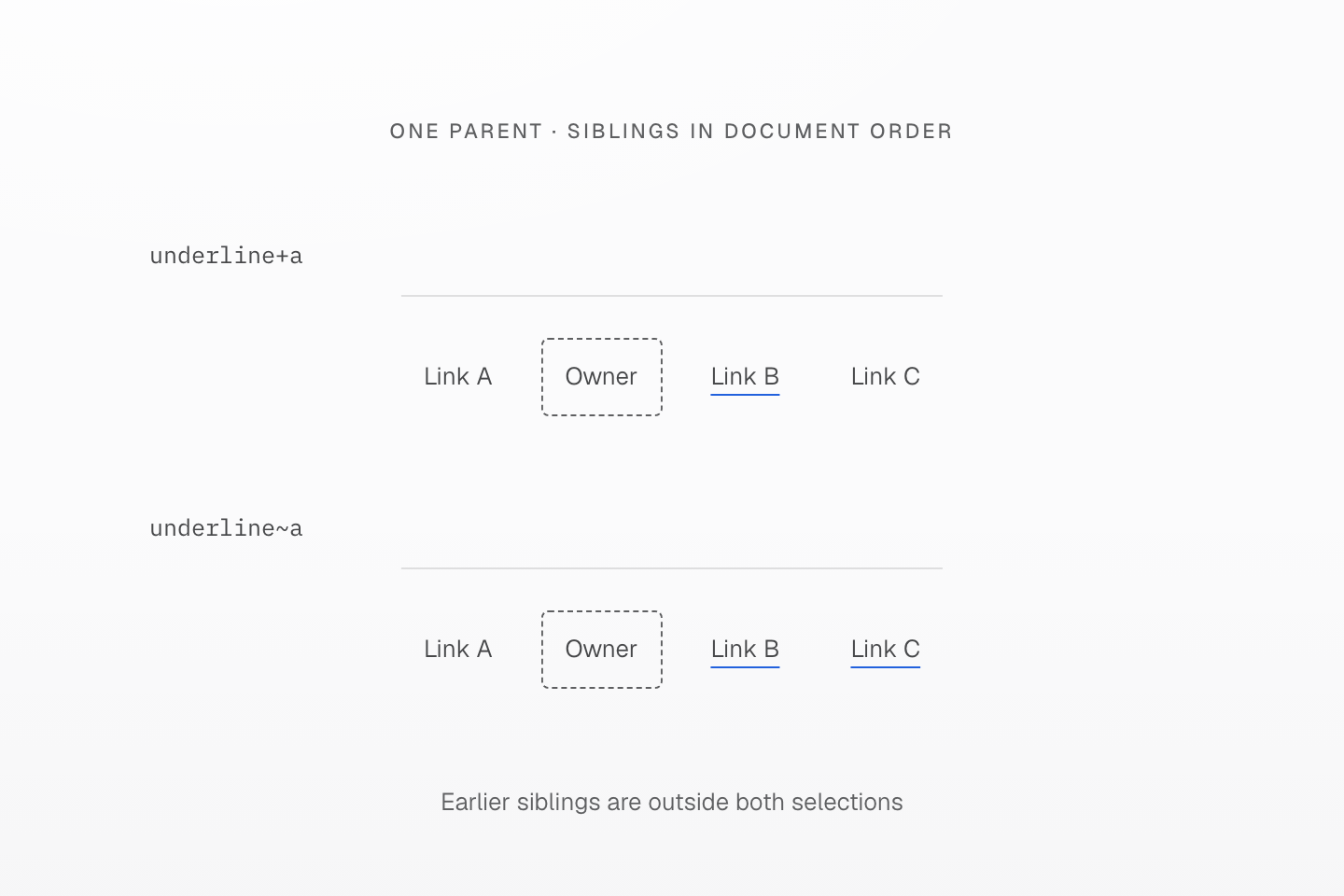
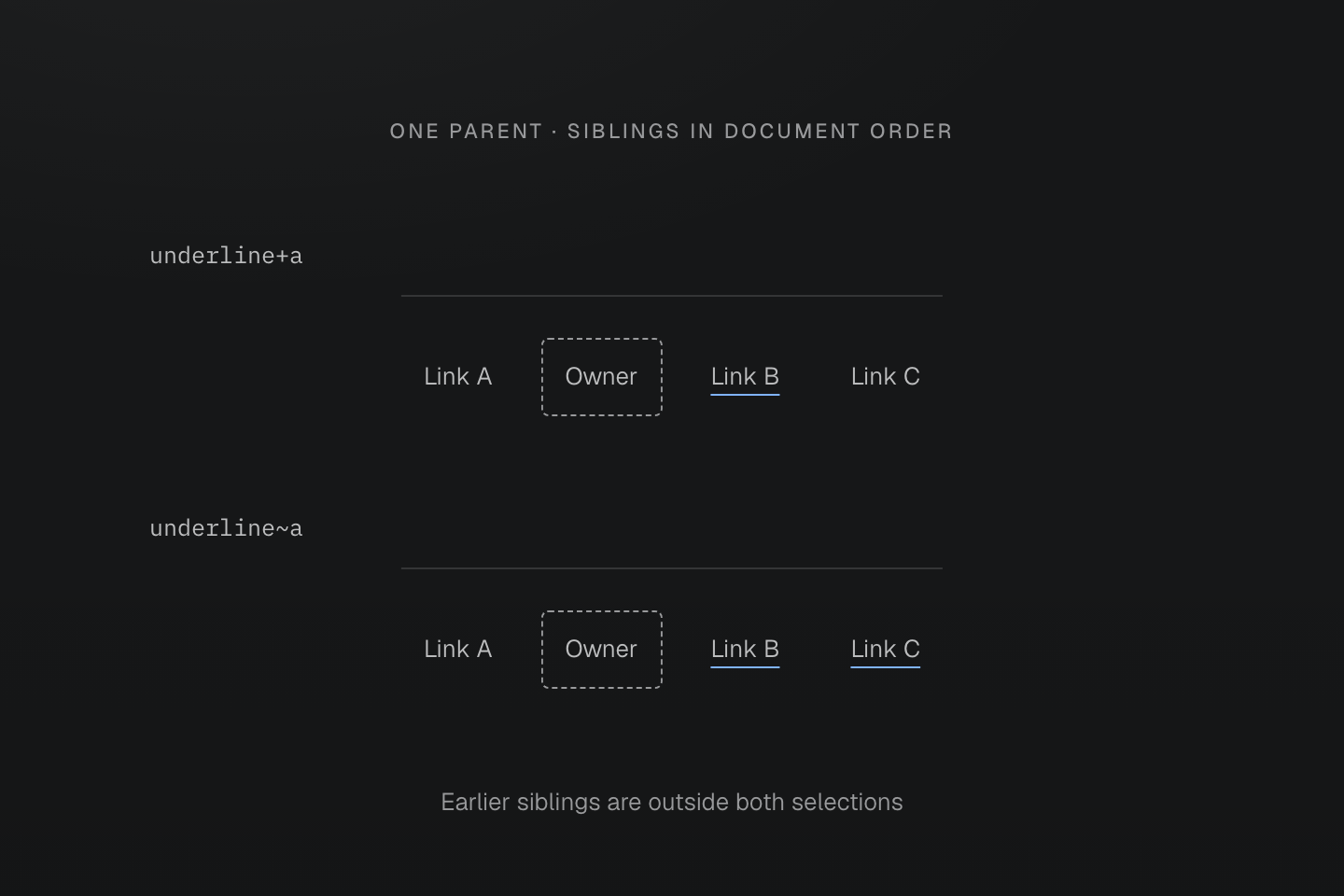
每排所有节点具有同一个父元素。边框标出的所属元素带有类,下划线标出被选中的链接。
文字说明
- 兄弟顺序为链接 A、带有类的元素、链接 B、链接 C。
- underline+a 选择下一个兄弟元素 B。underline~a 选择后方的兄弟链接 B 与 C。
- 两个选择器都不会选择前方的兄弟元素 A。若下一个元素不是链接,+a 就不会选择任何元素。
状态的位置
状态的位置决定哪个元素必须匹配该状态。这两个类具有相同的父子关系,但在不同位置检查悬停:
| article 上的类 | 悬停条件 | 添加下划线的链接 |
|---|---|---|
underline:hover>a | article 处于悬停状态 | 所有直接子链接 |
underline>a:hover | 直接子链接处于悬停状态 | 仅该链接 |
相同悬停,不同目标
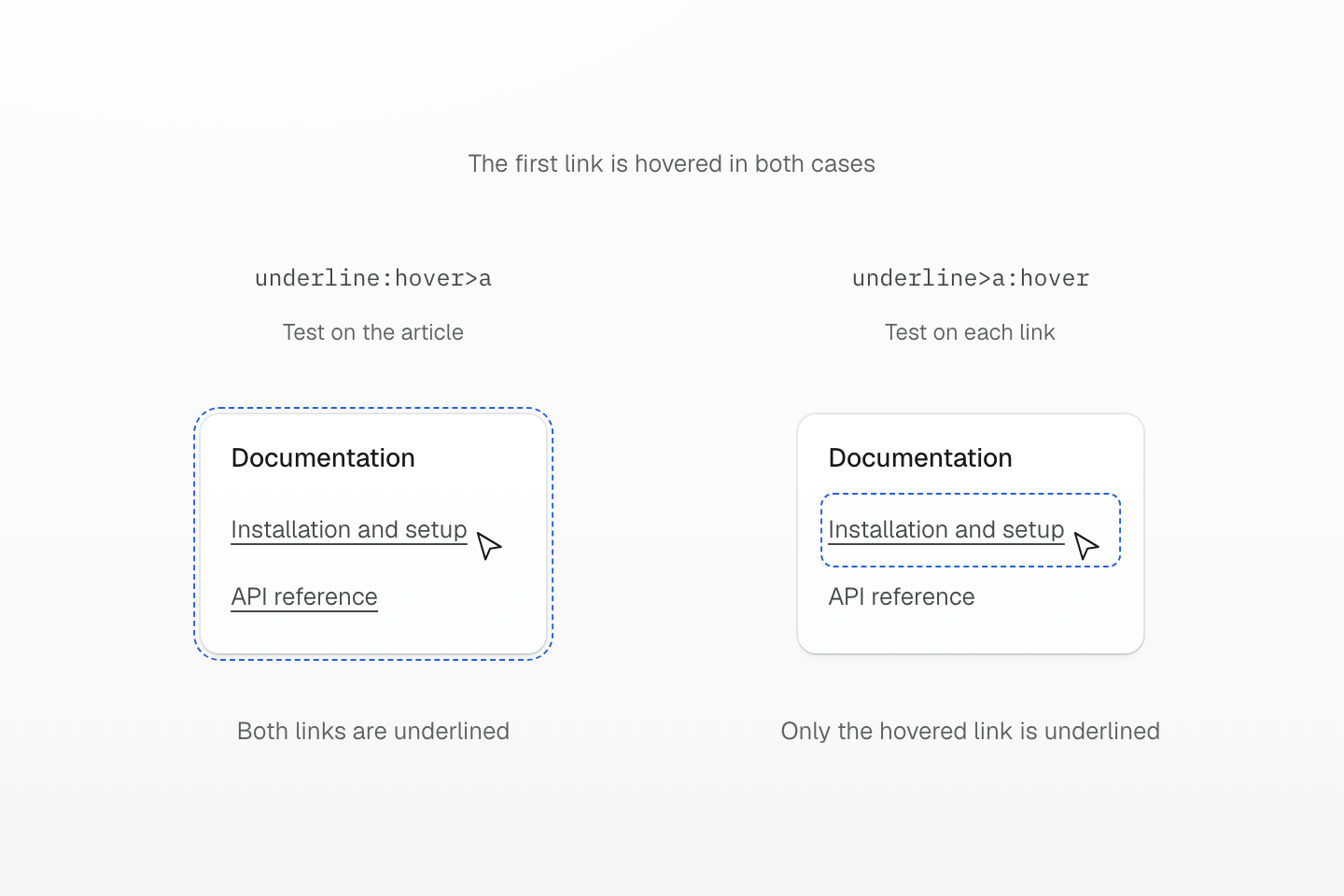
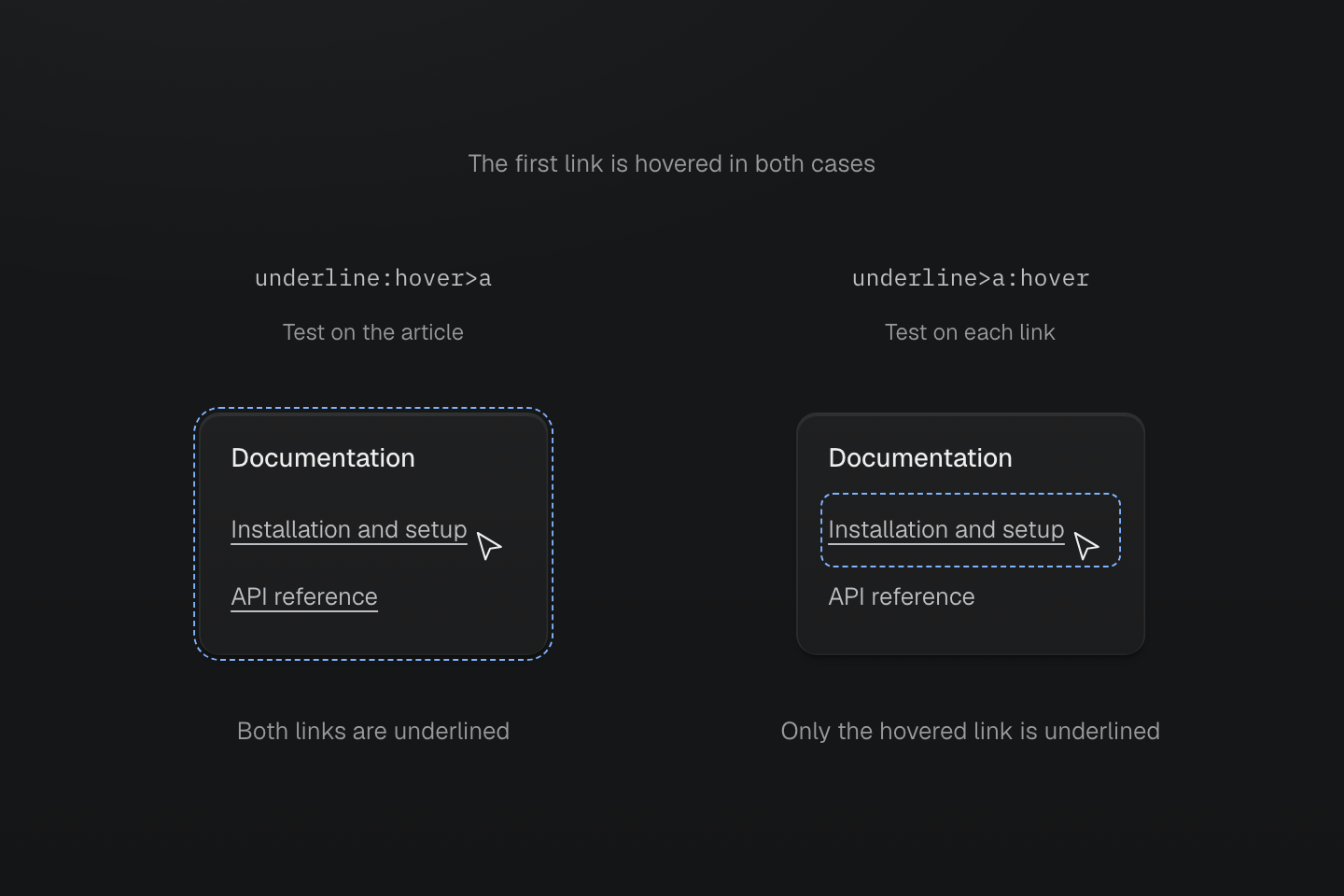
两个示例的第一个链接均处于悬停状态。蓝色虚线轮廓标出匹配后缀 :hover 检查的元素,并非生成的边框。
文字说明
- 两个 article 都带有工具类,并包含相同的两个直接子链接。第一个链接处于悬停状态,因此两个祖先 article 也都匹配 :hover。
- underline:hover>a 先检查 article,再选择直接子链接。两个链接都应用 text-decoration-line: underline。
- underline>a:hover 先选择直接子链接,再逐一检查。只有处于悬停状态的第一个链接应用声明。
- 蓝色虚线轮廓标出匹配悬停检查的元素。它们不表示生成的边框,也不表示第二个 article 未处于悬停状态。
<article class="underline:hover>a"> <p>Documentation</p> <a class="(text-decoration-line:none)" href="/guide/installation">Installation and setup</a> <a class="(text-decoration-line:none)" href="/reference/packages">API reference</a></article><article class="underline>a:hover"> <p>Documentation</p> <a class="(text-decoration-line:none)" href="/guide/installation">Installation and setup</a> <a class="(text-decoration-line:none)" href="/reference/packages">API reference</a></article>生成的 CSS
@layer utilities { .\(text-decoration-line\:none\) { text-decoration-line: none } .underline\:hover\>a:hover > a { text-decoration-line: underline } .underline\>a\:hover > a:hover { text-decoration-line: underline }}悬停链接时,其祖先 article 也会处于悬停状态。因此第一个示例中两个链接都符合条件;第二个示例中,另一个链接仍未通过自身的 :hover 检查。各类都属于 article,但声明指向它的链接。链接自身的类先移除默认下划线,优先级更高的父子选择器则在悬停条件匹配时恢复下划线。
选择器列表
顶层逗号会从同一个带有类的元素开始另一条分支。每条分支都要重复组合器:block>div,>span 选择直接的 div 子元素与直接的 span 子元素。第二条分支不会接续第一条分支的目标。
<section class="block>div,>span"> <div>First child</div> <span>Second child</span></section>生成的 CSS
@layer utilities { .block\>div\,\>span > div, .block\>div\,\>span > span { display: block } .\(content\:\'“\'\)\:\:before\,\:\:after::before, .\(content\:\'“\'\)\:\:before\,\:\:after::after { content: '“' }}函数或带引号属性值中的逗号仍留在该结构内。underline:is(:hover,:focus-visible) 是一个包含两种选项的选择器后缀,而不是两条顶层分支。
生成的 CSS
@layer utilities { .underline\[data-label\=\'draft\,review\'\][data-label='draft,review'] { text-decoration-line: underline } .underline\:is\(\:hover\,\:focus-visible\):is(:hover, :focus-visible) { text-decoration-line: underline }}选择器列表从类所属元素重新开始
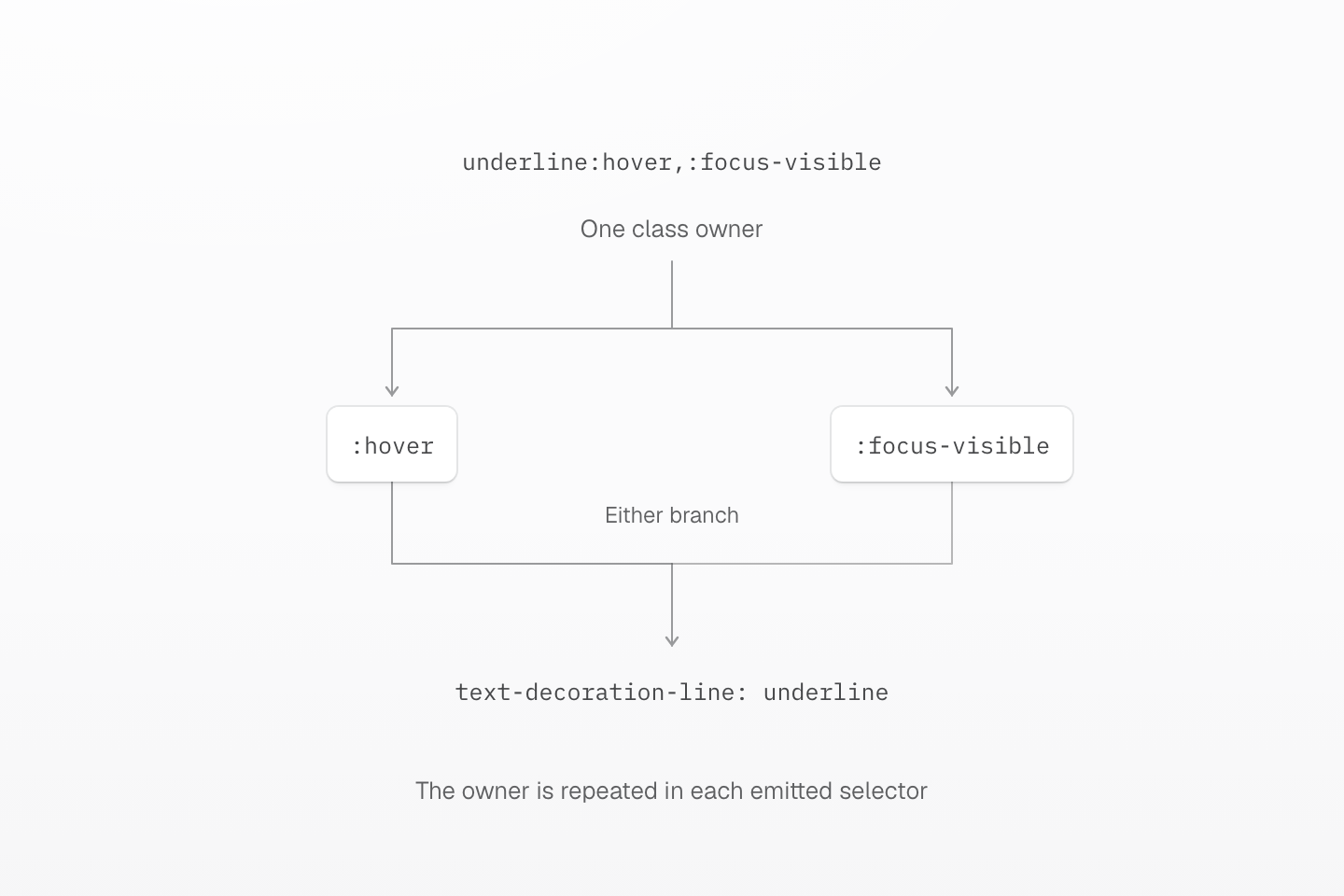
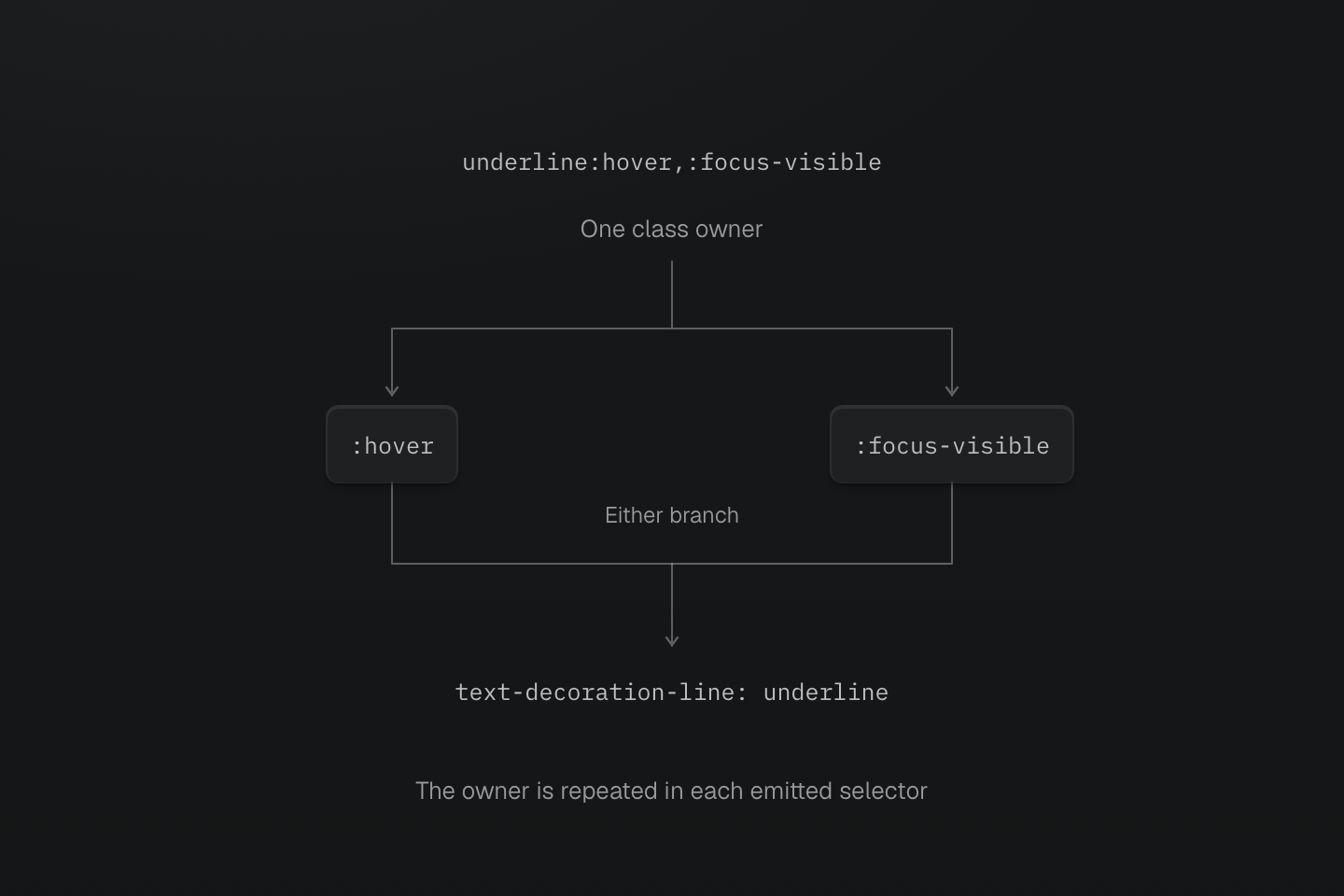
逗号分隔不同选项。每个选择器均从带有类的元素开始;任一状态均可匹配。
文字说明
- underline:hover,:focus-visible 生成选择器列表,每条分支均重复完整且已转义的类所属元素选择器。
- hover 与 focus-visible 是可选状态,不要求同时匹配。两条分支共用声明。
选择器函数
| 函数 | 匹配行为 |
|---|---|
:is(...) | 匹配列表中的至少一个选择器 |
:where(...) | 与 :is() 相同,但函数及其参数的优先级为零 |
:not(...) | 排除匹配列表中任一选择器的元素 |
:has(...) | 从当前选择的元素检查相对关系是否匹配 |
:has() 检查关系,但不会将声明移到匹配的相关元素。b-blue-60:has(>input:checked) 在 label 的直接子 input 被选中时设置 label 的边框颜色:
<label class="b(1) b-solid b-line-control b-blue-60:has(>input:checked)"><input type="checkbox" />Include archived items</label>生成的 CSS
@layer theme { :root, :host { --color-blue-60: oklch(51.83% .2687 266.1) }}@layer utilities { .b-blue-60\:has\(\>input\:checked\):has(>input:checked) { border-color: var(--color-blue-60) } .underline\:has\(\+input\:checked\):has(+input:checked) { text-decoration-line: underline }}相对匹配也可以是兄弟元素:underline:has(+input:checked) 在下一个兄弟元素是已选中的 input 时,为带有类的元素添加下划线。原生 :has() 限制仍然适用;将 :has() 嵌套在自身内部无效。可运行的复选框示例及实用回退方案见兼容性。
has() 检查子元素,为所属元素应用样式
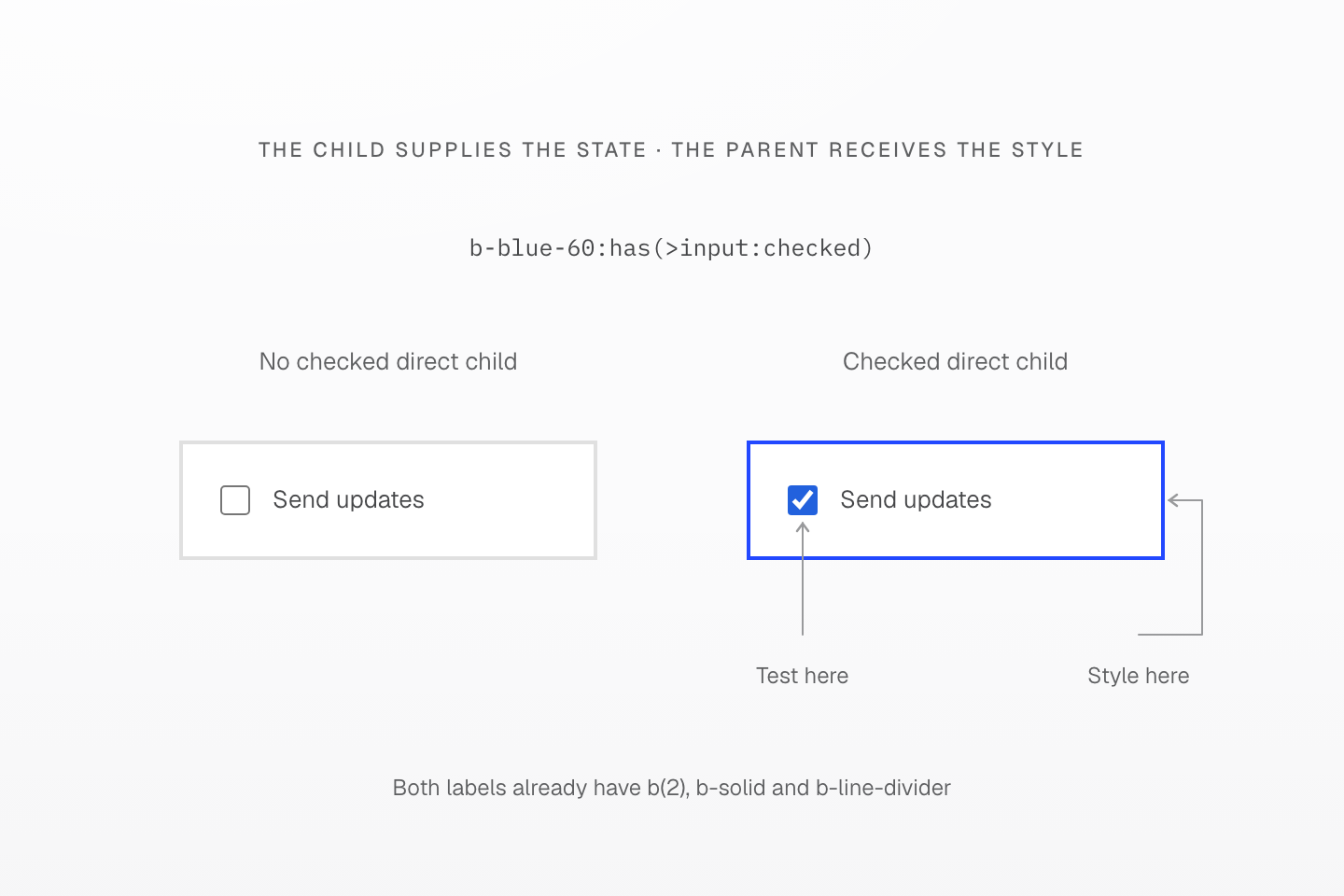
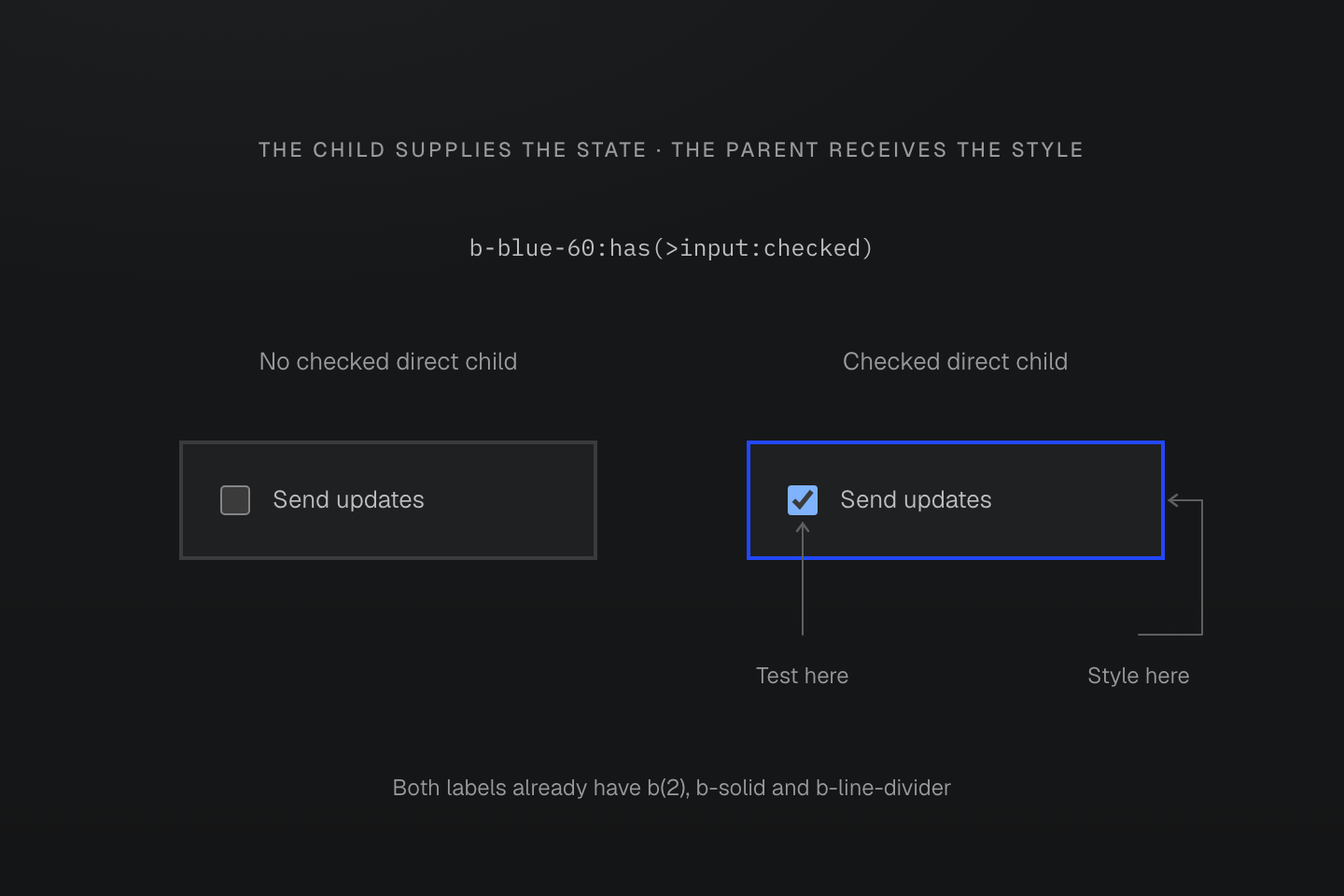
类位于 label 上。检查的是 input 的选中状态,应用 border-color 的则是 label。
文字说明
- b-blue-60:has(>input:checked) 检查带有类的元素是否具有已选中的直接子 input。
- 匹配时,改变的是所属 label 的边框颜色,而非 input。input 画在同一边界内,以区分检查位置与样式目标。
原生状态
Master CSS 保留原生伪类名称。以下为常用后缀,并非完整的状态注册表:
| 后缀 | 原生匹配上下文 |
|---|---|
:hover, :active | 指针悬停或激活 |
:focus, :focus-visible, :focus-within | 元素获得焦点、显示焦点指示,或其内部有焦点 |
:first-child, :last-child, :nth-child(even) | 兄弟元素间的位置 |
:valid, :invalid, :required | 原生表单约束 |
:disabled | 已禁用的表单控件 |
:checked, :indeterminate | 原生控件状态 |
:dir(rtl), :dir(ltr) | 解析后的文本方向 |
请使用 :first-child、:nth-child(odd) 这类完整名称。即使 Master CSS 能输出某种写法,浏览器仍可能不支持或视为无效。各状态的详细行为以原生伪类参考为准。
<ul> <li class="bg-surface-inset:nth-child(even)">Draft</li> <li class="bg-surface-inset:nth-child(even)">In review</li> <li class="bg-surface-inset:nth-child(even)">Published</li></ul>生成的 CSS
@layer theme { :root, :host { --color-zinc-5: oklch(96.5% .0011 265); --color-zinc-100: oklch(15% .0016 265) } :root, :host { --color-surface-inset: light-dark(var(--color-zinc-5), var(--color-zinc-100)) } :root, :host { --spacing-xs: .5rem }}@layer utilities { .bg-surface-inset\:nth-child\(even\):nth-child(even) { background-color: var(--color-surface-inset) } .mr-xs\:dir\(rtl\):dir(rtl) { margin-right: var(--spacing-xs) } .\(opacity\:\.5\)\:disabled:disabled { opacity: .5 }}属性选择器
属性后缀检查 DOM 值。布尔形式的属性选择器检查属性是否存在:[open] 匹配展开的 details 元素,[data-active] 则在该属性存在时匹配。检查特定状态值时请包含该值,例如 [aria-pressed=true]。
| 后缀 | 匹配条件 |
|---|---|
[data-active] | 属性存在,即使值为空 |
[aria-pressed=true] | 值恰为 true |
[href^=https] | 值以 https 开头 |
[href$='.pdf'] | 值以 .pdf 结尾 |
[title*=master] | 值包含 master |
[lang|=en] | 值为 en 或以 en- 开头 |
[title~=css] | 以空白分隔的值包含单词 css |
属性值完全相等与单词匹配不同
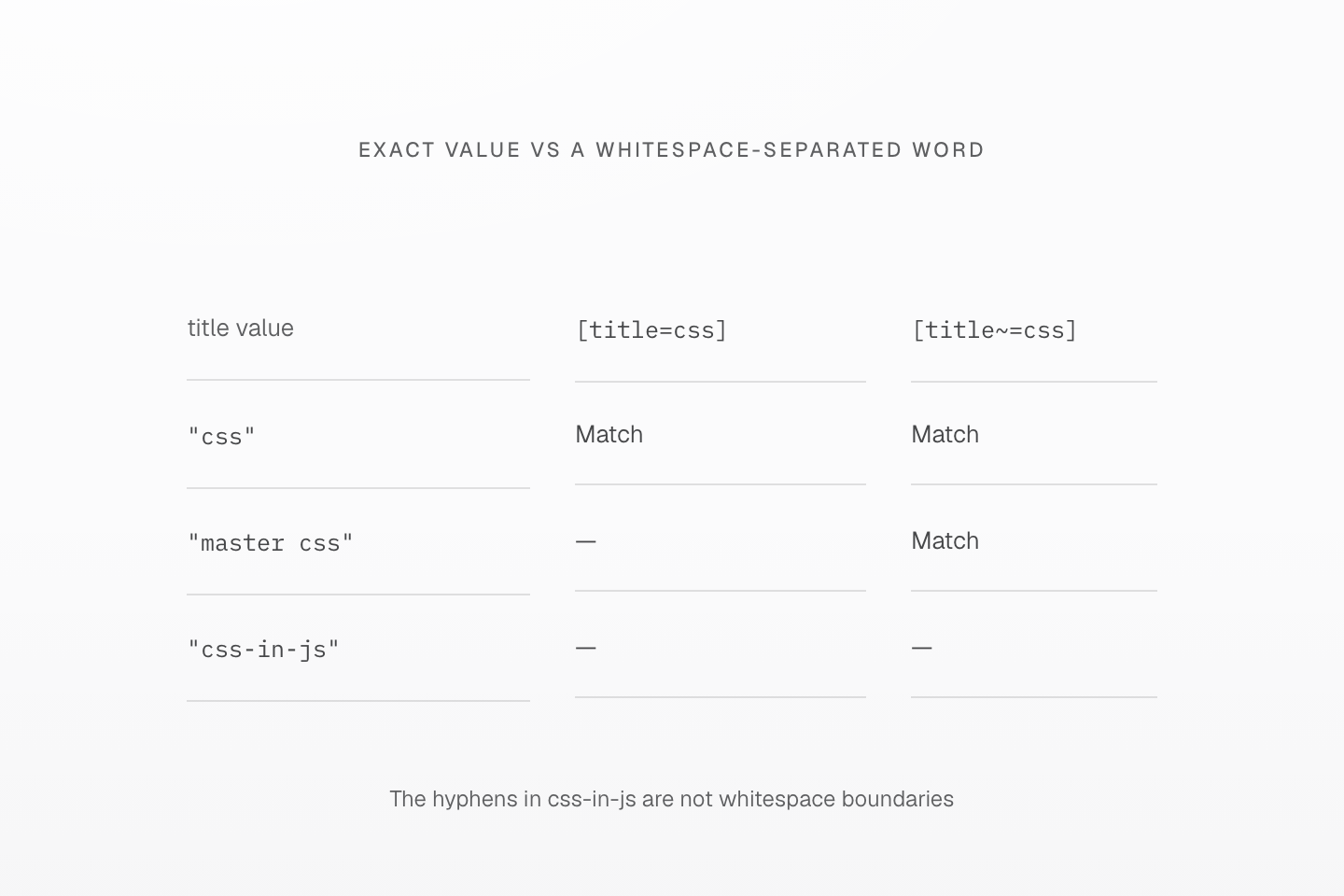
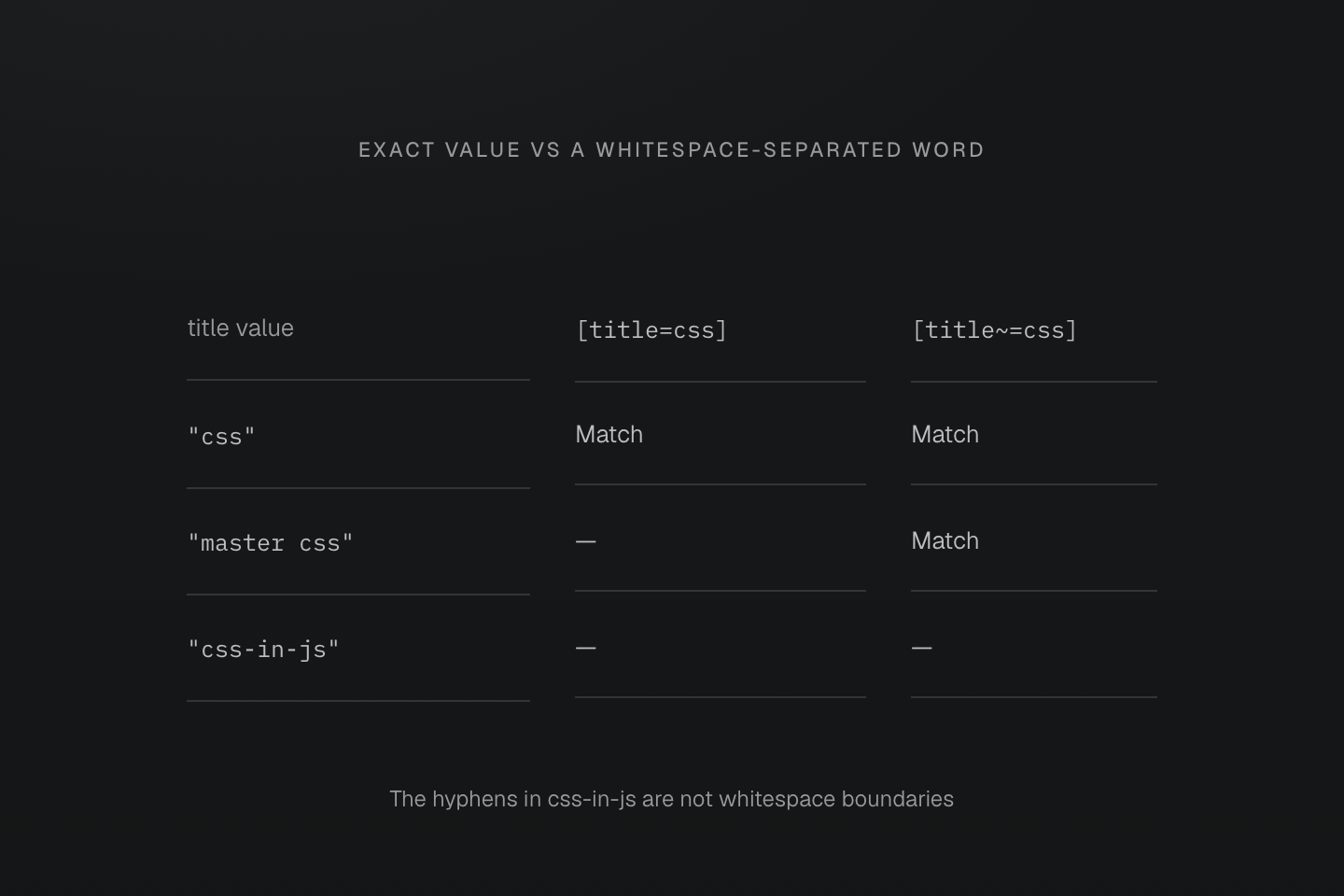
每行用两个后缀检查同一个 DOM 属性值。连字符不构成以空格分隔的单词边界。
文字说明
- [title=css] 仅匹配恰为 css 的值。[title~=css] 则匹配以空格分隔且等于 css 的单词。
- 两个选择器均匹配 css。只有单词选择器匹配 master css。两者均不匹配 css-in-js。
- 选择器检查属性,不会分割类字符串,也不会编辑属性值。
引号内的属性文本保留字面含义:underline[data-state=':first']:first-child 检查值 :first,并另行检查元素位置。[data-id='a_b'] 中的下划线留在值内;.is\_active 中转义的下划线则留在类标识符内。
<a class="underline[data-state=':first']:first-child" data-state=":first" href="/guide">Guide</a><a class="underline.is\_active is_active" href="/reference">Reference</a>生成的 CSS
@layer utilities { .underline\.is\\_active.is\_active { text-decoration-line: underline } .underline\[data-id\=\'a_b\'\][data-id='a_b'] { text-decoration-line: underline } .underline\[data-state\=\'\:first\'\]\:first-child[data-state=':first']:first-child { text-decoration-line: underline }}CSS 引号无法阻止 HTML 空格分隔类。属性值中若需要真正的空格,请用 CSS 转义,例如 [data-label='New\000020collection']。带引号的值后可直接接大小写标志,例如 [data-kind='draft'i] 表示 ASCII 不区分大小写匹配。原生运算符与大小写匹配见属性选择器。
生成的 CSS
@layer utilities { .underline\[data-kind\=\'draft\'i\][data-kind='draft' i] { text-decoration-line: underline } .underline\[data-label\=\'New\\000020collection\'\][data-label='New\000020collection'] { text-decoration-line: underline }}伪元素
伪元素后缀指向该伪元素,而非其来源元素。使用生成内容时请显式编写 content 声明:
<span class="(content:open-quote)::before (content:close-quote)::after">Keep the interface clear.</span>生成的 CSS
@layer utilities { .\(background-color\:currentcolor\)\:\:-webkit-scrollbar-thumb::-webkit-scrollbar-thumb { background-color: currentcolor } .\(content\:close-quote\)\:\:after::after { content: close-quote } .\(content\:open-quote\)\:\:before::before { content: open-quote }}生成内容属于伪元素
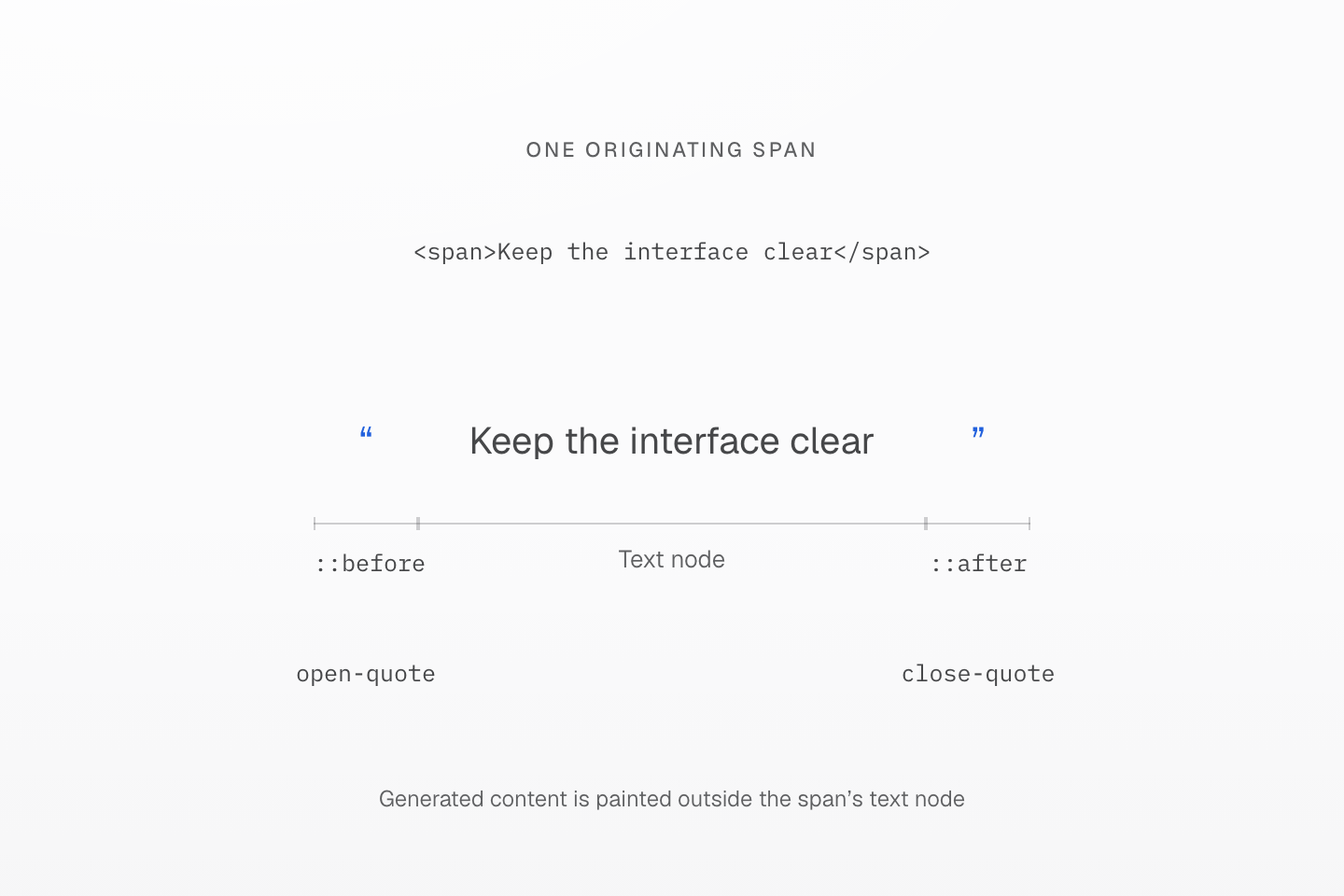
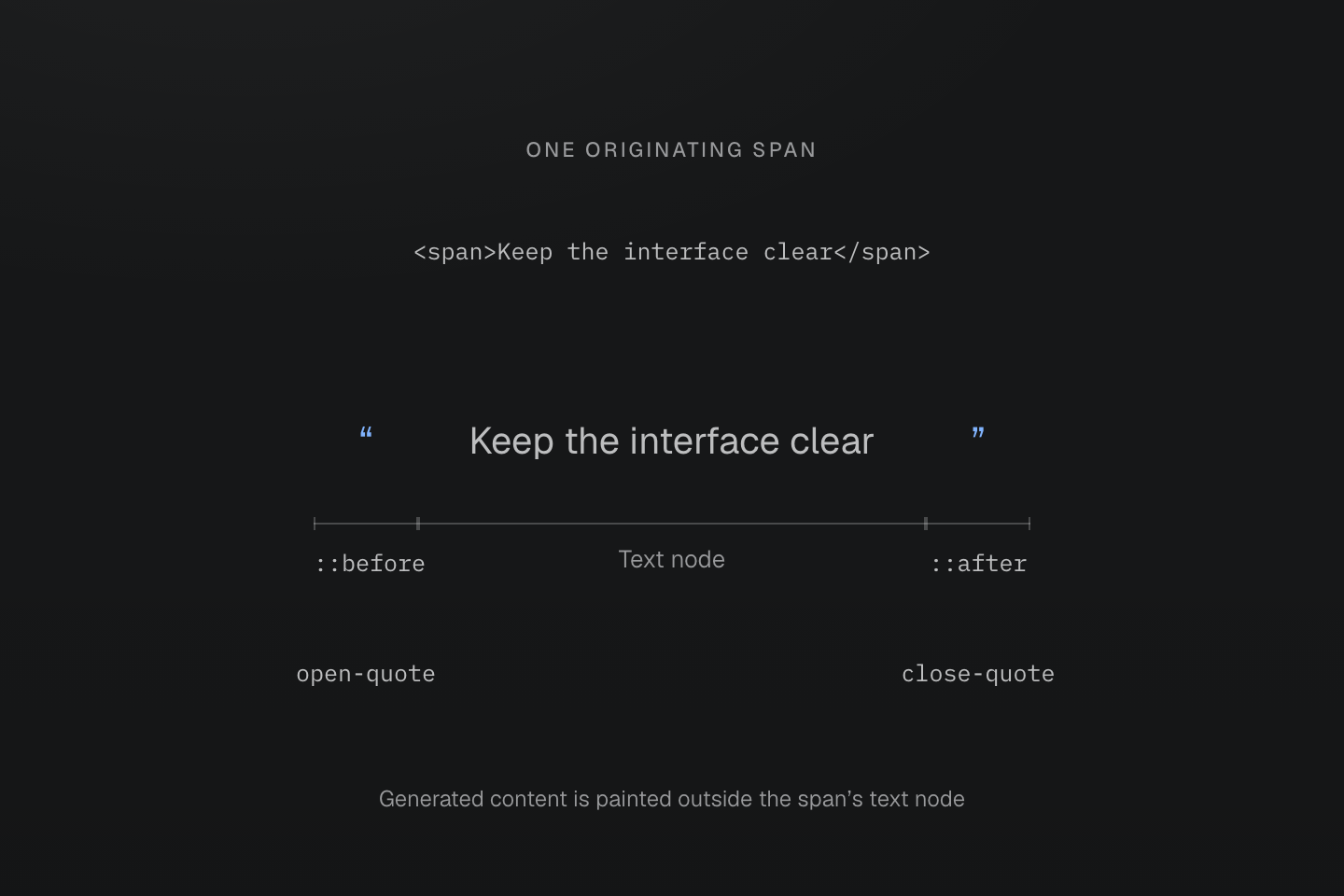
引号由真正的 ::before 与 ::after content 声明生成。三个括号标出同一渲染元素的各部分,并不表示三个 DOM 子元素。
文字说明
- span 包含文字 Keep the interface clear。其 (content:open-quote)::before 与 (content:close-quote)::after 类提供可见的引号。
- 每条声明都指向自己的伪元素。Master CSS 不会创建独立子元素,也不会仅因存在伪元素后缀就添加 content 声明。
厂商专属选择器须显式编写。Master CSS 保留其拼写,不会将伪元素展开成厂商变体,也不会补充浏览器支持。带引号的值包含括号时,请见原生声明边界。
优先级
生成的选择器遵循浏览器的优先级规则。无论名称内有多少标点,转义后的类名都只贡献一个类选择器的优先级。附加后缀另行计算。
| 类, ID-类/属性/状态-类型/伪元素 | CSS |
|---|---|
underline | 0-1-0 |
underline:hover | 0-2-0 |
underline>a | 0-1-1 |
underline:where(:hover,#selected) | 0-1-0 |
underline:is(:hover,#selected) | 1-1-0 |
:is()、:not() 和 :has() 采用选择器列表中最高的参数优先级。:where() 不增加优先级,其参数也不增加。组合器与通配选择器同样不增加。这些权重在层叠已决定来源、重要性与层优先顺序后才适用;优先级更高的选择器不会自动胜过另一层中的规则。
生成的 CSS
@layer utilities { .underline\:is\(\:hover\,\#selected\):is(:hover, #selected) { text-decoration-line: underline } .underline\:where\(\:hover\,\#selected\):where(:hover, #selected) { text-decoration-line: underline }}where() 与 is() 可匹配相同状态,但优先级不同
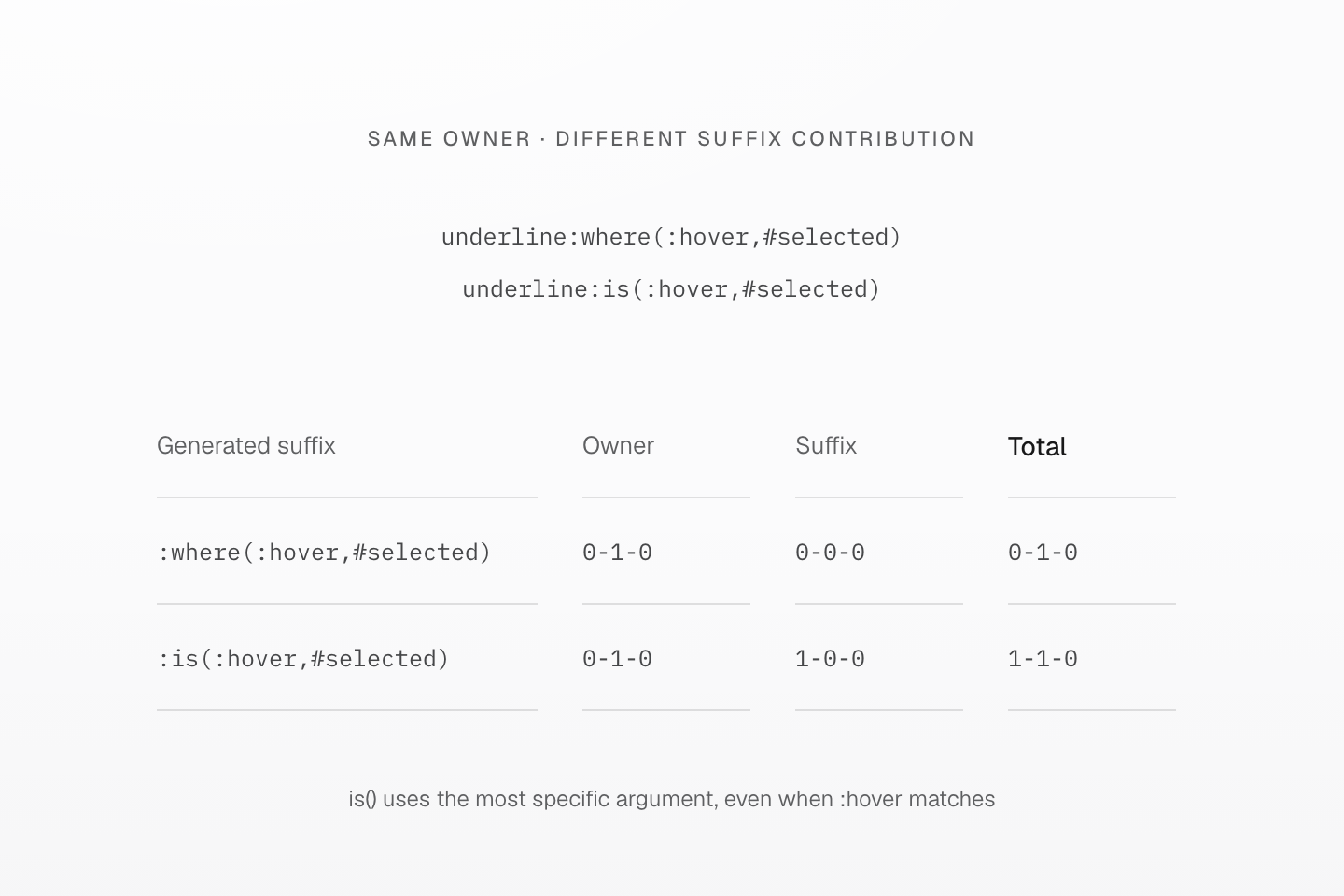
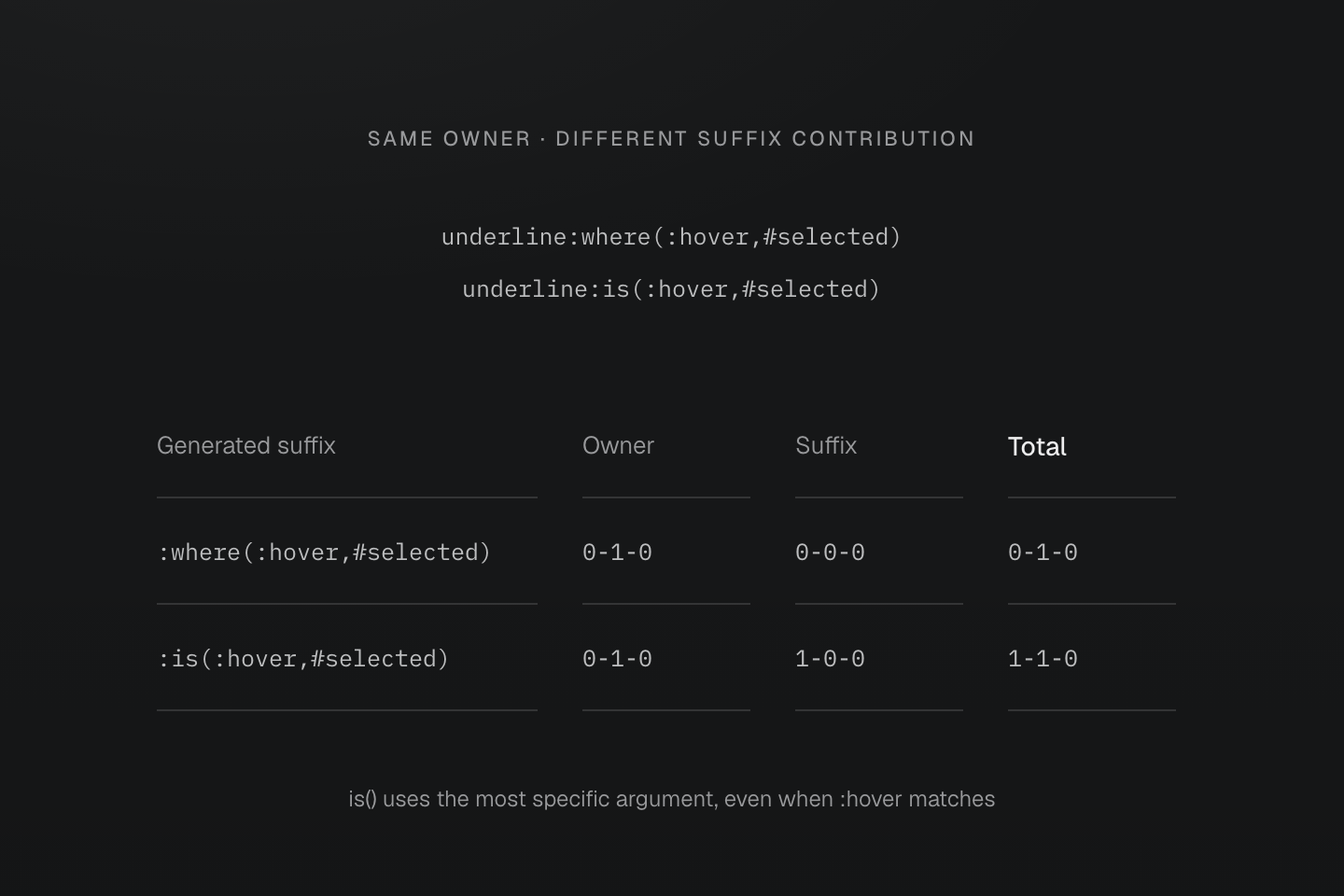
图示仅比较选择器优先级。层叠会先考虑来源、重要性与层优先顺序。
文字说明
- 两个生成选择器中,转义后的完整类所属元素均贡献 0-1-0。
- :where(:hover,#selected) 的后缀贡献 0-0-0,因此总计为 0-1-0。
- 对于 :is(:hover,#selected),ID 参数提供最高参数优先级 1-0-0,因此即使匹配的是悬停选项,总计仍为 1-1-0。
规则排序见层叠层,实际决策见 指南的覆盖流程。重新排列 HTML 类名不会改变优先级。
外部上下文
后缀以带有类的元素为起点。目标需要根据祖先或前面的兄弟元素应用样式时,可以用原生 CSS 规则直接表达关系:
@layer components { .active .contextual { display: none; } .active > .child-contextual { display: none; } .active + .adjacent-contextual { display: none; } .active ~ .sibling-contextual { display: none; }}要将多个工具类声明包在相同关系中,请使用包含原生选择器与 @contents 的混入。混入内容契约定义展开与转发方式;复用样式说明何时适合选择此形式。
生成 CSS 只能证明规则已输出,不代表浏览器一定支持或匹配该选择器。请检查 DOM 关系、实际状态与原生选择器合法性。普通 CSS 选择器列表中,无效分支可能使整个列表失效;:is() 和 :where() 则使用容错列表。浏览器检查及回退设计见兼容性。